

UPDATE Panasonic WhisperGreen exhaust fan with manual override switch?
I am shopping for an exhaust fan (fan only, no light, no heat, no nightlight) for my upcoming bathroom remodel. There is currently no fan in the room (there is a window). I'm in California, where I am required to add an exhaust fan with a humidistat during the renovation. (Will be installed by an electrician.)
I would like the fan to turn on/off automatically in response to humidity levels, but would also like to be able to turn on/off the fan manually.
On the Panasonic website, I found the WhisperGreen Select - Fan Only; Model FV-0511VK3, 50-80-110 with optional add-on modules: WiFi, Motion Sensor, Condensation Sensor.
Panasonic's installation video shows an option for a manual "override switch" by connecting the red wires on the fan. If the remote switch is in the “on” position, it is in active mode; i.e, it is turned on manually and will stay on as long as the switch remains "on." If the switch is in the “off” position, the fan is controlled by the condensation sensor and (optional) motion sensor.
The sensitivity of the condensation sensor can be adjusted. With this set up, there is no way to completely turn off the fan manually; that is, it is either manually turned on or automatically controlled by built-in sensor(s).
Does anyone have this setup with the manual override? Do you recommend it? Do you recommend adding the motion sensor? What about the Wifi module?
Comments (38)
 11 months agolast modified: 11 months ago
From reading the installation instructions, it appears that model FV-0511VK3 will run continuously unless you equip it with the optional FV-VS15VK1 multi-speed switch which lets you set the minimum speed to 0. Or can also buy the FV-0511VKS3 which includes the multi-speed module. Read the installation instructions yourself to confirm.
You could also buy the FV-0810VSS1 but read the installation instructions to understand how a 4" duct is connected to the fan.
I see no need for a motion sensor (do you want to fan to turn on every time you enter the bathroom?) and I can't imagine a use for the wifi module.
"With this set up, there is no way to completely turn off the fan manually; that is, it is either manually turned on or automatically controlled by built-in sensor(s)."
Correct, but you can always wire the fan through a wall switch. So you would have two switches, as shown in the installation instructions, one "power switch" and a second "signal switch" using, for example, the Lutron R62-05634-0WS double switch.
coastal_vibe thanked wdccruisecoastal_vibe
Original Author11 months agolast modified: 11 months agoThanks. I think I understand it now. Except that I am confused about whether the timer de-activates the optional wall switch connected to the red wires. If this switch is turned on, will the fan run at a high speed for 20 minutes (using default factory setting) or will the fan stay on at high speed until the optional wall switch is turned off?
Amazon description says: "... allows fan to run for a user-set time after wall switch or add-on module sensor is activated."
-------
I can choose one of the following Panasonic fans with add-on Condensation Module:
1) FV-0511VK3 plus add-on multi-speed module FV-VS15VK1
2) FV-0511VKS3 includes multi-speed module
3) FV-0511VKS3S includes multi-speed module and an "architectural" cover
No motion-sensor module, WiFi module, or speakers needed.
Power to the fan can be hard-wired in the ceiling or connected to an on/off wall switch, such as the Lutron switch you suggested. This wall switch would be kept in the "on" position all the time.
The multi-speed module has a flow ranging from 0 to 110 CFM. The min speed flow can be manually selected. If it is set at 30 CFM, the fan will run continuously at a low speed.
There is a timer (select between 0 to 60 minutes). If the condensation module detects moisture above the selected %age, for example, above 80%, it will "boost" the CFM from min speed to max speed until the timer runs out, and then re-check the moisture level.
The red wires can be connected to an optional on/off wall switch. If this switch is turned "on," it will boost the fan from the selected min speed to the max speed. In the "off" position, it returns control to the add-on condensation module.
Related Professionals
Lake Charles General Contractors · Spartanburg General Contractors · Coldwater General Contractors · Eugene General Contractors · Atlanta Home Remodeling · Philadelphia Home Remodeling · Anniston Home Remodeling · Modesto Home Remodeling · San Angelo Home Remodeling · Macon Bathroom Remodelers · Dickinson Kitchen & Bathroom Designers · Rochester Bathroom Remodelers · Frisco Tile and Stone Contractors · Brattleboro Tile and Stone Contractors · Queens Tile and Stone Contractorscoastal_vibe
Original Author11 months ago
No heater on the fan because it would require a dedicated circuit (my subpanel has been changed twice and is full); the fan-only unit can be shared with the lights on the same 15-amp circuit serving the bathroom for lighting.
No nightlight is needed in this room; I have added a 14-inch diameter sun tunnel (tubular skylight) with a built-in solar-powered nightlight.
The fan will likely be positioned in the center of the ceiling and next to the sun tunnel. Strategically placed recessed ceiling lights will give me a cleaner and more balanced look than adding a light on the fan.- 11 months ago
"If this switch is turned on, will the fan run at a high speed for 20 minutes (using default factory setting) or will the fan stay on at high speed until the optional wall switch is turned off?"
You can never force the fan to run continuously.
The FV-CSVK1 condensation sensor is a separate purchase.
I would buy the FV-0511VKS3 or FV-0810VSS1*
-----
*only if I were using a 4" duct
coastal_vibe thanked wdccruise coastal_vibe
Original Author11 months ago
Thanks. Then it is as described by Amazon: Turning on the optional on/off wall switch (connected to the red wires) will turn on the fan only for the duration designated on the timer (range from 0 .. 60 minutes) and does not turn on the fan continuously until manually turned off.
I am planning for a 4-inch duct. The cheaper model, Panasonic FV-0810VSS1, would be louder than my refrigerator; 1.3 sone vs 0.7 sone for the more expensive (~$100 more) and quieter FV-0511VKS3. I think that the only difference between ... VKS3 and ... VKS3S models is aesthetics, swapping out the standard grill for one that is either more traditional or more contemporary.coastal_vibe
Original Author10 months agoAfter meeting with two prospective electricians, I have decided, instead, to pair a single-speed Panasonic exhaust fan with the wall-mounted Panasonic WhisperControl Condensation Sensor Plus on/off Fan Control with adjustable countdown timer, Model FV-WCCS1-W.
It was too complicated to install a multi-speed fan, and then use it as a single-speed fan (zero speed or high speed). The electricians do not like having to return to adjust the humidity sensor settings.
Now I am trying to find a quiet, single-speed Panasonic fan. The room is about 8 ft wide x 8 ft long x 8 ft ceiling. Any suggestions?- 10 months agolast modified: 10 months ago
[corrections]
"It was too complicated to install a multi-speed fan, and then use it as a single-speed fan (zero speed or high speed)."
No, it's not complicated. The fan will run at the speed set on the Air Volume switch (50, 80, or 100) when humidity is detected. Set the CFM dial to 0 and the fan will shut off when humidity is no longer detected.
"The electricians do not like having to return to adjust the humidity sensor settings."
The humidity control is part of the optional FV-CSVK1 condensation sensor. [You can adjust this yourself after removing the cover.]
"...adjustable countdown timer, Model FV-WCCS1-W"
That's the same as the DewStop HS-C00-W7 at twice the price. Read the DewStop Q&A and reviews. People don't like it.
Don't listen to the electrician. Stick with the original plan. Just buy the FV-0511VKS3 [and FV-CSVK1] install [them], and forget it. []
coastal_vibe thanked wdccruise coastal_vibe
Original Author10 months ago@wdccruise, thank you, and now I am over-thinking it, or at least re-thinking it!
"The humidity control is part of the optional FV-CSVK1 condensation sensor. Don't buy this and there will be nothing to adjust."
I need a humidistat to pass inspection -- either the optional add-on condensation sensor in the fan or the condensation sensor on the wall switch.
Are you saying that the condensation sensor add-on installed in the ceiling fan works better than the wall-switch sensor? Or that a multi-speed fan is a better choice? (The wall-sensor switch can be used only with a single-speed fan.)
In reading some of the negative reviews for the wall sensor switch, I found at least one homeowner who admitted they had mistakenly turned the dial to the low setting, which would increase the sensitivity to humidity, causing the fan to run continuously. When they moved the sensor dial to the high setting, it worked as expected.- 10 months agolast modified: 10 months ago
I edited my last comment.
A number of owners of theDewStop HS-C00-W7 reported that the fan turn on and off, on and off, repeatedly even when they weren't showering even when the humidity control was set at it's lowest setting.
-----
CR tested the Panasonic WhisperFit FV-0511VFL1K and it earned a recommended rating. It's available with the humidity sensor built in as the WhisperFit FV-0511VFC1 so I'd get that one.
At Home Depot, Amazon, Lowes.
coastal_vibe
Original Author10 months ago
I have one more electrician to interview for my bathroom remodel. I will be interested to hear what he recommends.
On their website, Panasonic shows the WhisperFit FV-0511VFL1K as a discontinued model.
Setting the humidity control to its "lowest setting" will cause the fan to run continuously. It sounds counterintuitive, but setting the control to its "highest level" means that the humidity has to be very high to automatically activate the fan.
If the humidistat is in the ceiling fan and connected to an optional on/off wall switch to manually activate the fan for a user-set time, then ... someone needs to remember to turn off the wall switch so that it will return control to the humidistat.
I am managing this project as owner-builder. Fortunately, my other remaining decisions are personal preferences, such as paint colors and cabinet knobs.- 10 months ago
"On their website, Panasonic shows the WhisperFit FV-0511VFL1K as a discontinued model."
You are looking at the wrong model. It's the FV-0511VFC1.
coastal_vibe thanked wdccruise coastal_vibe
Original Author10 months ago
With your patience and help, I have narrowed my options to:
A. Humidity Sensor built-in to the fan: Pair the Panasonic WhisperFit FV-051VFC1 fan 50/80/110 CFM with the Whisper Control Pre-set Countdown Timer FV-WCD01-W wall switch (or a similar timer switch). The timer on the fan is factory set to 20 minutes.
B. Humidity Sensor on the wall switch: Pair the Panasonic WhisperFit FV-0511VF1 fan 50/80/110 CFM with the Panasonic FV-WCCS1 condensation sensor plus wall switch. Same fan as Option A but without the built-in humidity sensor on the fan. The user can adjust the timer on the wall switch .
With Option A or B above, the selected wall switch can be pushed to manually activate the fan to run for a user-set time (5 to 60 minutes). A wall switch with a timer does not need to be manually turned "off" to return control to the humidity sensor.
Of the three electricians whom I interviewed, one is willing to install a fan with a built-in humidity sensor. He has worked on my house previously. My dilemma is that his quote is $8500 for rewiring the bathroom (adding the fan, more outlets, more lights) while the other two bids were close to $4500.- 10 months ago
The primary feature of the FV-WCD01-W is the "Adjustable Minutes Per Hour (MPH) Fan Timer". The FV-WCD01-W does not allow the fan to be disabled; when the fan is not turned on manually, it will always return to humidity-sensor mode. If you want to be able to disable the fan, use the Lutron R62-05634-0WS double switch* instead.
----
*one switch for fan's black wire, one switch for fan's the red wires.
coastal_vibe
Original Author8 months ago
Thank you for your help with this! And thank you for asking for an update!
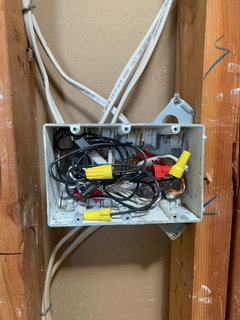
I had inadvertently missed your post about a double switch and did not see it until now. My electrician ran black wires to the switch box for power so that the fan can be turned off. I remember telling the electrician that I wanted the red wires run to the switch box for a timer, but I think he was just focused on the black wires.
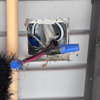
I think I need him to come back (before drywall) to run the red wires for the timer -- I do not see any red wires there (photo attached). The switch box will hold two dimmer switches for recessed ceiling lights as well as the fan switch.
I looked at the double switch you recommended, but I do not see a timer on it. Is there a different one with a timer?
After interviewing four electricians, I hired the last one I interviewed who, surprisingly, gave me the lowest quote, $4000, for the electrical work required for the bathroom remodel. Two of the electricians whom I interviewed had insisted on a humidity sensor on the wall; and the third electrician apparently did not want the job because his quote was double and he said it would take him four days for rough electrical work. (It took 1/2 day for one electrician and two assistants.)
Following your advice, I requested that the electrician order and install the Panasonic WhisperFit FV-0511VFC1 fan with a built-in humidity sensor on a preset 20-minute timer. The remodel passed a rough electrical and mechanical inspection this week. (Photo attached of the fan installed.)
I had a difficult time finding someone to cut a hole in my roof to duct the exhaust fan. The guy I hired (recommended by a local roofing contractor) insisted that the 4-inch ducting needed to be insulated (like a heating duct) -- it did not need that. It has taken a couple tries to get the duct installed correctly, and the electrician needs to adjust it again before I can bring in the drywall team.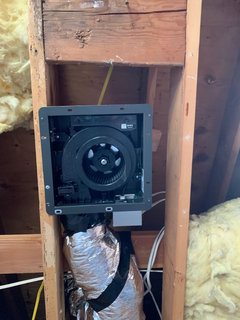
- 8 months ago
I looked at the double switch you recommended, but I do not see a timer on it. Is there a different one with a timer?
No, you don't need a timer. One switch is for the black wires (to control power to the fan) and the other is for the red wires (to temporarily turn on the fan, overriding the humidity control).
coastal_vibe thanked wdccruise coastal_vibe
Original Author8 months agoThen the wall switch (connected to the red wires) is constrained to the same preset time as the mechanism on the fan: 20 minutes? Is there any way to have the red wires run to a timer?
My electrician has agreed to run the red wires before drywall happens.- 8 months agolast modified: 8 months ago
"Is there any way to have the red wires run to a timer?"
You have a 3-gang box.
Option 1 with no timer:- Gang 1: Leviton 5634-WS Dual Switch (for black and red wires)
- Gangs 2 and 3: Lutron (DVCL-153P-WH-2) (2-Pack) Diva LED+ Dimmer Switch (for lights)
Option 2 with timer:*- Gang 1: Decora 5601-2WS Single-Pole Switch (for black wires)
- Gang 2: Leviton In-Wall Timer Switch (for red wires)
- Gang 3: Dual Dimmer (e.g., TOPGREENER Kalide) for lights
-----
*I do not believe that you can put all this into the 3-gang box
coastal_vibe thanked wdccruise coastal_vibe
Original Author8 months ago
Yes. I think you are correct on my options for the 3-gang box, except that I do not like Option 1, and Option 2 is no bueno. I am proposing Option 3 or Option 4 (see below).
This is based on the following information in the Panasonic installation instructions:
The power switch (connected to the black wires) should be left on at all times.The fan will run for 20 minutes when power switch is first turned on, regardless of the humidity sensor or control switch settings. After 20 minutes, the fan will return to sensor mode.
Do NOT connect the red signal wires to a live power supply (AC 120 V 60 Hz), it will damage the product. Please use an optional switch to connect the red signal wires.
Your Option 1 will be too confusing. One of the 1/2 switches must be kept in the "on" position (connected to the black wires) to allow the built-in humidity sensor to do its thing. I have no idea how to work the on/off switch connected to the red wires. Is it simply a "toggle" switch? Turning it "on" activates the fan for 20 minutes? And turning it "off" activates the fan for another 20 minutes?
Your Option 2 fails to meet code. I am in CA, where I am required to have at least one light switch on a vacancy sensor and all light switches on dimmers. My plan (which meets code) is for the two ceiling lights over the shower to be controlled by a dimmer switch without a vacancy sensor, while the three ceiling lights outside the shower are on a separate dimmer switch with a vacancy sensor, located at the room entry.
Here is my Option 3:Keep all switches in the 3-gang box near the room entry, as is; ignore the red wires.
To manually activate the fan (override the humidity sensor), turn off the power switch to the fan and immediately turn it on again. This activates the fan for the preset 20 minutes and then returns control to the sensor. Probably useful only to frequent users of the bathroom.
Here is my Option 4:Keep all switches in the 3-gang box near the room entry, as is.
Add a single-gang timer switch on a different wall (to the left of the vanity) and connect this switch to the red wires coming from the fan.
Is Option 4 feasible? Is it a lot of extra work for my electricain to wire it? I am assuming that the red wires and black wires run independently, that they do not need to run alongside each other.
I had initially planned for the fan switch to be to the left of the vanity, but the electrician suggested having all switches in one place, since there was space for 3 switches near the room entry.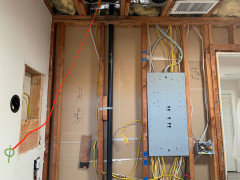
coastal_vibe
Original Author8 months agolast modified: 8 months agoI contacted Panasonic to get more information. It took a few days for a technician to get back to me and then they answered all my questions on a phone call.
Black wires: the black wires for the selected fan are connected to an on/off wall switch that must be kept "on" for the humidity sensor to automatically activate the fan. The neutral (white wires) are tied together. When humidity reaches the selected sensitivity level, the fan runs continuously until the moisture level is 5% lower than the selected level, and then the fan runs for 20 minutes longer before automatically shutting off.
Options for the red wires:
- Ignore the red wires and rely on the built-in humidity sensor to activate the fan
- On/off switch: Connect the red wires to an on/off switch (can be placed on any wall in the room; need not be in the same electrical box as the black wires) -- turning the switch to the "on" position manually overrides the humidity sensor to activate the fan; the fan runs continuously until the switch is manually turned off, and then control returns to the humidity sensor built in to the fan
- Mechanical timer: Connect the red wires to a mechanical timer switch (need not be in the same box as the black-wire switch) -- twisting the mechanical timer activates the fan until the timer runs down to zero
- Digital timer: Connect the red wires to a digital timer -- it must be a dry-contact switch and the wire needs to be spliced (to avoid running power through the red wires)
Product recommended for the dry-contact digital timer switch: Panasonic Swidget Model# S16008WA. This model has "buttons" to select 20-40-60 minute intervals.
Edited to add: there are likely other dry-contact switches that can work. I am uncertain how the duration (20, 40, or 60) is selected on the product recommended.- 8 months ago
Your last comment indicates to me that you learned nothing from all the help I provided.
coastal_vibe
Original Author8 months agolast modified: 8 months ago@wdccruise, I apoligize if I gave that impression. Honestly, I found your comments very helpful.
When I started this thread, I was overwhelmed with exhaust fan choices; the only recommendation I had from local GC's and electricians was to choose the Panasonic brand. Based on your advice, of the 165+ models on the Panasonic website, I selected the exact fan (with a built-in humidistat sensor) that you suggested.
My electrician mistakenly thought that I was insisting on a switch to disable power to the fan, and I mistakenly thought that was how the wall switch had been wired. Now we have that straightened out. I explained that I want to be able to manually activate the fan (to "air out" the room even if the humidity level is low).
I do not need a power switch for the fan. I will have only one fan switch -- an on/off switch (connected to the red signal wires) to manually activate the fan ("on") and manually return control to the built-in humidistat ("off"). No timer -- keeping it simple. I checked with my City Inspector to confirm that this will meet code.- 8 months agolast modified: 8 months ago
I'm not aware of any code requirements for low voltage "signal" wiring - eg. thermostat wiring. As long as you don't put the wiring or switch in the same boxes or conduits as the 120 volt wiring I think you should be OK.
coastal_vibe thanked dennisgli - 7 months ago
@coastal_vibe Thanks for the summary, I'm in the same situation as you where I'm trying to decide how I want this fan to operate. When you say that you "do not need a power switch for the fan", are you talking about the black wires? My understanding was that these needed to be connected to an on/off switch that should be kept on in order for the humidity sensor to work.
coastal_vibe thanked cayoung05 - 7 months agolast modified: 7 months ago
Why woud you install a switch that would be on all time?
coastal_vibe thanked dennisgli  7 months ago
@wdccruise - I have saved your comments in order to share them with my daughter and SIL - they are currently adding a fan to a bathroom that currently doesn't have one (has a small tilt out window in the tub/shower surround). I am sure that they will be happy to receive all the info you've provided. Thanks!
- 7 months ago
dani_m08: "I have saved your comments in order to share them with my daughter and SIL..."
Ignore most of the endless back and forth here. Just tell them to...
- Buy the Panasonic WhisperFit FV-0511VFC1.
- Wire the black wires through a switch so they can keep the fan off.
- Wire the red wires to a switch so they can turn the fan on independently of the humidity sensor.
That's all they need to know.
coastal_vibe
Original Authorlast month
The exhaust fan / switch is not working as I expected, or rather, not as I requested. The shower was finally made operational last week; this was the first chance to test the fan.
I wanted to have the red wires (signal wires) from the fan connected to an on/off wall switch. The electrician said that he understood what I wanted, but that did not happen.
Instead, the electrician chose Option 3 (upthread):Ignore the red wires. To manually activate the fan (override the humidity sensor), turn off the power switch to the fan and immediately turn it on again. This activates the fan for the preset 20 minutes and then returns control to the sensor. Probably useful only to frequent users of the bathroom.
I am annoyed that the fan was not installed the way I requested. Is it better to just leave it "as is," if (and this is a big if) it will pass inspection. Maybe I will call the inspector this week to ask. The electrician hates it when he finds out that I have asked the inspector questions. He does not want me to talk to the inspector at all: "Have the inspector call me if he has a question!"
My intention was that turning the wall switch (connected to the red wires and not to black wires) to the "on" position would override the humidistat, and manually activate the fan, regardless of the humidity level (e.g., to freshen dry air). This would keep the fan activated (regardless of humidity levels) until the switch is manually turned to the "off" position, returning control to the humidity sensor in the fan. The downside is that the fan would continue running with dry air until manually turned off.
A couple items remain before final inspection. The electrician needs to return, anyway, after the walls are painted. He installed a motion sensor for a light switch (the rightmost switch in the photo below), and the brand of sensor that he chose bulges out from the wall plate, so that the plate does not fit snugly against the wall. I already have an OK from the City inspector to change the motion sensor to a dimmer switch because it controls only LED lights.
I am already planning another renovation project for next year. I need to stay on good terms with my local inspector.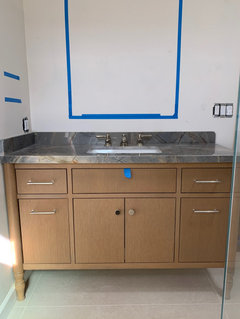
 PROlast month
The Panasonic WhisperGreen line is fantastic! For the manual override, those red control wires are essentially just a dry-contact signal line.
If you don't want your electrician to wall-fish a new line just for that manual override switch, you can wire a micro wireless receiver module to the fan's red control wires, and pair it with a stick-on kinetic switch inside the bathroom.
That way, you get full manual control from anywhere on the wall—100% waterproof, no line-voltage wiring needed, and zero battery changes to worry about!coastal_vibe thanked Leo_HomeTech- 29 days ago
Since the electrician has to come back anyway, I'd probably get the red wires connected to the switch the way Panasonic described rather than adding another gadget. I'd be a bit cautious with a wireless receiver unless Panasonic confirms it's compatible with that fan. Seems better to get the original setup working as intended first.
coastal_vibe thanked zackharris - PRO29 days ago
Makes totally sense, Zack! Getting the factory setup working with the electrician is definitely the most straightforward path.
The wireless module is just a dry-contact relay in parallel, so it acts like a simple physical switch without affecting the fan's board, but sticking with standard wiring first is always a solid move!coastal_vibe thanked Leo_HomeTech  2 days agolast modified: 2 days ago
@leo_hometech
WhisperGreen fan FV-0511VKS3S: how would you pair it with a smart switch (Aqara Light Switch H2 Vertical - 2-in-1 Neutral, 2 Buttons, 2 Channels) - the top button with have on/off for the over-the-sink vanity lights with traditional wiring - but not sure how to wire the bottom button of the Aqara to the WhisperGreen?
Based on internet searches, I don't think the Aquara can accept the red signal wires, because the H2 send voltage and the signal wires do not accept voltage - correct?
I would like to use with a smart sensor, instead of the Panasonic integrated sensor, so that when people use the restroom in the middle of the night, it does not trigger the boost mode.Do you run the black wire to the switch and keep it always on, then create an on/off when the sensor is triggered?
Or, would you also include an Aqara Dual Relay Module T2 and install it on the red wires in dry contact mode?
I have watched a dozen YouTube videos, Reddit threads, and Panasonic FAQ - but the WhisperGreen with smart switch has not been discussed. The "always on" is the big dilemma here - as the original author pointed out.
I have an electrician performing the install, but they do not seem to be familiar with the WhisperGreen "always on" function and have done some Lutron installs, but I cannot find a Caseta that would work for my needs - I do not have room for a double box and need a stacked switch.- 8 hours ago
Eric Douglas: "WhisperGreen fan FV-0511VKS3S: how would you pair it with a smart switch (Aqara Light Switch H2..."
It does not appear that the Aqara switch is designed to control motors, just lights.
"I would like to use with a smart sensor, instead of the Panasonic integrated sensor..."
I don't understand how you want to trigger (turn on) the fan. What does the "smart sensor" sense?
- PRO1 hour ago
Hey Eric! Spot on with your second thought—you definitely don't want to wire a standard line-voltage smart switch directly into those Panasonic red control wires, because they are strict dry-contact signal lines and adding voltage will fry the control board.
Using the Aqara Dual Relay Module T2 in dry contact mode (like you mentioned) is actually a brilliant way to handle this. It lets you keep the fan powered continuously via the black wires, while the T2 relay safely bridges that low-voltage dry contact signal without pushing line voltage into it.
As for wdccruise's point about motors, since the T2 relay is just acting as a dry-contact switch to trigger the fan's internal controller (rather than directly driving the fan motor's main power), it completely avoids that issue.
If you want to bypass the built-in sensor for night-time use, keeping the wall switch always ON and letting a smart automation trigger the T2 module (or a micro wireless receiver paired with a kinetic switch) gives you total, silent control without waking up the whole house.









coastal_vibeOriginal Author