Software
Houzz Logo Print
merryheart_gw

How can I add photos to my posts?

18 years ago

I know many of you do this....I have tried to find a way to just add a photo to a post but so far I have had no luck at all.

Can anyone tell me how to do this? I figured out how to post pics in the gallery but I have a lot of pics to post and it appears like I need to do it one at a time on there and have a separate link for each one.

Can anyone give me some clues as to how to work this? I have noticed a number of people who add photos right in their posts.

G. M.

Comments (15)

  • 18 years ago

    G.M.

    I have a free Photobucket account where I upload photos. I can then copy the "HTML Tag" line from the photo on photobucket and paste it in my message here where I want the photo to appear.

    randy

    Here is a link that might be useful: Photobucket

  • 18 years ago

    Oops

    I put my message telling you how to post a pic into your rose thread :)

  • 18 years ago

    Wow Dan thanks for the great info. I should be able to work with that. I will have to decide if I want to go with one of the image hosting sites or just make a new personal website.
    And by the way since I can't recall now which thread the pics of your new garden and yard are in.....your lawn looks FANTASTIC! What kind of grass do you have? I know there is lots more to it than grass involved in a gorgeous lawn but grass is important too.
    Your little veggie garden should do just fine if and when we get some good sunshine and heat on it. You did good.
    G.M.

  • 18 years ago

    GM, if you want to play around a little, you should be able to post pictures from my photobucket site. I've hidden all my tags except the HMTL ones, so that should make it easy :)

    Lisa

    {{gwi:492135}}

    Here is a link that might be useful: Lisa's Photobucket

  • 18 years ago

    Lisa
    Wow thanks for much for allowing me to use your pics and see how the account works. I did it and it worked very easily with the Photo Bucket. So that is what I will do...just get myself a Photo Bucket account.
    I could see from the preview it had worked so I didn't go ahead and post the message. I used a picture of your daisies.
    You certainly have some lovely flowers!
    Thank you so much for your help! I appreciate it very much!
    Have a great day.
    G.M.

  • 18 years ago

    GM: I'm glad it worked for you!

    Thanks for the compliments...they all go to the flowers! I just water and weed 'em (sometimes!) :)

    Lisa

  • 10 years ago

    I haven't figured out how to post my photobucket pics yet. It is super easy to post pics that are stored on your hard drive. Click on the Photo icon, hit the browse, find the pic on your hard drive, and hit "enter". (those directions are from memory, if I missed anything!)


  • 10 years ago

    I sent a note to the Houzz gurus to ask if there was a way to put in the photobucket pics. I'll let you know if I hear back.


  • 10 years ago

    (apparently the entry before my responses has been deleted :)


  • 10 years ago

    Okay, got the word back from the tech team...

    Because photos can be posted directly to posts and comments on Houzz, embedding from outside sites like Photobucket is not supported in the platform. You can definitely link to those photos using the link function in your posts, but they will only display automatically when uploaded directly to the site.

    One thing that may work for you, for photos that are not available elsewhere is to add them to an ideabook on your Houzz account using the bookmarklet tool in your browser http://houzz.com/bookmarklet That will make them available directly on the Houzz platform and you can share them in your posts by clicking the Houzz Photo link and then copy pasting the url of the photo in your ideabook into the post.

  • 10 years ago

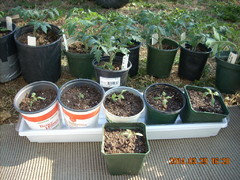
    <a href="http://s558.photobucket.com/user/slowpoke_gardener/media/DSCN1972_zps3aac038b.jpg.html" target="_blank"><img src="http://i558.photobucket.com/albums/ss25/slowpoke_gardener/DSCN1972_zps3aac038b.jpg" border="0" alt=" photo DSCN1972_zps3aac038b.jpg"/></a>

    I am still trying to learn to post pictures, it sure is hard to teach an old dog new tricks. you can see I was much farther ahead last year than I am this year

  • 10 years ago

    Larry, you may be behind last year, but you are ahead of me. My tomatoes are only about 4 inches high, but they look nice. I actually had to start over once. I started with a poor starting mix the first time and it dried out so quickly that I gave up and started over. Even after that, I planted too many seeds and probably have 60-70 plants, but I don't have a lot of variety. Outside I have planted onions, potatoes and a few peas. I threw some corn salad seeds in the onion bed, but I think the birds cleaned most of it up before it sprouted. When we had a hail threat, I covered one onion bed with row cover just to make sure I didn't lose them all, but the hail didn't come. I think the robins are having a family reunion in my garden this year. When we get past the next 10 days, then I will worry about getting everything in.

  • 10 years ago

    Good job Larry!! I am able to upload from my hard drive really easy, but I haven't figured out the Photobucket ones yet...or how to do it from my phone :( ...where most of my photos are now coming from!


  • 10 years ago

    Thanks ladies, but those are last years plants. I think I have saved about a 12 plants of this years planting. The wind we had night before last blew the starting container off the porch and it was upside down in my front lawn. The plants were just breaking through the soil and were hard to find and re-pot.

    I don't have a seed starting area this year because of remodeling inside of our house.

    I still don't understand the picture posting process. But one of Madge's daughters is here this weekend to celebrate Madge's 76th birthday, I will seek her help on picture posting.

Sponsored
Ed Ball Designs
Average rating: 4.8 out of 5 stars31 Reviews
Exquisite Landscape Architecture & Design - “Best of Houzz" Winner