

Pretty easy photoshop help please?
16 years ago
Sort by:Oldest
Comments (3)
Related Stories

BUDGET DECORATINGEasy, Beautiful, Cheap: Managing the 3 Points of Home Projects
When you're decorating or building, it helps to be realistic about what's possible. Here are some equations to ponder
Full Story
BATHROOM DESIGNDesign an Easy-Clean Bathroom
These ingenious strategies and sleek designs for the sink, tub, shower and toilet help your bathroom practically clean itself
Full Story
GARDENING GUIDES3 Easy Ways You Can Garden for Nature
Your choice of plants can help wildlife while cleaning the air and water
Full Story
GARDENING GUIDES9 Fresh Herbs for Crowd-Pleasing Thanksgiving Dishes
Pluck these herbs from a windowsill pot or a garden for a Thanksgiving meal that sings with fresh flavor
Full Story
SUMMER GARDENINGHouzz Call: Please Show Us Your Summer Garden!
Share pictures of your home and yard this summer — we’d love to feature them in an upcoming story
Full Story
LIVING ROOMSCurtains, Please: See Our Contest Winner's Finished Dream Living Room
Check out the gorgeously designed and furnished new space now that the paint is dry and all the pieces are in place
Full Story
DECORATING GUIDES10 Easy Fixes for That Nearly Perfect House You Want to Buy
Find out the common flaws that shouldn’t be deal-breakers — and a few that should give you pause
Full Story
BEDROOMS10 Quick and Easy Ways to Dress Your Bed
How to make your bed: Change up your bedroom design style with what you already have
Full Story
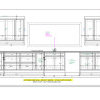
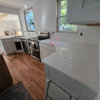
janana2
needsometips08Original Author
Related Professionals
Jacksonville Kitchen & Bathroom Designers · Greenville Kitchen & Bathroom Designers · Worcester Kitchen & Bathroom Designers · Fergus Falls Kitchen & Bathroom Designers · Anchorage Kitchen & Bathroom Designers · Murfreesboro Kitchen Remodelers · Niles Kitchen Remodelers · Omaha Kitchen Remodelers · Newport Kitchen Remodelers · Amarillo Kitchen Remodelers · El Paso Kitchen Remodelers · Vancouver Kitchen Remodelers · Oxford Custom Countertops · Columbia Custom Countertops · Kahului Custom Countertopsdoggonegardener