Software
Houzz Logo Print
tcamp30144

new site format


Does anyone like it seems a bit easier I just don't like the fact that the emails you all the time.

Trace

Comments (38)

  • 11 years ago

    Trace you can change that in your profile. Up at the top right hand corner under "your houzz" click "edit profile" then go to advanced settings on the left side there, and un-check the boxes you don't want. Be sure to save it at the bottom of each page you change. you can do the same with some of the other pages.
    Not too sure I like the format though, except for the pics, other stuff is not as good. I don't like how what you've read stays the same color. On the old site if you read a thread it changed color, quick and easy to see. Sigh, change is the only thing that stays the same.

  • 11 years ago
    last modified: 11 years ago

    I hate it.

    But that's just me :-)

    Agreed, the threads don't change color after I've read them. Is there a way to set that so it does?

    Otherwise, there's WAY too much white space and WAY too much screen real estate devoted to other stuff, links, advice (?), stories (?), so-called 'related discussions', etc. Too much scrolling to see content. Wish there was a way to reduce font size a bit. Takes so much room for each response. And really, do we need a 'like' and 'bookmark' icon under each response? Takes even more valuable space.

    At least you can load more than one pic per post.

  • 11 years ago

    I like it you can actually do a lot with it once you get used to it

    Trace

  • 11 years ago
    last modified: 11 years ago
  • 11 years ago

    It worked

    Trace

  • 11 years ago
    last modified: 11 years ago

    Well, it's not as pretty as the GardenWeb format. And, have to see if we can add multiple photos, instead of loading images to photo sharing sites and then copying and pasting the HTML code string in order to add multiple photos. That would be a nice benefit. Haven't had a chance to check out what I can do to customize things, but, so far, not so bad! Change is always a little painful, but I'm sure we'll all learn to really like the new format :-) One thing missing that is pretty crucial - no ability to put in your zone or location.

    Patty S.

  • 11 years ago

    I wonder why I have to keep scrolling down trying to find the newest post. Is there a way to load the newest on top? The old site worked that way too, although I looked for a way to reset that. Maybe I missed how to do that. It is hard to read list gray on lighter gray. Also the posters names are large and the topics are small font. I find I keep clicking on the name instead of the topic.

  • 11 years ago
    last modified: 11 years ago

    You can add more than one photo per post. So that's at least one good thing about it.

  • 11 years ago

    Barb was exactly right about how to change your notifications. You can also unsubscribe to one particular thread at a time - just look for 'Click to switch off notifications about new comments' at the bottom of the post.

    Hoosierquilt - You can add your zone to your display name - Dave figured it out! Click on 'Your Houzz' at the top right corner of the page and then 'Edit Profile'. You can't change your user name, but you can change your 'First Name' to display whatever you'd like. This is the name that will show on your posts -- it doesn't have to match your user name. So, you would just change your 'First Name' to: hoosierquilt z10a/23 Vista Calif.

    Let me know if you have other questions!

  • 11 years ago

    Hi Steve,

    You can link to photos on Photo Bucket by clicking the Add Link button below your post, but you will need to upload them directly or have them saved in an Ideabook to embed them inside your post.

    Hope that helps!

    Tamara

  • 11 years ago

    I have been a member of Houzz for a long time... too long. I can't change my avatar for some reason. I've tried. Maybe a different browser will work, but I'd prefer not to have this OLD photo on here!

    I hate this format too, but we are stuck with it!


  • 11 years ago
    Thnaks Tamara for helping us as needed>>I have a question? Do I have to use a photo host site to display mutiple pic na dor video or is there as eaiser way than like for instance having ti use Photobucket?
  • 11 years ago

    Its does a lot just have to play with it so far I like it.

    Trace

  • 11 years ago

    As long as you have a pic file somewhere you can access, you should easily be able to add one or more photos.


    Click on the photo icon below the New Message window, click on Browse within the dashed box. Select a file from your hard drive or wherever. To add a second pic, go thru that process again.

  • 11 years ago

    Interestingly, if you go to your Profile, which is housed on Houzz, I can't see how to get back to GardenWeb. No link to click on. Anyone figure out how to go from Houzz to GardenWeb??


    Patty S.


  • 11 years ago
    last modified: 11 years ago

    We are not on the front page anywhere that can easily be seen. You have to go up the top bar, click on "Advice" and we are on the left side under the Houzz links. Seems odd to me that GW isn't really visible on the main page. Presumably they bought GW for the traffic it generates, but if you hide it from the rest of Houzz and any random visitors, that kinda defeats that purpose, imo.

    So far I've had to use the back button to get to where I was. Once I'm in the Garden Web area, there are links at the top for various GW areas. But it makes no sense to me to hide us under Advice on the front page. Would be better to at least have us as one of the drop down menus on the lower front page bar. I don't even see where the Houzz forums are, from the front page.

    So, no, no easy way to get back to the GW area from your profile page, except the back button, as far as I can tell.

  • 11 years ago

    My pictures always look squished to me but not to others on this site. I use a Samsung Note 4 with a screen resolution of 2560 x 1440 pixels (5515 ppi). The camera is 16 MP, OIS, F/2.2. Do I need to make some adjustment so the pictures come out correctly when I view them on this site and also so everyone else can keep seeing them correctly?


    Also, I run out of space typing in this box so I can'tcan't see what I am typing or make corrections.


    Also words come out in duplicate while I type, especially words woth apostropheapostrophes --- well here is another example. Often I can't even correct the duplication. Examples are doesn't, it's....well wouldn't you know it is working correctly at the moment.


    I also have to press the submit button twice before it takes; also the same with the insert photo button.


    Thanks,


    Cory

  • 11 years ago

    I wonder if they're still tweaking this site, because now my 'read' posts are graying out. This didn't happen a few days ago.

  • 11 years ago

    Patty, you have to go to the advice link on the right at the top. When you click that, you will see the garden web menu. It's a real pain!

  • 11 years ago

    Thanks Barb and Suzi, not enough clicking around to find us hidden under "Advice". Not liking that much, I have to say. I'll look around to see if Houzz has a place for us GardenWeb folks to voice our feedback. Would like to be a bit more visible on Houzz' home page.


    Patty S.


  • 11 years ago
    last modified: 11 years ago

    They need to add a link under the Outdoor drop down on the home page and elsewhere for Gardenweb forum. Im mean 99% of our forums are outdoor and that is were most will click first looking for our kind of info.

  • 11 years ago
    Patty, I am with you..I feel like I am running around in a maze to keep up..This is just plain stupid
  • 11 years ago
    I am under..My Profile...It allows me to post this with other conversations on other threads, but I see nothing on this page that allows me to get back to the citrus forum alone..
  • 11 years ago
    How the heck do I get back to Citrus Forums without having to use the back arrow!!!???
  • 11 years ago
    How do I get from my 'Profile' to the forums again?????
  • 11 years ago

    That is the fastest way Mike.

  • 11 years ago
    I had to arrow BACK 9 times before I got to this screen again...What a joke!! There is no option for the forums in my profile page...Stupid
  • 11 years ago
    last modified: 11 years ago


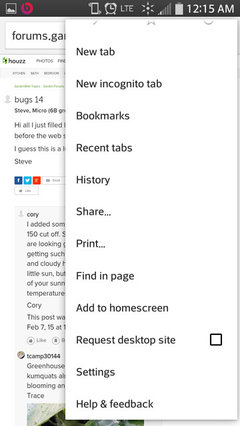
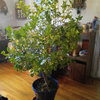
    I created a short cut on the home screen of my phone. Cory Mike go into your browser settings Google Chrome it has an option to put short cut on your home page that's what I did to make it easier. Took screenshot of phone to show my short cut.

    Trace

  • 11 years ago

    Houzz paid Garden web a lot, and we all know Garden Web was all about the money. Garden web is not a big focus on HOUZZ! Sad but true.


  • 11 years ago
    last modified: 11 years ago

    At the tone please I- phone touch pad the number one, then page forward to the back space after redialing the proshop @ photobucket . com to store a pic, after you've scaned the profile then follow the twittter on facebook you can post a pic on the forum ?


    Mahnnn them old school desk top computers are sounding better every day.

  • 11 years ago

    Trace, I have always had a shortcut on my home screen too. I am surprised the same one still works.


    Cory

  • 11 years ago

    Suzi, why would Houzz pay a lot of money for a Forum that they dont care about. That makes no sense.

  • 11 years ago

    Maybe they just made GardenWeb an offer they couldn't refuse.

  • 11 years ago

    Mike, I had the same question. When you're on your Profile page, you then have to click on "Advice" -- "Garden Forums" -- "Citrus". Not particularly good navigation, and GardenWeb is essentially hidden on Houzz. I find this baffling. Hopefully, Houzz will realize they've buried GardenWeb from their home page. They have a more work to do, I think, to set up their home page, and to fix this strange re-navigation issue when going to your Profile page. And Suzi, I don't think it's "all about the money". I think it is just poor integration, and there needs to be a better look by Houzz and how they have GardenWeb set up on their site.


    Patty S.


  • 11 years ago

    Tropicalfruit forum has a dedicated citrus forum and we are asking them to add a dedicated temperate fruit and orchard forum as well. Ill be spending more time there if anyone gets bored and wants to check it out. it was started when a bunch of members from Gw got fed up and the citrus part was added when members of Citrusgrowers forum wanted somewhere new.

  • 11 years ago
    last modified: 11 years ago

    Way to go Mike and others involved. I have more temperate fruit trees and bushes by far than citrus that I could use help on.

    Steve

  • 11 years ago
    last modified: 11 years ago

    I found a way to get rid of all that blinding white. At least for Chrome users. Chrome has a extension for free called "Screen Shader". It changes the background to a softer color, their default is a soft orange, but you can change to a few other colors such as pink, soft blue, various tans, and black. You can also adjust the intensity from a very subtle color to more vibrant. I think it can also vary it automatically from day to night. Anyway, it's nice and it's free. Here's a link;

    screen-shader

    If you use other browers, check out their ext. and apps. most have similar free add ons. For Firefox there's no squint

    I didn't even realize how much it was hurting my eyes until I undid the white. Like when some annoying background noise stops, so relieved!

Sponsored
Franklin County's Heavy Timber Specialists | Best of Houzz 2020!