Software
Houzz Logo Print
phylis_gw

Traders -> Now ANYONE can message you!

11 years ago
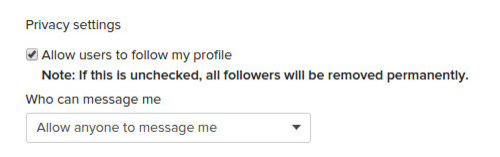
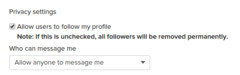
Go to https://www.houzz.com/editProfile

Edit Profile -> Advanced Settings -> Privacy Settings -> Who can message me -> select "Allow anyone to message me" (near bottom of page)

Comments (42)

  • 11 years ago

    I saw that setting and hoped this was what it meant. This will make it easier to initiate trades & exchange contact info privately. Thank you!

  • 11 years ago

    Hi oldmobie, I just noticed the new feature too. Can you see the message button on my profile page? Yours is not showing up.

  • 11 years ago

    I may have to review my settings. Yes, when I click your name, I'm taken to your profile. There is a "follow" and a "message" button on the right hand side.

  • 11 years ago

    Mine was set to let my followers message me. I JUST changed it to anyone. Hopefully it shows up now.

  • 11 years ago

    yep. i can see the msg button on your profile. it's working. woohoo!

  • 11 years ago

    Just changed mine. Thanks, Phylis.

  • 11 years ago

    Hey, Sue. How do you get your zone next to your name? I've tried to edit it and it says I can't change my name. I've tried and tried to do it and it won't accept it. Am I missing something?

    Thanks,

    Alicia

  • 11 years ago

    LADY_ALICIA said, "Hey, Sue. How do you get your zone next to your name? I've tried to edit it and it says I can't change my name. I've tried and tried to do it and it won't accept it. Am I missing something?"

    Go to your page and Edit Profile.

    Then under Profile information, fill in the first name name box ( and I used the last name box too) as you want it to appear when you post.

    I made my first name Chemocurl zn5b/6a

    and the last name indiana


    I think it is really nice to know a member's location when trading plants, for numerous reasons.

  • 11 years ago

    Thanks! Just changed it.

  • 11 years ago
    last modified: 11 years ago

    cool!

    and about the zones, i just noticed yesterday in the edit Profile - "advanced settings" page, there is a box for putting your zone info in. i put my zone in there and it now shows up beside my name in parenthesis.... (8)....

    edit oops, yesterday it did today it doesnt...well...i will mess with it again...

  • 11 years ago

    Yeah, I read on a forum that it was beside people's names, but mine wasn't, and I've had my zone in there, so must be a glitch they're working out. I have it in there anyway now since chemocurl explained how to do it. All is good.

  • 11 years ago
    last modified: 11 years ago

    leila hamaya said......"

    cool!

    and about the zones, i just noticed yesterday in the edit Profile - "advanced settings" page, there is a box for putting your zone info in. i put my zone in there and it now shows up beside my name in parenthesis.... (8)...."

    and

    she said, "edit oops, yesterday it did today it doesnt...well...i will mess with it again..."

    hmmm...I just went and used the advanced settings and put in "zone 5/6" in the box labeled CLIMATE ZONE FOR GARDEN FORUMS.

    Now where will the "zone 5/6 appear"? I'm lost.

    ================================================================================

    Edited to add. May I whine? Whenever I include a photo, or add a link into the message the photo or link doesn't end up being where I want it to be. Grrrrrr...........................

    The wet cat was to have been at the bottom of my previous post.
    :

  • 11 years ago

    How do I get to my profile?


  • 11 years ago

    Hi zzackey,


    You get to your profile just by clicking on your member name in any post.

    Sue

  • 11 years ago

    @ chemocurl

    yeah....its not working anymore. i dont know what happened, yesterday i noticed that some people had the zone in parenthesis beside their name, when i went and put in my zone, mine showed beside my name....at least for a day!

    but today thats not like that. ???? so maybe they were messing around with it and decided to not have it be that way.

    so anywho i thought that would work like it did yesterday but it didnt.

  • 11 years ago

    ps cute grumpy wet cat =)

  • 11 years ago

    Leila, the user's zone info is somehow missing from the seed exchange forum, but still shows up by your name if you post on the perennials and other forums.

    http://forums2.gardenweb.com/forums/peren

    I'm sure support is sick of getting complaint emails from me, so I'll sit this one out. ^_*

  • 11 years ago

    I found my profile. Thanks!


  • 11 years ago

    yeah thats kinda strange...i am not sure what forum i was in...but i just went to check on the rate and review forum, to see if it was still there (!) and it was still at the same address ...and for whatever reason the zones show up in parenthesis there! so i guess only on certain forums it shows up...perhaps it will start showing up in the other garden web forums too....idk

    check it out if you want: http://forums.gardenweb.com/forums/raterev/

  • 11 years ago

    Thanks !!!


  • 11 years ago

    Just bumping this to the top as members are still posting to trade, yet have no message link.

    I for one have never traded with anyone that wasn't set up for trading....ie didn't have messaging enabled


  • 11 years ago
    last modified: 11 years ago

    I wish they'd turned on messaging for everyone by default. At least that's how all social media sites do it. Opting out requires user to take action. I just spent the last two hours browsing through old trade posts hoping to find someone's email address for trade. Luckily, I found it. :)

    Also, I noticed all forum post listings now have the last updated date on the side.

    The sort feature on forum posts by "Last Activity, Popular, Unanswered, Featured" is great!

    Kudos to houzz for being such gracious host to support Gardenwebbers' requests.

  • 11 years ago

    ttt To the top!

    On a good note, everyone who posted to this thread (except one member) now has a MESSAGE LINK on their Member Page.

    Whoo-hoo! Getting there.

    Sue


  • 11 years ago
    last modified: 11 years ago

    A workaround to add some background colors to this site -

    Changing HOUZZ page appearance

    I use chrome "Change Colors" extension and set my background to light green... so much better for my eyes!

    Color codes - http://www.color-hex.com/color-names.html

    Glad I'm following you leila! The activity feed led me to that post on Computer Help.

  • 11 years ago

    hey cool =)
    i am almost finished putting a few final tweaks to the styles i was creating....cause i am mostly on fire fox, so i ve been creating some styles, with the help of Richard (chuggerguy) and

    molanic that will work with firefox "stylish".

    if anyone wants to try them out heres the link to where they are being posted :
    https://userstyles.org/styles/browse/gardenweb


    well this only works on firefox, but its something!

    i am liking the one i made for myself.....very pretty and purple =)

    much easier on my eyes. i think molanic is going to create a nice one soon that is able to work on small screens...well see what happens, but its a big improvement, especially if they never change up the stark whites, etc...

  • 11 years ago

    ah ok, i am done messin with them. got all the little bugs out, that i could find, and changed them a little, just mellowed out some of the font sizes...cause i made them kinda huge....anywho maybe i will post up a new thread somewhere...to let people know they are out there and usable...

    https://userstyles.org/styles/browse/gardenweb

  • 11 years ago

    To the top.

    Hopefully everyone will eventually get their message links enabled so everyone can easily be reached for trading.


  • 11 years ago

    to the top so traders will get their messaging link enabled.


  • 11 years ago
    last modified: 11 years ago

    reposting instructions from -

    Chemocurl zn5b/6a Indiana(zone 5/6) February 21, 2015

    Go to https://www.houzz.com/editProfile Edit Profile -> Advanced Settings -> Privacy Settings -> Who can message me -> select "Allow anyone to message me" (near bottom of page)

    That will place a "MESSAGE" link on your Member page. (Click on my name to see what I mean.)

    ADDITIONALLY you will not be able to see your OWN message link on YOUR page, so you might ask that someone message you or let you know if they see it.

    ADDITIONALLY , you will probably want to turn on getting email alerts whenever you get a new message. On the same Advanced Setting page as noted above choose

    EMAIL NOTIFICATION...(when) Someone messages me...EVERY TIME.

  • 11 years ago

    Does anyone know why trade lists aren't visible when I click on "duane456"?

    I have allowed anyone to message me.

  • 11 years ago
    last modified: 11 years ago

    Duane, I can see your trade list on your profile page, "view my trade list" link.

    Some users choose to post their trade list on the "About Me" section that shows up on the Overview page.

  • 11 years ago

    Does anyone know why trade lists aren't visible when I click on "duane456"?

    I have allowed anyone to message me.

    We cannot see our tradelists as others see them, just as we cannot see our own page with the MESSAGE and FOLLOW links and the personal blurb and join date and zone.


    I replied to your message and sent you my email address. If you will message or email me your address, I will attach screen shots of your page and your trade list as others see them.


  • 11 years ago
    last modified: 11 years ago

    Also, you can log out, then search for your user name. Then you'll see what we see, though you'll have to log back in to post or make changes.


    *****************EDIT****************************

    Sorry, that wasn't quite true. I last tried that trick before houzz gave us back the ability to allow messages from anyone. You have to be a member (and log in to prove it) in order to message. So, if you log out, you won't see your message button.

  • 11 years ago

    to the top. Some members who are posting to The Seed Exchange still need to get their member Page MESSAGE link enabled so that they can easily be reached for trading.


  • 11 years ago

    just sending this back to the top. :)

  • 10 years ago

    Kchd,

    i'm interested on your list....sent you an email.

  • 10 years ago

    Thank you! I was wondering why nobody was replying. I thought I had done it right the first time, but now I realized I hadn't!

  • 10 years ago

    Bump.

Sponsored