Software
Houzz Logo Print
bunnyemerald

MacBook Pro ForceTouch

11 years ago

I just got a new MacBook Pro with a ForceTouch trackpad. I'm adjusting. I used to be mostly a mouse person, or a combination mouse + trackpad, but I think I'm slowly coming around to just the trackpad.

But. The touch can be really sensitive! Last night I was rereading an email before sending it, and whoosh, it was sent, as if by thought alone. Good thing the content was innocuous, because any second thoughts went out the window.

Do any of you have more experience with ForceTouch? I don't see any settings that reduce sensitivity. Looks like I need to not be so ham-handed.

Comments (13)

  • 11 years ago

    I am about to get my MacBook Pro worked on, then give to DH. Will get the new Pro. I've gotten in the habit of not putting in the email address until I'm finished - on laptop and iPhone.

    Bunny thanked User
  • 11 years ago

    allison, that's the wise thing to do. Whenever I'm sending an email that I need to mull over, check the wording, I do the same thing. Make darn sure it's ready to go and THEN add the addresses.

    I'm just floored by how easily a click is registered when I think my fingers are just resting. I swear I've evoked clicks while only hovering over the touchpad.

    I have always loathed the Magic Mouse, although I bought a new one with this new MacPro thinking a new one would behave. I'm finding it's more jumpy with the new MB. I'm gradually using it less.

  • 11 years ago

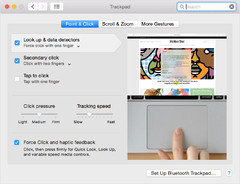
    select the Apple () menu and choose System Preferences. Then choose Trackpad, click the “Point & Click” tab
    Link

    Bunny thanked User
  • 11 years ago

    I have it, but find I never use it...i use it just like the old one without the extra click.

    Bunny thanked Annie Deighnaugh
  • 11 years ago
    last modified: 11 years ago

    Annie, you mean the force click? The day I got my new MBP I tried it out, but in practice I don't use it.

    enmc, what should I be looking for? I've been there many times, mostly changing how I want to invoke right-click. On your screen shot Tap to click (tap with one finger) is unchecked. That confused me, so I unchecked mine, yet I'm still able to tap with one click. Still confused why the same behavior exhibits whether checked or unchecked.

    What I was actually hoping to find was a way to reduce the sensitivity of the trackpad. I just turned the click pressure to Firm and will see if that makes any difference.

    ETA: enmc, sorry, I didn't see the link you included before I posted. I will check it out. Thanks.

  • 11 years ago
    last modified: 11 years ago

    I don't have the Force Touch (older MacBook) but I found this on the Apple website so looks you'll need to experiment/research/go the Apple store and ask - they really are helpful. Reminds me that I was amazed at the trackpad when I got my iPad and then MacBook. The other laptop computers that I had used were awful in that regard. I was like "Wow. This thing is really easy to use." Good luck!

    "In addition to the intuitive Multi-Touch gestures you may be familiar with — like scrolling, swiping, pinching, and rotating — Force Touch brings a new dimension to the Mac experience. The sensitivity is customizable, allowing you to adjust how much pressure is needed to register a click. And the trackpad can even tell whether you’re clicking with your thumb or another finger and automatically adjusts the sensitivity level."

    Bunny thanked rosesstink
  • 11 years ago
    last modified: 11 years ago

    Sorry to have caused confusion. I don't have a Macbook...know nothing about them. I just googled macbook forcetouch sensitivity settings.

    I only included the pic of the half azzed screen capture to give you an idea at what it should look like, so you know it when you see it.

    That link actually tells you how to see a video on forcetouch....still, the "directions" are the same, and you can see from the options shown how you can lessen the sensitivity. Substituting your own preferences, of course, in place of the ones shown in the graphic

    Bunny thanked User
  • 11 years ago

    Yes I mean the force click...I tried using it a few times, but I find it does nothing or does nothing useful on most things I'm doing. On the NYT crossword, it does change the direction of the word (from across to down or v.v.) but other than that, it doesn't seem to do much and I don't even think about using it.

    Bunny thanked Annie Deighnaugh
  • 11 years ago

    Annie, after playing with the force click extensively when I set up my MBP, I no longer think about it, i.e., I haven't used it at all. It is rather freaky to realize that there is no actual movement (up/down) on the trackpad and the sensation of a deep click is all done with sound and vibration.

  • 11 years ago

    I have it and really like it. The two things I use it for the most are to 1) hover over a word and use the force click to get the definition/synonyms, etc. 2) If I am reading a blog or news story with linked source webpages, you can force touch the link and it will open a smaller window for you to preview the story to see if it is worth reading. I'm sure as the software adapts to the hardware, there will be more things force touch can do. But it is fairly limited now, and I would not purchase a new computer just to get that feature.

    Bunny thanked AtomicJay007
  • 11 years ago

    Atomic, thanks for the tips. No, I wouldn't buy something new just for that, but I'm sure new software will start taking advantage of it.

    I'm still using Microsoft Office 2008 (just Word and Excel because I'm old school) and they both look like crap with retina display. I found a plist edit but at this point I'm gonna leave well enough alone. I just can't get into Pages and Numbers yet. Old school.

  • 11 years ago

    allison, cool!! Even my MBP is lighter than my 2010 version.