Software
Houzz Logo Print
rosebud0388

Previewing a message

10 years ago

Photo upload instructions say to "preview the message" to see if the photos are there quote "if you see them, we can see them." I can't find a button to do that. I tried the "Post" button but it posted the message with the HTML code instead of the pictures. I deleted the message and I'm asking for help.

Comments (31)

  • 10 years ago

    I don't see any "Preview" button either so I am sure that is obsolete copy you're reading.

    I posted a small guide on how to upload pics here: http://forums.gardenweb.com/discussions/3955325/here-are-a-few-of-my-favorite-hostas

    The post UI in this forum does not seem to support HTML or any other sort of code (if anyone knows otherwise, please tell me!), so you shouldn't be seeing any before or after you post.

    What you see in the text box should be a pretty accurate representation of what you'll see after your post submits.

  • 10 years ago

    Did as instructed up to the point of seeing a green spinning icon. Clicked on the photo file and waited, and waited, and waited but nothing happened, no spinning icon and no picture appeared. I seem to remember reading somewhere that there is a file size restriction on the downloads. Am I remembering correctly?

  • 10 years ago

    Yep, there will be a limit, but I haven't seen exactly what it is. Also, if you try to upload a huge image, even if it's under the mystery limit, it will take a very long time (unless you have an amazing connection?).

    Resize the image in some graphics program first - you should be able to get it down to under 500kb and still have decent quality.

  • 10 years ago

    Thanks for the help, I'll try again.

  • 10 years ago
    last modified: 10 years ago

    There is no preview as what you write is what you get.

    To post a photo, write whatever text you want hit enter, takes you to a new line.

    Hit the photo button at the bottom, takes you into the files on your computer.

    Find the photo you want to post and double click it.

    Takes you back to your post with a green whirling thing displayed.

    Now wait as it is uploading.

    This may take some time depending on how high the resolution of your photo.

    Once it is displayed hit enter, takes you to a new line. Type text if you wish, hit enter, then hit photo button again to display another picture.

    When finished hit submit and wait for confirmation.

    Not sure there is much of a size restriction as I am posting pictures of around 6MB

    Dave

  • 10 years ago

    below the box you type in ... use the photo/camera icon ... upload the pic from your hard drive ... it will pop right under your typing ...


    if you approve ... hit submit..


    if not.. backspace until it is gone ...


    that is the preview.. no other mechanism ...


    practice right here. right now ...


    ken

  • 10 years ago

    Trying as instructed.

    No luck. No green spinning thingy, no photo. Reduced the file to 595k but still no luck, aaaaaaaaaaaaahhhhhhhhhhhhhhhh!!!!!!!!!!!!!!!!!!

    Thanks for all the help, I'm at a loss as to how to proceed. Think I'll try the HTML with the smaller file. Stand by!

  • 10 years ago
  • 10 years ago

    Exactly how I'm doing it with a file size of 595k. I don't get the spinning green icon and nothing happens. On to the HTML method in this post, see below.

    <a href="http://s1297.photobucket.com/user/rmrose2010/media/DSCN1601_zpsldwarw0b.jpg.html" target="_blank"><img src="http://i1297.photobucket.com/albums/ag36/rmrose2010/DSCN1601_zpsldwarw0b.jpg" border="0" alt=" photo DSCN1601_zpsldwarw0b.jpg"/></a>

  • 10 years ago

    After you select the photo icon, are you selecting one photo from a file on your computer?

  • 10 years ago

    That's your problem. You can no longer upload from Photobucket.

    It has to come from your hard drive on your computer.

    Dave

  • 10 years ago

    Yes to all the above. No luck.

    Trying as instructed.

    No luck. No green spinning thingy, no photo.

    Reduced the file to 595k but still no luck, aaaaaaaaaaaaahhhhhhhhhhhhhhhh!!!!!!!!!!!!!!!!!!

    I give up, thanks for all the help everyone.

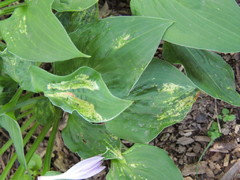
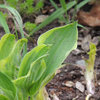
    Would someone please go to the link in the third message above this one and tell me if this hosta is diseased (HVX) and if so what should I do? I have over 30 varieties in my hosta garden and I hate to think about losing them all.

  • 10 years ago

    Yes you CAN use PhotoBucket. The "Direct Link" in PB has a file name that ends in .jpg. Copy that link into the file name when you hit the photo icon.

    And then wait...it may take a minute or two but it does work.

    Here is one of the above PB pix from rosebud.

    I have been touting this here and on other forums since Houzz took over.

    tj

  • 10 years ago

    tj I stand corrected. Just didn't seem any point in using PB when I could upload direct.

    Dave

  • 10 years ago

    Some devices have a hard time getting their pix to load here, but can easily be put on PB. Sometimes the device on hand does not have the pix you want to post and PB can be used. And sometimes older pix that were put on PB are easier to find.

    tj

  • 10 years ago

    Trying again.

    I am very frustrated, I followed tsugajunkie suggested on this post. Clicked the photo icon, pasted the PB Direct file name into the file download block and waited, and waited and.......... It's been over 30 minutes and nothing showed up. Thanks for all your help everyone but my frustration meter is pegged out!!

  • 10 years ago
    last modified: 10 years ago

    What kind of device and what browser are you using rosebud?

    tj

  • 10 years ago

    A Toshiba Satellite laptop running Windows 10

  • 10 years ago

    Might be a Win 10 thing. I'm on Win 7 and using Mozilla Firefox.

    tj

  • 10 years ago

    Anyone else out there having trouble with Windows 10 and picture upload?

    Thanks for the help tj.

  • 10 years ago

    Windows 10, but which browser? Windows IE11 or Chrome or Firefox? Can you download the pic from Photobucket to a folder resident in your computer, and then when you click on the little camera icon, browse to get the photo? Don't give up, we'll get there.... ;-) I don't have a problem with Win 10. If you would like, I can go to my desktop (Win10) and use IE11 or Chrome to try to replicate your problems.

    -Babka

  • 10 years ago

    Internet Explorer 11

    I was able to download it from PB. I then clicked the "Photo" icon and selected the downloaded file but nothing happened. Tried it twice and waited several minutes each time. No indication that the file was being inserted.

  • 10 years ago

    OK! Just finishing dinner out here on the West Coast. I will download a photo from my computer, running Win 10, IE11 and see what happens. Hold on...

    -Babka

  • 10 years ago

    I don't see something...◔̯◔

    tj

  • 10 years ago
    last modified: 10 years ago

    You wouldn't believe the stuff I had to go thru to get signed in and recognized here using IE11. But that is neither here nor there. YOU ARE RIGHT. Nothing appears when you click on a photo resident in your computer. Let's try a link. Not. Can't do that w/o closing this page. Perhaps I am doing something wrong in Windows. But there is no way to minimize the forum while going elsewhere.

    Perhaps someone who uses IE 11 in Win 10 regularly can figure out this mess.

    In the meantime...I suggest you try a different browser on your Win 10 computer. I like Google Chrome, and have heard good things about Firefox. Chrome takes just a few minutes to load. It will take you a small while to acquaint yourself with how the bookmarks bar (ala Windows favorites ) works) but once you do you will be pleased.

    No thanks, Bill Gates. I really did try... ;-( So sorry.

    Babka-

    Edit: I tried to go to my old Photbucket account, but it has been over a year and they do not recognize me, that is why I tried it from a photo sitting in my computer in Windows photos. Frustrating with a capital F. Either way I haven't seen that kind of damage on a hosta. Perhaps someone has???? Thanks for posting the pic, TJ.

    rosebud0388 thanked Babka NorCal 9b
  • 10 years ago

    Thank you so much for your efforts. I'll look at Google Chrome. Saw another post here on the forum that had the PB picture address instead of the picture. Again, thank you for all your help.

  • 10 years ago

    I have the same set up as you. Toshiba Satellite laptop running Windows 10.

    I'm using Firefox browser.

    Try that see if that makes a difference.

    Dave

  • 10 years ago
    last modified: 10 years ago

    (posting from IE11)

    Wow, you guys found it! It's totally the browser. You can even see a bunch of errors in the console here.

    Rosebud, use Chrome or Firefox ;)

    edit: Hey, Edge works! May as well update your browser https://www.microsoft.com/en-us/windows/microsoft-edge

    rosebud0388 thanked teuth
  • 10 years ago

    Trying with Edge.

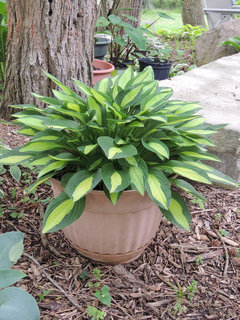
    IT WORKED USING THE "DIRECT" BUTTON!!!!!! THANK YOU teuth and everyone else who contributed. A picture of my sweet Gypsy Rose!


  • 10 years ago

    It was worth the wait, that is one good lookin' hosta!

    -Babka

Sponsored
Miller Woodworks
Average rating: 5 out of 5 stars23 Reviews
Franklin County's Trusted Custom Cabinetry Solutions