Software
Houzz Logo Print
cpartist

Anyone else having this problem?

9 years ago
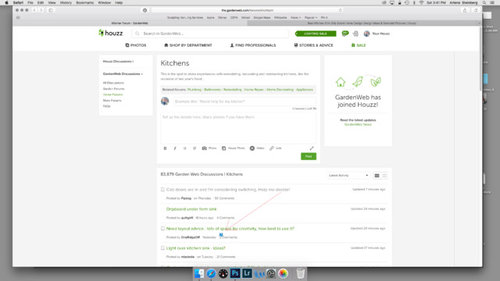
When I enter this or any of the GW forums, I'm fine. If I then click on a thread, and then click back when done in the thread I get this question mark. (see my arrow pointing to the question mark.)

The problem is when the question mark shows up, I need to refresh the page to be able to click on any new thread.

It started happening a few months ago when I was in FL on an old MAC, so I thought it was a problem with my MAC in FL. However as soon as I got back to NY and onto my less than 1 year old MAC, (and after first updating both the operating system and Safari), I still seem to be having this problem.

Clearing my cache didn't help. Does anyone else have this problem?

Comments (36)

  • 9 years ago

    I don't get the question mark, but starting about 19 days -2 weeks ago. I can only click on one tread,p and then when I go back to Building a Home main page (or Home Decorating, etc) I can't open anything else unless I leave to site and come back. Weird! I've been suffering in silence, but it's a big PITA.

    cpartist thanked mojomom
  • 9 years ago

    I've noticed it too, also on a Mac, using Safari. I can also see a faint "box" outline over the thread titles, covering the top 7 or 8 threads. Below that, I can click; otherwise, I have to refresh the screen.


    It does NOT happen on my work computer, which is a PC.

    cpartist thanked User
  • 9 years ago
    last modified: 9 years ago

    That " box " outline is happening on an off on my iPad too. Weird! I have to refresh screen to do anything. Thought my iPad was going bad, so glad to hear it's not just me.

    just happened again after I posted this really strange.


    cpartist thanked Ktdh
  • 9 years ago

    I've written them several times and each time they claim I need to either clear my cache, update my computer, etc. Then they sent me to an Apple page where people were complaining about getting a question mark with a blank page. That's not what's happening to me.

    I think it's a glitch with their program and Apple and they need to fix it.

    You can write them HERE. Right at the top in Green it says Submit a Request.

  • 9 years ago

    It can be reproduced in "Safari", I am not seeing this issue when I use Chrome as my browser.

    cpartist thanked jimpats
  • 9 years ago
    last modified: 9 years ago

    Jimpats, exactly. They told me originally to switch to Chrome, but I don't have Chrome downloaded and have no desire to do so. I'm happy with Safari and don't have this problem with any other site.

  • 9 years ago

    I'm having the same problem on my iPad. The weird box forms and I have to refresh my page. If a thread is not in that weird box I can click on it without refreshing. It seems like a glitch on their end. My iPad is up to date. I use my iPad daily for my work/contracted with apple and I have not seen this with any site.

    cpartist thanked User
  • 9 years ago
    last modified: 9 years ago

    Actually, cpartist - I see the "box" on your screenshot, too - that black line down the right side of the screen. And no - I don't have this problem on any other website. Just Houzz.

    cpartist thanked User
  • 9 years ago

    imstillchloecat, I just clicked out of this forum and saw the box you talk about. When I scrolled down below the box, yes I could click on those threads. When it was inside the box, I can't click on the thread!

  • 9 years ago

    I can click ONE thread and read it. When I click the back button (or swipe right on my magic mouse), the black "box" is there, along with the question mark. I have to refresh - OR, I can click on the main links on the left side, in the smaller white box.

    cpartist thanked User
  • 9 years ago

    Me too imstillchloecat. Same problems.

  • 9 years ago

    I have also been having this same problem on my IPad.

    cpartist thanked mark1993
  • 9 years ago

    Strange - I am on a Mac, latest OS and Safari- no issues like this at all... I can't see the boxes, nor do I have the question mark.

    cpartist thanked just_janni
  • 9 years ago
    last modified: 9 years ago

    Thank God I'm not the only one with the black box (actually it's only a dog leg, so, half a box!)

    Edit: IPad here

    cpartist thanked Sammy
  • 9 years ago
    last modified: 9 years ago

    MacMini running Sierra 10.12.5 with Firefox and Chrome browsers. No problems whatsoever. (Not counting cataracts that nicely blur everything.)

    cpartist thanked worthy
  • 9 years ago

    I started having this problem when this site had a hiccup a couple off weeks ago. I was unable to make any posts and turned it in. Problem with posting was fixed but now getting the issue raised by CP. iMac with all updates and only a problem with Safari.

    cpartist thanked User
  • 9 years ago

    So this is the response I got from Houzz today. I'm quite annoyed with them for their lack of caring about fixing the problem:

    "Hi Arlene,
    Thank you for providing us with this information!

    Let's try looking into the page settings:

    1. Open a Houzz.com in Chrome on your computer.
    2. To check a site's security, to the left of the web address, look at the security status:
      • Secure
    • Info
    • Not secure
    • Dangerous
    1. To see the site's details and permissions, click the icon. At the top of the panel, you'll see a summary of how private Chrome thinks the connection is.


    After you have done that, can you send us a screenshot of both the drop down settings and site settings (click “site settings” in the bottom left corner of the drop down box) you are seeing? This will help us to look into the issue that is occurring when you are opening houzz.com. "

    I wrote them back the following:

    Please let me reiterate. I Do NOT have Chrome downloaded to my computer and do not want to download it. I have Safari!

    Their response:
    Hi Arlene,

    Thank you for reaching out to Houzz Support

    That would be the only suggestion we have for you. Houzz was built to work best on Chrome and if the past troubleshooting steps did not work we could only suggest downloading Chrome.

    Best,

  • 9 years ago

    So I wrote them the following:

    What you seem to miss is that I am NOT the only one with the problem. It is a problem for many of the Apple users! This is something that should be fixed by your IT people. Here's the two threads showing that it's a problem. I bet that if I posted in every other forum, I'd find a lot more people it's happening to.


    Why are you so blasé about fixing a problem that many of us are encountering?


    http://ths.gardenweb.com/discussions/4653673/ot-anyone-else-having-this-problem?n=20

    http://ths.gardenweb.com/discussions/4653535/anyone-else-having-this-problem?n=17

  • 9 years ago

    And here is their latest response. I wish there was another site like this we could use instead since they don't seem to care about many of their members.

    Hi Arlene,

    Thank you for reaching out to Houzz Support.

    We have offered you many suggestions, we do not have access to your computer therefore we cannot see what the issue is unless you are willing to follow the steps we provided.

    Have a great day,

    The Houzz Team

  • 9 years ago

    Please write them yourself. I have and they seem to think it's a problem only with my computer. Here's the link. Then click on at the top where it says Summit a Request.

  • 9 years ago
    last modified: 9 years ago

    They don't appear to have IT developers or testers. I submitted the issues to their support system which does not have a category for issues by just Website Suggestions.

    cpartist thanked homepro01
  • 9 years ago

    I noticed that homepro01

  • 9 years ago

    Just submitted a request. NOT user friendly at all ...PITA

    cpartist thanked Ktdh
  • 9 years ago

    Exactly Ktdh

  • 9 years ago

    I don't even use Chrome on a PC. Buggy as hell and full of Microsoft crap. Nope Nope Nope.

    cpartist thanked User
  • 9 years ago

    I'm having the problem and have submitted a "request".

    cpartist thanked jlhug
  • 9 years ago

    Here's the latest request I sent:

    Myself and many other Apple Safari users are having an issue with the GW site.
    Here are four OT threads I started in different forums on GW asking if I was the only one with the problem. I'm not. There are many of us and it seems your solution is instead of using our Safari browsers, we should switch to Chrome (Those on an IPAD can NOT use anything other than Safari!) Why are you not willing to look at the problem many of us Apple Safari users are having.

    Here are the threads:
    http://ths.gardenweb.com/discussions/4653673/ot-anyone-else-having-this-problem?n=36
    (Kitchen Forum with 10 users with Safari problems)

    http://ths.gardenweb.com/discussions/4654673/ot-anyone-else-have-this-problem?n=9
    (Bathroom forum with 4 users experiencing problems with Safari)

    http://ths.gardenweb.com/discussions/4653535/anyone-else-having-this-problem?n=25
    (Building a Home forum with 10 users having problems with Safari)

    http://ths.gardenweb.com/discussions/4654675/ot-anyone-else-having-this-problem-with-their-apple-products?n=18
    (And 10 on the Home Decorating Forum)

    So far that's 34 GW users having problems with Safari. Sorry but telling us to switch to Chrome (which is not even possible when using the IPad is not the answer!)

    Here is what happens. When I click onto a forum everything is usually fine. If I start clicking on the threads, and then click back to the forum, I get the blue box. (See attachment labeled Screen Shot 2017-05-20 and see red arrow pointing to blue box) Apparently I didn't realize this, but I also get a gray lined box around the outside of the threads that go down about 12-14 threads (See green arrow pointing to the line).

    Anything within that gray lined box, meaning the top 12-14 threads can not be clicked on. Nothing happens. Anything below that gray box can be clicked on. (See attachment labeled Screen Shot 2017-05-24 which shows the bottom of the gray lined box.)

    A company that cares about its users will not just say tough luck and switch to something else. They will find a solution. I have contacted the website request but to no avail as they tell us to switch to Chrome or it's a problem with our browser. Yes it's a problem with our browser, but it's a problem for many of us!

    Attachment(s)
    Screen Shot 2017-05-24 at 9.16.39 AM.png
    Screen Shot 2017-05-20 at 3.41.51 PM.png

  • 9 years ago

    Emily H, thank you.

    It was quite disheartening to be told we should switch browsers. It made us feel like we were being ignored by your tech team.

    Houzz/GW is my favorite site and I'm thrilled to hear that you've heard our calls for a fix.

  • 9 years ago

    We definitely did! Thanks for your patience on this.

    cpartist thanked Emily Hurley
  • 9 years ago

    It appears to be FIXED! At least for me. :) THANK YOU!

    cpartist thanked User
  • 9 years ago

    It's fixed for me too! Thanks cp for bringing it to Houzz/ Gardenweb's attention.

    cpartist thanked Ktdh
  • 9 years ago

    Yes It seems to be better for me too. I haven't had to backtrack once tonight.


  • 9 years ago

    Seems fixed here!! Thanks cpartist!

    cpartist thanked User
  • 9 years ago

    Thank you Emily H and the houzz crew for fixing the problem. Hopefully next time when there's a problem, they will be more willing to listen right away and not just tell us to switch to a different browser. :)

  • 9 years ago

    Thank you, cpartist, for getting this problem fixed! I am very appreciative.

    cpartist thanked mark1993