Software
Houzz Logo Print
jeanzbi

What a difference! oooeeeee!

14 years ago

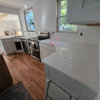
We live in a small, oceanfront condo in Florida and finally remodeled our original, 1980-ugh kitchen to 2012-smashing!

We used Martha Stewart's Perry Street metal and glass cabinets on top, which all have lights in them, and the coordinating Perry Street white cabinets on the bottom. Kashmere White granite. A zero-radius, large, stainless steel sink. All new stainless steel appliances. Clear glass subway tile backsplash. Now if only I can figure out how to upload pictures to this forum, I will post the before and after photos. WHAT A DIFFERENCE!

Comments (26)

  • 14 years ago

    1. Open a Photobucket or Flicker or whatever freebie photo storing site you like. I randomly chose Photobucket and it's really easy to work with.

    2. Load your photos from your camera onto your computer. From Photobucket (or wherever), hit the "upload" button and follow the directions.

    3. When you mouse over one of your stored photos a box comes up with a list of things like "direct link," "html code," and "image code." The one you want to click on is "direct link." It begins with "http://"; and ends with ".jpg"

    4. Whenever you want to place a photo in a post, you type in this script:

    <img src="Your URL location here" </img>

    Paste the direct link address you copied from your photo between the quotation marks (replacing "Your URL location here").

    5. If you want to use a photo from somewhere else on the net, click on the photo and a list comes up which includes "copy image location." Click that to copy and proceed as above.

  • 14 years ago

    Thank you, Suzannes1. I will try doing as you instructed.
    I really appreciate your help!

  • 14 years ago

    No, it's easier than that. In photobucket, hover over the image you want to post. Left click the box next to HTML code. It will briefly say "copied" in the box. Then paste it in the message box here. You don't need to type anything. When you click on the "preview message" box you will be able to see your image. You can add text before or after your image if you like.

  • 14 years ago

    Huh! Good going, cat. I tried your way and it works! My way is the standard HTML code for including images, but your way is much shorter. Thanks.

  • 14 years ago

    There's an even faster way with Photobucket. Open your album. Find the pic you want. Hover your mouse over the image and a drop down pops up. Click in the "HTML code" field and it indicates in the field "copied". (the contents of the field start with "a href") Then you come to your post and press "ctrl V" like this

    {{gwi:1576445}}
    and viola! It's in there. No typing at all.

    Ne

  • 14 years ago

    I know this is OT but what color are you hallway walls suzannes? It is very pretty and I love your cabs, btw.

  • 14 years ago

    Believe it or not, the bit of hallway you see through the kitchen door in the picture above is actually painted a light gray. The other tiny bit of the hall you can see close to the barstools is a light blue. This photo shows the actual dark blue accent wall (BM New Born's Eyes) and the lighter blue of the dining room (BM Heaven on Earth). I'm not really sure why photos show the pale green - something about the light I suppose.

  • 14 years ago

    Little known fact: there is also a test forum, so you can try out your new found photo posting skills, too :-)

    Here is a link that might be useful: test forum

  • 14 years ago

    Beautiful, jeanz! Enjoy!

  • 14 years ago

    I like your kitchen! Can you post some close ups of your backsplash?

  • 14 years ago

    So, where is jeanz kitchen? I want to see those glass cabinets!

  • 14 years ago

    I'm still trying to upload pictures. Even the Geek Squad at Best Buy this afternoon couldn't do it. Actually, he said he uploaded the pictures to this site, but, obviously, he didn't. I will keep trying. In the meantime, the glass cabinets are G*O*R*G*E*O*U*S!

  • 14 years ago

    can you see your pics on your photobucket album?

    if so, hover the cursor over the pic til the box pops up with codes in it. hover over the 'http' code. It should automatically 'copy' it. (If not, while over the http code right click and click on 'copy').

    then pop back to this site, put cursor in msg box, right click and 'paste'. The code should appear. Then scroll down to below the msg box and click on the grey box that says 'preview message'.

    View the post... you should see your pic.

    if more than 1 pic, do this for each pic you want to show here. only scroll down to preview box when you have all of the codes of pics you want us to see pasted into the msg box.

    you can type a note/info on a line inbetween each code if you want to - to tell us what the pic is showing us.

    like 'old kitchen' or 'new kitchen/sink area' etc

    click on prev msg after any changes in the msg/text box.

    after you prev your post and it is as you want it to be for here, then click on the 'submit' button (on lower left below the preview of your post).

  • 14 years ago

    can you see your pics on your photobucket album?

    if so, hover the cursor over the pic til the box pops up with codes in it. hover over the 'http' code. It should automatically 'copy' it. (If not, while over the http code right click and click on 'copy').

    then pop back to this site, put cursor in msg box, right click and 'paste'. The code should appear. Then scroll down to below the msg box and click on the grey box that says 'preview message'.

    View the post... you should see your pic.

    if more than 1 pic, do this for each pic you want to show here. only scroll down to preview box when you have all of the codes of pics you want us to see pasted into the msg box.

    you can type a note/info on a line inbetween each code if you want to - to tell us what the pic is showing us.

    like 'old kitchen' or 'new kitchen/sink area' etc

    click on prev msg after any changes in the msg/text box.

    after you prev your post and it is as you want it to be for here, then click on the 'submit' button (on lower left below the preview of your post).

  • 14 years ago

    My son finally helped me upload a picture. Hopefully it is embedded here but, if not, please click on the link below.

    Here is a link that might be useful: FL Kitchen

  • 14 years ago

    Here you go:

    {{gwi:1576448}}

  • 14 years ago

    Wow!
    So clean and pretty! :)

    Congrats.
    I'll bet you walk through there just petting everything. :)
    I would.

    Enjoy your fabulous space!
    Christine

  • 14 years ago

    Suzannesl...What color is your granite? I asked a question a few min. ago about getting new countertops, and I love yours.

  • 14 years ago

    Ours is Kashmir Gold. The gray with blue undertones in the granite inspired the entire blue kitchen, which led to the gray in the living room...and, you know how it goes :)

  • 14 years ago

    Yup, that is our new, little, contemporary, gray kitchen! I finally emailed my oldest son and had him upload the picture. Now I will email him a picture of the other side of the kitchen and have him upload that one, too. We used Kashmere White granite, Dal Tile Glass Reflections backsplash, Martha Stewart "Perry Street" cabinets.

  • 14 years ago

    Suzzannes1, What is your backsplash? Closeup please. :)

    And, Jeanz, WOW, GREAT kitchen! Do you have before pics?

  • 14 years ago

    Jeanz, what a nice clean look. I especially like the use of knobs on the uppers. It makes them less stark than they usually are. I hope you have a nice blue ocean right outside as a final accessory. :)

  • 14 years ago

    Nicely done Jeanz! I really like the look of those uppers with the overall look. Looks great with the beautiful counters! Enjoy.

  • 14 years ago

    Here is the before picture.

    Here is a link that might be useful: FL Kitchen before photo

  • 14 years ago

    sandesurf - sorry to be slow, but we spent the day flying from one coast to the other.

    The backsplash is a torreon tumbled travertine in a mini-Versailles pattern. Every here and there, we cut out a 1 x 1 piece of travertine and replaced it with a blue glass tile canabalized from a sheet of glass tiles in 4 blues, some in clear glass and some frosted.

    tiles that came in 4 blues, both frosted and clear.

  • 14 years ago

    I love it! It looks just perfect for an oceanfront condo. You must be so excited. Enjoy!

0
Sponsored
Whisler Home Improvement
Average rating: 5 out of 5 stars9 Reviews
Franklin County's Committed Home Improvement Professionals