Software
Houzz Logo Print
j_lozano

Internet/ Security system Pre wire

9 years ago

Hey Guys,


I'm in the middle of a new build and looking at installing a security system. I have a few questions:


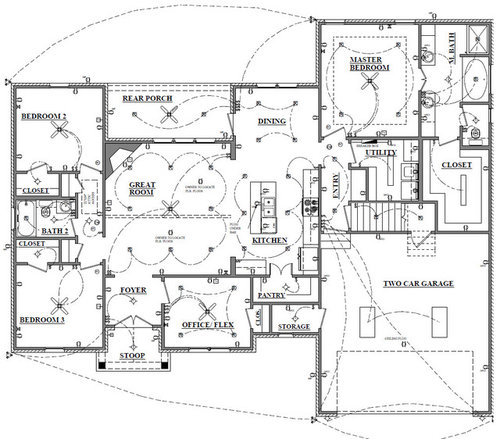
For the internet cable: Should I run cat6 cable? How much would I need for the floor plan (rough estimate)? Any suggestions are greatly appreciated.


For the Security system: Should I run cat6 cables to potential camera locations? What time of cable is needed for the senors (window, door, etc...)? Again, any tips are appreciated.


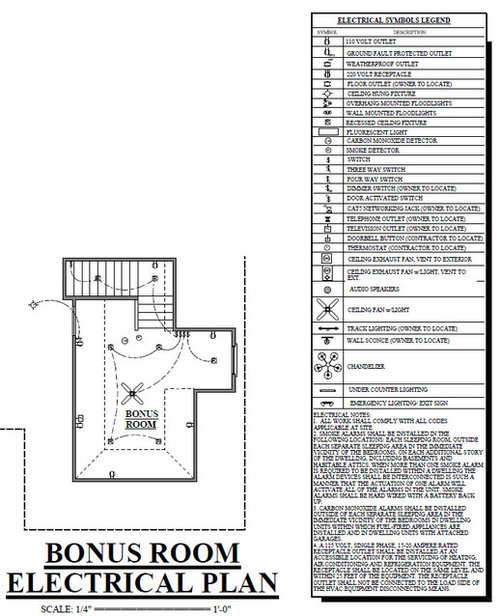
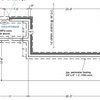
Please see the attached floor plan for reference.


Comments (13)

  • 9 years ago

    I am planning on running Cat6 to each of my drops, but DH and I do use the internet a lot for our jobs when we are working from home.

    As for the security cameras and the types of wiring, your builder should be able to tell you the best wiring for the security system, or if you are having it monitored by a specific company, they will come out and do a walk-though of where and the type of wiring should go. Also do you want cameras outside or inside?

  • 9 years ago

    I would also ask in the electronic's forum. :)

  • 9 years ago

    Bry spelled it out well. We are pre-wiring as well. For you ipcameras, run 2 cables to each location. Cable is cheap and no more costly to pull than a single. Do not use wifi cameras! Before you actually run you cable for cameras, take a laptop, POE switch, camera mounted on a 2x4 and bucket full of sand. Test you mounting location. Do not mount higher than 8' unless you want to see the tops of heads. Lastly, spend time on ipcamtalk.com - great resource and look hard at the Dahua Starlight cameras. Excellent low light cameras.

  • 9 years ago

    I need to cat6 cables for ip cameras? or why did you suggest i run two? Also, what cameras are you planning on installing?

  • 9 years ago

    Yes, you need Cat6 cables. The cameras are POE, Power Over Ethernet and the one cable powers your camera and takes care of transmitting signal for video. Cable is cheap, a good way to troubleshoot if you have a problem you can rule out a bad cable right way by changing connections to second cable. I'm getting the Dahua Starlight cameras, about 12 of them. Model selection depends on where you are placing the cameras, no one size fits all. Visit that website and out in the time and you'll be rewarded with a very good system if you do. It takes time reading and asking questions. The folks are very good about helping. Focus on the Dahua forum. Good luck.

  • 9 years ago

    I think there is a lot of misleading information in this thread. What you need will depend on the specific cameras you intend to use. e.g. None of the advice above is correct for the particular cameras I use. In my experience, you need to consult a "low voltage" specialist, someone who wires for audio, video and security systems.

    In retrospect, I would have installed much less wire in my new build. I'm using wifi, main router plus mesh access points, for almost everything, and it works great! I even stream TV (using Roku). I did install conduit from the mech/data room to the attic/garage/basement/etc so that I could easily pull cable through in the future, because who knows what the future may bring... e.g. 60 Amp electric car charger in the garage? Satellite dish on roof?

  • 9 years ago
    last modified: 9 years ago

    With all due respect: Wifi cameras are NOT dependable. I would never trust a wifi camera to protect my home. To each their own, wifi goes out and NO coverage. Spotty signals and poor or NO coverage. OP, prewire for cameras now. It will never get any less costly. Lastly, in areas with competing wifi (think your neighbors) you've got potential for interference with signal. ANY time you discuss networking with anyone with a reasonable amount of knowledge, point blank they WILL take a hard wired network over wifi all day long. Pure fact. Lastly wifi cameras CAN NOT stream HD video. Ok, I'm done LOL. OP, best of luck. I would urge you to do some reading. The cameras I am pointing you towards are professional grade cameras and NOT consumer grade. Here is a DIRECT LINK to the Dahua forum on ipcamtalk. Sign up over there and ask a few questions. The folks over there do this for a living. When is the last time you saw a wifi camera installed on the exterior of ANY business? There is a reason. Here is the link: https://ipcamtalk.com/forums/dahua.8/

  • 9 years ago

    Updated posting with forum links for the OP.

  • 9 years ago
    Pensacola, I went with wired! I got them to run cat6 cables to the potential locations. I've been doing research and wired seems to be a way better more secure option.
  • 9 years ago

    OP: do you know what cameras you'll be using? Do you know how they get power?

    if your answer to either of those questions is NO, then you might not be done yet.

    e.g. many cameras do not have built-in POE "transformers" meaning you might also want to run low voltage wires to each camera location.

  • 9 years ago
    I'm planning on getting "plug and play" cameras. seems like they only need the cat6 cable and nothing else.
  • 9 years ago

    Stream video continously. If you do not and you set up for motion activated, you are liable to miss critical footage. Use either an Network Video Recorder or a PC dedicated to your system and run Blue Iris software, actually better than the NVR.