Software
Houzz Logo Print
dviolet1

First Class 2 for PC and Mobile - Q&A on GW?

8 years ago

Have you used FC2 for PC and Mobile (iOS)?

I see lots of references to the software in GW messages on this forum, and I also see an AVSA online form for questions.

However, I may have some general questions better answered and discussed by the users themselves in a forum setting.

So for starters I was wondering who is or has actually used the PC and iOS Mobile versions of FC 2. And then more specifically, has anyone used both versions?

Thanks in advance for your replies.

Comments (23)

  • 8 years ago

    uh..huh?? can we dumb this down for poor heather please?? what is FC2?

  • 8 years ago

    What the heck are you talking about? Is this a violet I have never heard of?? lol Rosie

  • 8 years ago

    I have first class program on my laptop... so far didn't feel the need But a club member has it on his phone - and loves it. I think HE DOES CHECK THEM WHILE DRIVING... Works really well on the plant sales - you can immediately see if you are looking at the correct one or the sport.


  • 8 years ago
    last modified: 8 years ago

    First Class 2 (FC 2 for short) is a computer program (SOFTWARE/APP) for displaying and searching African violet names, descriptions, and photos (among other things). Those names, descriptions, and photos are contained in the First Class 2 database.

  • 8 years ago

    I was to embarrassed to ask what the heck dviolet was talking about. Now I know. Good to know that the database exists.

  • 8 years ago

    How the heck do you find that list aegis??? Is it a list you can save in a folder? Rosie

  • 8 years ago

    Rosie - this is a database program - so it is more complicated then an excel sheet - it includes registration particulars and a photo or 2. You can print labels for the club sale on it - especially if you sell non-blooming starters. You can enter your own non-registered plants or Gesneriads into this database creating your own subset. Very handy easy to work program.

  • 8 years ago

    Rosie just ran away in fright...it's more complicated than an Excel spreadsheet :)

  • 8 years ago

    It is easier to learn than Excel spreadsheet. Much less options.

  • 8 years ago

    YIKES!!!!! I am still running! Ok slowing down now.

    You will be pleased to know that I am teaching myself about a spreadsheet! I am cautiously pressing buttons (so I don't do damage) and slowly learning which ones do this and that! I think I got this spreadsheet thing down pat! At least for the things I need!

    But you can keep that other thing. I don't think I need it! Rosie

  • 8 years ago
    last modified: 8 years ago

    Just decided to go for it! Just it installed it! And I LOVE it already!!

    Thanks for replying everyone. Irina and Aegis thanks for the help with explaining it to people. Originally I had questions about the PC version working with the mobile version but I'll somehow get it figured out.

    I found you don't have to be a seller or pro to benefit from it. Even as newbie grower, there's so much I'm going to do with it. I will spare boring you with details as Rosie's eyes are still rolling back into her head from the word "database".

    (Close eyes now Rosie...) Databases don't frighten me as that was my specialty in a past life. This one could be improved for the average person if it allowed for some user-defined searchable fields. But I can make do with the notes fields and it's very usable as it is! I'll be tying it into the spreadsheet I'm using now so I do have fields for that kind of extra stuff.

    I imagine this post is about to fade away into that black hole where all the First Class software posts have been lost. Nonetheless, I can post some links about the software if anyone is interested.

    I'm done geeking out around here. So now it's safe. You can come out again, Rosie. ;-)

  • 8 years ago

    Oh, can't breathe,,,you sure it is safe to come out???? WHEW! Rosie

  • 8 years ago

    ...i'm still curious about this program..

  • 8 years ago
    last modified: 8 years ago

    Heather, here's some more things about the software you might find helpful.

    Link to screen prints:

    http://firstclass2.com/features.htm

    Link to purchasing download or CD:

    http://avsa.org/store-software

    You can search for registered AVs already in the database, add your own unnamed ones, add your own pics and your own notes.

    Save different groups of AVs, such as a wish list, list of AVs you own, list of AVs you sell or gift.

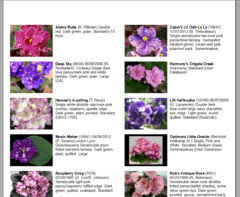
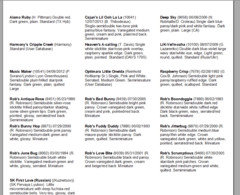
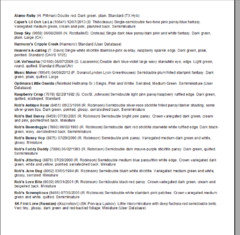
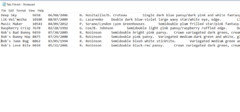
    Print out these groups in different formats for different uses. Here's some examples:

    Printout of paper or sheet of labels with pics:

    Printout of paper or sheet of labels without pics:

    Printout of plain list, for a notebook or your word processor:

    Contents of text file, with data separated by tabs. You can easily pull this file into your spreadsheet software:

    That's it for starters. Using the Search feature is very easy, too. I just got done creating all the above lists of some named violets in about 10 minutes. There's nothing very involved in learning the database, you just need a general knowledge in using computer software.

    The downside of it all is that the cost is a little steep if you are not an AVSA member.

  • 8 years ago

    Just when you thought it was safe to come out, Rosie...

    heheh ;-)

  • 8 years ago

    Nah - the photos are too small... You can recognize the plant but you probably won't start drooling so bad that the floor becomes too slippery to walk....


  • 8 years ago

    But -

    For Rosie - instead of keeping 50 thick volumes all around the house - you can create a personal database - wish list - and it will be all neatly packed in one program. You can wake up one day and say - I want to get something with a name "Rosie" for example - and look at your wish list! And GET IT! Lets say as your Labor Day gift to yourself. Something like "Rosie Ruffles". You cannot buy everything - the house will explode - and you cannot really spend unlimited amount of money ... none of us can... just once in a while. To feed an addiction.

  • 8 years ago

    :) Irina, you can be so funny.

  • 8 years ago

    Irina, you will be pleased (I hope) to know I no longer keep a notebook on my violets/gesneriads. Nooo, I didn't start using index cards either! I taught myself to use a spreadsheet!

    In fact as soon as I am done today in gwf, I will be entering the rest of my violet/gesneriad names! I have gone paperless!!!!!! Well, except for one minor detail. I learned how to copy JUST the names of the violets, paste them on a word list and will print it out once a month so I can take inventory! Then I will transfer info back to the spreadsheet and throw away the temporary printed list! Well,,,,,,wadda ya think!!!???

    But on that program thing you guys are talking about,,,,Het !!!!! Not for me. I will be happy with my little spreadsheet!

    Now about that "Wish List" of mine! haha Rosie

  • 8 years ago

    Rosie - if you can do GardenWeb - you can do FC2 program with your left hand. I bet some of your local AV buddies already use it and are itching to get you started.

  • 8 years ago

    But Irina, gwf is so easy. But,,,,now let's wait a sec. How much does this program cost?? Not sayin' I can do it or will, but just askin' !!!! Rosie

  • 8 years ago

    thank you dviolet..that was VERY helpful and what i needed to know...and yes marina..expensive...will be going to the bottom of the list for me lol