Software
Houzz Logo Print
lenoreepstein

Tech question: no formatting buttons on mobile site

Yesterday the editing box had the usual editing buttons below the box (bold etc, insert URL, make bulleted & numbered lists) on my iPod touch, my ancient Android phone, the new iPhone I'm in the process of setting up, and my iPad. Today everything but the iPad has lost all editing buttons except the buttons for inserting photos or videos.

Is this happening to everyone, or is it a personal problem?

Comments (23)

  • 9 years ago

    Yep. Let's see if <I>html formatting</I> works.

  • 9 years ago
    last modified: 9 years ago

    Okay, I guess we'll have to do without.

  • 9 years ago

    I just noticed that they also removed the icon above the list is posts that gives your a preview of the last part on a thread and instead of trying directly in the search box at the top of the page I have to tap a magnifying glass icon to get the search box to appear. There's probably other stuff I haven't noticed yet. I guess someone with an ancient phone complained that the site took too long to load or something. If I knew how to contact houzz support I'd let them know that I'm going to miss the features.

  • 9 years ago

    Does it look to you like something is missing from mine as well?

    Honestly, it’s always been this way. I only use my iPhone or iPad on here so I don’t know of anything else.

  • 9 years ago
    last modified: 9 years ago

    At the top of the Houzz Support page is a box to "Submit a request". That is, unless the "i" devices are blocked from that as well.

    tj

  • 9 years ago

    Dave, I'll post a photo from my iPad when I get to it, but the same buttons are missing in your screenshot.

    tsuga, that linked page is almost empty, just two wide buttons to select support topics and a header with the houzz logo.

    I did find a site feedback link and wrote them a note, but it looks like they rolled out a new and improved design, so I don't expect anything to come of it.

  • 9 years ago

    I'm using an iPad and the formatting buttons are still there. However I sometimes find they don't work and I use the ones on the pop up key board instead.

  • 9 years ago

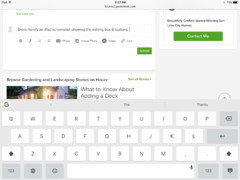
    Dave, here's an iPad screenshot showing the editing box & buttons.

  • 9 years ago

    Floral, I've just figured out how to format text into boldface, italic, etc. by using the pop-up that appears when I select text, so the thing I miss is being able to add a clickable link, because some people don't know how to copy and paste a URL into their browser search bar...

  • 9 years ago

    Litterbuggy,

    Not to side track, sorry for this, but I know we talked about Ficus Alii cuttings.

    Well, after moving things back indoors, everything is too big. The Alii needs to be trimmed soon.

    Do you want any cuttings now instead of spring?

    If not, no problem. You can still have some in the spring!

    litterbuggy (z7b, Utah) thanked Dave
  • 9 years ago

    I'll take them! I had no problem rooting my little benjamina cuttings last fall, so I'll be glad to take some Alii cuttings off your hands now, especially since I think I'm going to like my new 5:1:1 mix. Do you have messaging enabled on Houzz, or should I email my address?

  • 9 years ago

    Yeah, send me a message!

    I think maybe a little box would work? Have you received cuttings before?

    Wet paper towel in a bag sufficient in keeping them moist?

  • 9 years ago

    I went to your profile page but I cant figure out how to message you, but maybe there's something I'm missing. Have you enabled it at the bottom of the the advanced settings screen in your profile? You could also just message me your email address and we'll correspond that way.

    I haven't had anyone send cuttings before, but regular mail will take 3-4 days at most, so I think putting the cut end in a wad of moist paper towel and sticking the whole thing in any old plastic bag should work fine.

    It would get squished in an envelope, but you have a small box? If not, the P.O. always has free self-sealing small priority mail boxes in a display. Use whichever one works for you and tell me how much it costs so I can send $$ for either regular or priority postage by PayPal or mail.

  • 9 years ago

    I went to your page and also see nowhere to send a message.

    I looked for any advanced settings on mine and I don’t see any option for that.

    And it’ll be so cheap to send that I really don’t need any money. It’ll make me feel better knowing the cuttings are going to someone who cares rather than the trash can.

  • 9 years ago
    last modified: 9 years ago

    At least that means I'm not crazy. I hate posting private info on public forums, but I really would like to try to root the Alii cuttings, so I'll take a chance and post one of my email addresses below. Send me an email and I'll respond with my mailing address. Then I can come back and delete the email address from this forum in case someone decides to spam me.

  • 9 years ago

    I will email you tomorrow!

  • 9 years ago

    Dave,

    I think I've solved our messaging problem, because much to my surprise I got a message from another member yesterday. When I go to his page I see a box saying MESSAGE in the banner at the top. I don't see that on my own page, probably because I can't message myself, but in addition to the Overview, Ideabooks, and Activity links there's a link for Messages. I don't see the MESSAGE box on your page.

    That's why I think you haven't enabled messages. You can't send or receive messages without enabling messaging on your account, which would explain why you don't see the messaging option on my page and I don't see it on yours.

  • 9 years ago
    last modified: 9 years ago

    Interesting.

    Do you know where I can find the enable messages in my account settings? I don’t see it anywhere (using an iPhone).

    I have messaged back and forth with Al many times in the past. I think he’s the only one I’ve ever spoken to via messages.

    I’d love to enable messaging if I can figure out how, haha.

    EDIT: found it. It was set on “let users I follow message me.”

    Not sure how or why it was set to that, but that explains it! I just set it to let anyone message me.

    Do you see a link to send a message now?

    litterbuggy (z7b, Utah) thanked Dave
  • 9 years ago

    There it is!! I wouldn't be surprised if Houzz did something to the site that reset people's settings at some point.

  • 9 years ago

    I’ve sent you a couple emails. Did you get them?

    Im having to use a box about twice the size of the one you sent haha.

    The Alii leaves are pretty large.

    Going to get your cuttings mailed out tomorrow and I’ll send a tracking number.

  • 9 years ago

    Hey, sorry I didn't check the email account I gave you. I just sent you an email from the account I actually use all the time.

  • 9 years ago

    Sounds good! Emailed you back. Your cuttings will be mailed out today.