Software
Houzz Logo Print
hzdeleted_38710460

Off topic/What has Houzz done?

8 years ago
last modified: 8 years ago

Hi everyone, has anyone else found today that Houzz has changed the way our adenium forum pages look????

I was on the forum early this morning (Australia time) and posted a couple of comments and everything was normal and then I came back to check on the forum half an hour later and the whole layout seems to have been changed. Is it just me or is it different for others too. (I use an iPad when on the forum.) It also looks like I have to post a new thread differently too....extra step. Let's hope i can get this to post!

Obviously you can see I am not good with change. Lol....Maybe Houzz decided it was time for a refresh for the new year. I don't like it. :(

Comments (22)

  • 8 years ago

    Rachel my page seems the same im on a tablet but i don't pay attention i may of changed.

    User thanked Peter Newcastle Aust spider mite breeder
  • 8 years ago

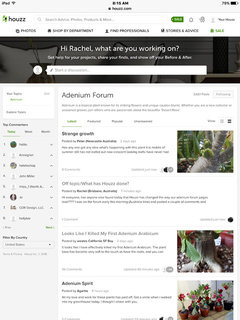
    Thanks Pete. My view of the pages has definitely changed from what it normally looks like. I have even tried logging out and logging back in. Here's a photo of what I see on my iPad now. Does anyone else see it like this???

  • 8 years ago

    Lol no i think i would notice that

    User thanked Peter Newcastle Aust spider mite breeder
  • 8 years ago

    I don't see that way Rachel, mine looks normal on ipad

    User thanked Agartta
  • 8 years ago

    Thanks Agartta, I don't know what's caused it to look this way on my iPad. I haven't done anything different today than any other day. If anyone knows if this is something I can change in my settings, please let me know.

  • 8 years ago

    Hooray, everything seems to have gone back to normal looking now on my iPad. Still didn't do anything different, it just seemed to fix itself. Weird, freaky thing. I hope it stays normal now. :)

    Please disregard this thread now.

  • 8 years ago

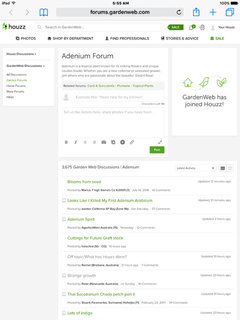
    Thanks Rob, everything is back to normal for me now. Here's a photo of what it looks like today....this is how it has always looked for me when I view on my iPad. As you can see, there is a big difference in how it looks. I am just glad it has gone back to normal. Still don't know what caused it. It probably looks different to everyone depending on whether they are on a computer, tablet, phone or iPad. Anyway just glad I don't have to navigate a new page design. Thanks again everyone. :)

  • 8 years ago

    I saw your post yesterday and my iPad displayed everything as usual BUT today its display is just like what you experienced.. Houzz is definitely trying out new things.. It persistently displayed an advertisement with no pathway to exit; I couldn't go back to my previous page without the annoying "ad" popping up repeatedly. After 3 attempts to evade, Houzz finally allowed me to continue reading the discussion posts.. Not a happy camper, here.

    User thanked paradiseprincess51
  • 8 years ago

    paradiseprincess, hmmm how weird that this seems to be happening at random. Maybe Houzz is just fiddling or updating their running system and its affecting some of us while we're online. Hopefully yours will be back to normal tomorrow for you.

  • 8 years ago
    last modified: 8 years ago

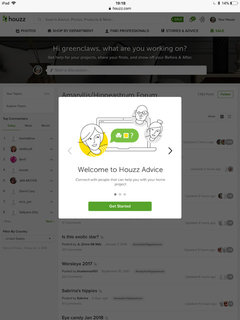
    Oh heck, my system has gone crazy now! I’m using my iPad and after saving the amaryllis forum to my favs via the iPad icon at the top right hand, on needing to go back to it I’m getting the page you did Rachel but in ghostly form and overprinted with a pop up box saying ‘welcome to Houzz advice’ for my projects apparently.....which just won’t go away! I have also lost for a week or more, the say thank you option in green that showed below the like/save option! What is going on Houzz...get it right please!

    Gill

    User thanked greenclaws UK, Zone 8a
  • 8 years ago

    like this....folks on c/s forum have been complaining too

    User thanked greenclaws UK, Zone 8a
  • 8 years ago

    Hi Gill, sorry to see you're having problems too. Since the first time I had the problem, I have had it happen again 1 more time, although it went back to normal later that day. I always open the forum from a bookmark on my iPad. The second time it happened I had cleared my history/website data in the settings app. ( Settings/safari/clear history and website data) then when I went back to open the forum from my bookmark it had changed to the other weird page. Clearing the history/website data should not have changed the way my page looked, as this is something I have always done. But for whatever reason, this seemed to be what caused it the second time.

    It sounds to me, like some sort of issue that is affecting some iPad users that are using houzz. Maybe an incompatible issue arising from something houzz has updated in their running system. (I have not updated or changed my running system on my iPad, so I can't see that as an issue.) Hopefully you will find a work around with your iPad to fix this...or maybe it will fix itself after a couple of days. Good luck Gill, and please let us know how you go. :)

  • 8 years ago

    I do clear history etc, but not done it that recently and I had an update come in a few days ago which I applied but this only happened today. Will see what transpires......!

    Gill

    User thanked greenclaws UK, Zone 8a
  • 8 years ago

    It's because there's two versions of the forums. There's one on gardenweb and one on houzz. The only time I hit the houzz version of the forums is when I leave a thread by clicking the forum link on the page. I get blasted full of pop-ups that won't let me go anywhere so I have to backtrack to the gardenweb url for normal viewing.

    User thanked dragonstone
  • 8 years ago
    last modified: 8 years ago

    Oh wow, I think 'dragonstone' is right. If you take a look at the two photos that I posted above you will notice in the website address at the very top of the photo that was weird to me it says "houzz.com" and the one that shows the page like I normally see it, says "forums.gardenweb.com"

    Dragonstone, thanks for the tip. I think you may have solved the puzzle for us :)

    Gill, your photo of the weird page also says "houzz.com" meaning you are on the same weird page layout as I was.

    Gill, I just did a search in safari for forums.gardenweb.com and it brought up the forum in the normal way of viewing and then I did a search on safari for houzz.com and it brought up the crappy version. Hopefully if you try this it will bring you back to the better version that we are used to seeing. Good luck :)

  • 8 years ago

    May be your browser.

    On my iPad, I use Safari and absolutely nothing has changed. *shrug*

    On my laptop, if I use EI, again nothing has changed. BUT if I use Google Chrome, THEN I get the view with the "bubbles" folks have been talking about.

    Currently, if in Google Chrome:

    After viewing a thread, to get back to the list of forum threads, click on the forum bubble at the very top of the page. In Chrome, it seems every time I click on a thread, a new tab is opened which means every so often I go to the top and close out a bunch of tabs. Rather foolish design really.

    Instead of viewing the original list of GW forums, it appears that one is to edit and use the "Your Topics" link in the upper left. Clicking on the edit will bring up the various forums and you check mark the ones you use. After editing, those forums show up in a list under "Your Topics". Moronically, they are NOT in alphabetical order.

    User thanked Paul MI
  • 8 years ago

    I just opened this thread from my email, and houzz.com is in the address bar. However, before the URL; is a padlock symbol, which means that my connection to this server is encrypted.

    So, I opened the "Adenium Forum" from one of the tiles on my "Start Screen". This time it said "forums.gardenweb.com". However, preceding the URL in this address bar; is an "Information" icon (circle w/ an "i" in it). This means that the connection is not encrypted.

    BTW, I'm running "Microsoft Edge" Windows 10.

    #1 - https://www.houzz.com/discussions/off-topic-what-has-houzz-done-dsvw-vd~5064413

    #2 - http://forums.gardenweb.com/forums/adenium

    Rob

    User thanked halocline
  • 8 years ago

    Hi all, this is becoming really weird. I just opened the forum from my bookmark again and it was back to the crappy view page. (I had cleared my history and website data the last time I was on the Internet)......Anyway, I had to sign in again after clearing my history but I still had the crappy view. Soooo, I opened this thread and clicked on my comment above (in green) that says forums.gardenweb.com and that opened the gardenweb forums where I then clicked 'garden forums' on the top left hand side and then choose 'adenium' from the list and I was back to the normal viewing page. "What the"

    Thanks Paul and Rob for your comments above....Rob, I see what you mean about the padlock symbol. Once I click on one of the threads, I do get the padlock symbol again when the page opens.

    Will be glad when this stops happening, sooo confusing.... Not something I want to be dealing with at 3.40am in the morning. (I'm having a crappy night sleep tonight, couldn't sleep anymore as its too hot here in Brisbane, so I just got up.) No rest for the wicked, Lol

  • 8 years ago

    I’ve given up! Bring back GardenWeb!

    Gill

    User thanked greenclaws UK, Zone 8a
  • 8 years ago

    Seriously, the new formatting is absolutely horrible. You can't even view more than one page and it seems like all forums are now linked? For a time I could manually enter in the URL for gardenweb and it still worked with the old format but it appears they have fixed that workaround.

    Ugh, why mess with a good thing. :(

    User thanked Sarah(4a)
  • 8 years ago

    Hi Sarah, I feel your pain. For the past week or more, I have been stuck on the crappy houzz version of this forum AGAIN. Nothing I do now is able to get me back to the gardenweb version. I have even been chatting with others on the “African Violet” forum who are also experiencing similar issues and have tried what they have suggested, to try and get back to the normal version...BUT nothing has worked. Seems like those of us that are experiencing this, may be stuck with the crappy version...at least until houzz decides to update or fiddle with their site again.

    Not a happy camper :(