Software
Houzz Logo Print
aegis1000

Odd, new, Gardenweb presentation format ... ???

8 years ago

Is anyone else experiencing a change in the way Gardenweb (on Houzz) is presenting ?


The most annoying thing about the change is that postings are presented previewing the FIRST posting, rather than the LAST posting. This way, there is no way to preview what the conversation has PROGRESSED to, ... only FROM where it started.

Comments (26)

  • 8 years ago

    I see comments like this on multiple other forums as well but it appears to be intermittent and highly dependent on how one accesses Houzz/GardenWeb. Personally, I am having NO issues at all, nor have even encountered them, other than by the descriptions others have posted.

    And I am somewhat confused about the above comment on how the postings are presented. They haven't changed for me at all but have always been presented in consecutive order with the most recent comment at the bottom. It has been this way since I first joined GW back in the 90's!!

    aegis, can you explain what you mean better? Or show a screen shot?

  • 8 years ago
    last modified: 8 years ago

    This is what I sent to Houzz earlier today ...

    So ... I've noticed a change in the way that the website presents the Gardenweb pages on Houzz since the beginning of 2018.

    It's not a big deal except in the way that discussion topics are listed and linked. It used to be that you could EITHER select the link to the BEGINNING of the discussion, ... or you could select the link to the LAST comment on the discussion. Now it seems to only allow you to select the link to the BEGINNING of the discussion. The former presentation had the advantage of allowing you to see whether NEW comments had been added to the discussion ... the new presentation doesn't allow that.

    Also, the BACK link to the discussion TOPIC used to show all of the branches of the selection (i.e. GardenWeb Topics / Garden Forums / African Violets). Now it just shows the immediately previous selection (i.e. African Violets).

    Another odd thing is that I am only getting the new/different presentation on one of (2) laptops where I access Gardenweb. On both machines I use the Chrome browser, but the presentation is different (one "old", one "new") on the two.

    Also, the page link for the “old” presentation and the “new” presentation is different.

    For the “old” presentation, the link is … http://forums.gardenweb.com/forums/afrviolet

    For the “new” presentation, the link is … [https://www.houzz.com/discussions/african-violets-dsbr0-bd~t_29811[(https://www.houzz.com/discussions/african-violets-dsbr0-bd~t_29811-dsbr0-bd~t_29811)

    I even tried emailing a link from the laptop with the old presentation ... to the other laptop, ... but the link, selected, ... presented the "new" presentation. I'm beginning to think that there might be a "presentation style" parameter that I've somehow tripped on the one laptop.

    Does anyone have any clue to what might be going on ?

  • 8 years ago
    last modified: 8 years ago

    Nothing has changed yet in my world. I am set up to get notifications sent to my email. When I click on one, it takes me right to where that message is in the thread. If there are multiple messages on the same thread in my inbox I delete everything except the OLDEST message because that will be the one it takes me to. Then I read on from there. Have noticed no changes happening at all.

    Aegis I don't understand what you mean about new/old presentation. Rosie

  • 8 years ago

    Houzz has responded and suggested the following ...

    We recommend using Google Chrome, as it seems to work best with our site.

    Also, let's try the following troubleshooting tips:

    1. Ensure that you have the latest operating system for your device/computer
    2. Ensure that you have the latest version of the browser you are using
    3. Clear your browser history and cache/cookies
    4. Restart your computer

    Let us know if this helps!


    I don't know if these will work, as I haven't had a chance to try it yet.

    But I do know that it's only one laptop that's showing the change ...


    This has to be something Houzz is trying (or tried). I have some experience with website design. These types of things don't just happen ...

  • 8 years ago

    Even when the Houzz site is functioning - the Gardenweb site works much better for me. There are some awkward features on a new one. Hopefully Houzz will keep the Gardenweb alive for a while.

  • 8 years ago

    Anytime things work too well for too long, somebody, somewhere with too much time on their hands "fixes it". Look at how well "they" have fixed healthcare!

  • 8 years ago
    last modified: 8 years ago

    Ageis, Your first is through Garden Web. Your second is through Houzz.

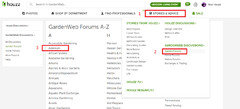
    If you see the Houzz type, scroll up to stories and advice. Don't click, just hover. It will bring up a screen for GW. Select Gardening (or one of the others), then select African Violets. That will get you into GW. I usually have "All Discussions" selected.

  • 8 years ago

    Thank-you Sherry ... that helps a lot ...

  • 8 years ago
    last modified: 8 years ago

    Oddly ... this fix doesn't seem to be working .... and I'm seeing the new format on another pc now.

    I think that I'll just make a bookmark to my preferred forum format ...

  • 8 years ago

    Agis, Here is the same conversation on another thread, It works for me logged in or not.

    https://www.gardenweb.com/discussions/5031364/need-gw-links?n=14

  • 8 years ago

    Hi all, this is also happening for those of us on the ‘Adenium Forum’. None of us are happy with the change and it seems to change on random days. This is not affecting everyone, at least “not yet”. Sometimes it looks like the normal format and sometimes it changes to the crappy format. It doesn’t seem to matter what I do to try and fix it. I have always accessed gardenweb from a bookmark on my IPad...I have not changed that. I have tried your advice above and that doesn’t work either. Today I am stuck with the crappy version. Sooo frustrated.

    Bring back Gardenweb..... :(

  • 8 years ago

    Follow this to get you to your desired forum/format ...


    Scroll up to "Stories and Advice". Don't click, just hover.

    Select GARDENWEB DISCUSSIONS>, then select your desired forum.

    Once you are in the desired forum in the Gardenweb format, ... bookmark that page.


    This workaround works for me ...

  • 8 years ago

    Nope, that didn’t work for me either. No matter what I try today, I just keep being redirected to Houzz and not gardenweb.

  • 8 years ago

    Bookmark this web address ... and go from there ...


    http://forums.gardenweb.com/forums

  • 8 years ago

    Aegis1000, thanks for trying to help. Unfortunately bookmarking the web address did not work for me. It does bring me to the ”gardenweb forums A-Z page”, but as soon as I click on Adenium for the Adenium forum it redirects me back to the houzz version. :(

    it does the same thing no matter which topic I click on...eg: African violets, house plants etc.

  • 8 years ago

    Rachel have you tried clearing your web browser's cache?

  • 8 years ago

    I experienced this stupid new format for the first time yesterday. Holy poopstick it's bad dudes. Back to normal today though, on the same computer. I must have done something different.

  • 8 years ago

    Rachel ...

    Bookmark this link for the Adenium Gardenweb forum ...


    http://forums.gardenweb.com/forums/adenium

  • 8 years ago
    last modified: 8 years ago

    Now it looks like the "Search" function has gone screwy.

    No matter what I search for, I get the same (inaccurate) results !!!

    For instance, a mention of "Yellowstone" should appear in this thread, according to a search for "Yellowstone" in "African Violets" ...

  • 8 years ago

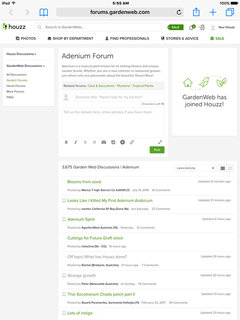
    dviolet1, I have cleared my “history and website data”....that seemed to be the precursor to all my problems. I have always cleared my website data/history regularly and have never had a problem with it before. I only have an iPad that I access the internet and gardenweb from. I also access gardenweb from a bookmark on my iPad and it has always taken me to the gardenweb site....but not anymore. Here’s a screenshot of what the layout has always looked like for me before the change. Notice, it says forums.gardenweb.com in the address bar. This is the normal view I have always had.

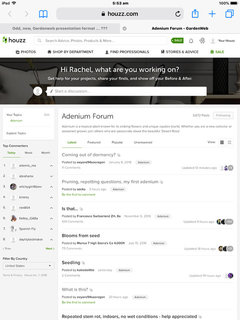
    Here’s a photo of the crappy version that I have been stuck with for days now.

    Notice, this time it says ‘houzz.com’ in the address bar.

    I had previously been able to get back to the usual format a week or so ago, when it first started happening, with a bit of a workaround, but now no matter what I do I’m stuck on the crappy version. There are others on the Adenium Forum that use iPads that are having the same problem + other problems as well. (Note - this is not happening to everyone that uses an iPad....at least Not Yet)

    aegis1000, I have tried a new bookmark as you suggested, but it is still redirecting me to Houzz every time I open it. Even if I do a separate search on the internet for gardenweb, (instead of using a bookmark) it still brings me to the houzz version. I have also tried logging out and logging back in, but no luck. :(

  • 8 years ago

    Sometimes my iPhone connects to the Houzz site instead. It usually happens to me when I use the Back button too many times and the Home link gets refreshed. Then I have to get to the forum the long way for it to connect right and it will work fine for the rest of that session.


    Other than this, I'm out of suggestions for you. :-(

    D

  • 8 years ago

    It's not so bad, I guess ... just something to get used to (or work around) ...

  • 8 years ago

    My Mac has retained the original format but the iPad starting presenting me with the crappy version per Rachel. Now, for some reason, I'm back to the original on the iPad. Can't figure it.

  • 8 years ago

    Same here. They have found the perfect solution to a non existent problem.

  • 8 years ago

    I’m still stuck with the crappy version on my iPad. Guess I will just have to get used to it now. Thanks to everyone that tried to help. :(

Sponsored
WellCraft Kitchen and Bath
Average rating: 5 out of 5 stars69 Reviews
Virginia’s Full Service Design-Build Remodeling Company