Software
Houzz Logo Print
kendrahhendra

How do you delete an ideabook?

8 years ago

I have ideabooks from years ago that I don't use. How do I delete them? I'm stumped.

Comments (33)

  • 8 years ago
    last modified: 8 years ago

    Go to the ideabook you want to delete. On the top right side of the page under "Your Houzz", it says "Email" and "...More." Click on "More," choose "Edit," and it will give you a page where you can delete the whole ideabook.

  • 8 years ago

    I keep finding these same instructions all over the site for deleting an ideabook, but it doesn't work for me because there is no "Edit" option under "More".

    Here is what I had to do:

    1. Click on the ideabook you want to delete.

    2. Click "More" in the upper right corner of the page just under "Your Houzz".

    3. Click "Settings". Then an "Edit IdeaBook" box pops up.

    4. At the bottom of the pop-up box in green, it says "Delete Ideabook". Click that link.

    5. It will ask if you are sure you want to delete this ideabook, and you can either hit "cancel" or "Delete". Hit "Delete" and voila, you're done.

  • PRO
    8 years ago

    This isn't working on idea books that were shared with me (there is no delete option). Ho do I delete or "un-share" those?

  • 7 years ago

    I have the same problem. Some ideabooks have the delete option, which works, but some don't have a delete option anywhere. I tried deleting all of the pictures from an ideabook individually - now I just have an empty ideabook - the bugger just won't go away!

  • PRO
    6 years ago

    I agree - I also have deleted all the pictures in an idea book but do not get the option anywhere to delete it. Very annoying! This should be simple and intuitive!

  • 6 years ago

    All my idea book disappeared. Has anyone else had this happen? Reluctant to save anything now as it seems pointless if it won’t be there in 6 months time.

  • 6 years ago

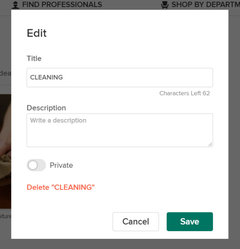
    2020: Go to the ideabook you want to delete. On the top right corner click Settings. The pop up window has the option to delete, in green, on the bottom.

  • 6 years ago

    How do I delete a photo from my idea book? Not the entire idea book.

  • 6 years ago

    Website instructions as of 6/13/20: Go into the ideabook that you want to delete. Select the "Settings" option on the left side of the page near the bottom. An "Edit" box should pop up, select the "delete (ideabook name)".

  • 6 years ago

    Thank you danishyvonne for your help- it worked for me.

  • 6 years ago

    Yes, like danishyvonne said... When you click on "Ideabook" you want to delete, two windows show up: (1) left side where it says "Dashboard" "Style Quiz" etc and (2) right side is where all your photos you saved would be (or it maybe empty if you deleted them all)


    On the left side of the screen, scroll down, then settings is there at the bottom, etc. Follow the rest of the instructions below.

  • PRO
    6 years ago

    None of these work for me. For some reason, on the ones I want to delete - I do not get the option to delete when I click on settings on the right side at top. I do get the option to delete some idea books - just not the ones I want to!! Very frustrating. Don't understand why I can delete some but not all. They are all unlocked. I do not have a "settings" on the left at bottom.

  • 5 years ago

    Thank you Stephanie, that is the one that worked for me. I ignored the left panel not thinking it was part of the ideabook page, but it had a settings link at the bottom left-most side of the screen that allowed me to delete it.

  • PRO
    5 years ago

    Having the same problem; not able to delete an empty ideabook. None of the above instructions work.

  • 5 years ago
    last modified: 5 years ago

    I finally figured it out. This has to do with sharing idea books,. You can't delete someone else's idea book that has been shared with you. How do you know it's a shared idea book? Easy, the option to DELETE doesn't show up under the idea book settings. HOWEVER, you can UN-invite the share and that will cause the idea book under your account to DISAPPEAR: Here's how: Select the idea book. To the right, look for an icon that says INVITE. Click on that and you'll see your Houzz account listed as a share-ee. Click EDIT, click REMOVE. Done!

  • PRO
    5 years ago

    OMG! How long has it been trying to sort this out and finally!! Thank you dave23571!! It didn't occur to me about the idea book being shared and by clicking on "invite" I realized the one I was trying to delete was one a client had shared with me a couple of years ago! What a dummy! So took myself off it and voila - gone!!!

    Thanks again!

  • PRO
    5 years ago

    Thank you so much dave23571!!!!

  • 5 years ago

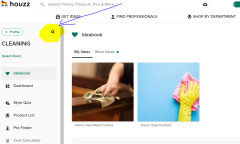
    As of 6/28/2021, Here is how to delete an Ideabook: Open the Ideabook you want to delete. On the left side of the page, above the name of your Ideabook you will see the word "profile" and, to the right of that, a settings icon (see screenshot attached). Click on the settings icon, and a box will pop up (see attached screenshot). Click on the bottom left-hand corner of the pop-up box where it says, in red letters, "Delete ___________________" (the name of your Ideabook will be next to the word delete).


  • 5 years ago

    Click on the Ideabook you wish to delete....on the left side near where it says profile, there is a little wheel. Click on the wheel, and a box pops up that says "delete whatever idea book you are in. click, confirm, gone!

  • 4 years ago
    last modified: 4 years ago

    The instructions are basically correct BUT if you have been invited to a book you can only remove yourself. If you have created the book you can delete the whole book. So if you have been contributing ideas to a book crated by somebody else, they could delete it without your permission. Or if like me, you are being emailed every time somebody contributes to a book you didn't crest and have no interest in you need to remove yourself from the book (but you can't delete it)

  • 4 years ago

    Update as of 11/7/21 click on the idea book you would like to delete on the left side of the page near the top click on the gear icon to open settings. In red just above cancel on the left click delete

  • 4 years ago

    None of the instructions above are working. There is no way to delete idea books. I think I will just delete my entire account, if I can find a way to do that. Maybe that will work and I can just start over.

  • PRO
    4 years ago

    cdoumbia, did you read dave23571 posting above? Ialso was so frustrated about not being able to delete an idea book - instructions did not work. Then dave23571 posted his solution – and it worked!! OMG, I was so happy. Maybe the issue he points out is yours as well.

    Good luck, it is frustrating! And yes – it should be easier

  • PRO
    4 years ago

    I just realized one of the ideabooks I wanted to delete was not mine as it was shared with me. I have a personal account that I do that with. The ones originated by me I'm able to delete under settings.

  • 4 years ago

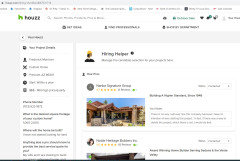
    It's April 15, 2022 as I write this and I cannot find any way to delete the following which I no longer need: https://www.houzz.com/hiring-shortlist/d647031714


    There is no "Settings" option.


    There is no "Edit" option.


    The only thing I can do is provide feedback to ask that the web page in question be deleted.

  • 4 years ago

    @Frederick Morrison The link doesn't work because it is only for you. If you take a screenshot of what page you are looking at, maybe I can help. :-)

  • 4 years ago

    Here's the page, which is still around as of April 27, 2022, despite begging Houzz to delete it on my behalf:


  • PRO
    4 years ago

    I figured it out. The above solution works if you created the ideabook. However, if the ideabook has been shared with you from another user you have to take different steps.

    1. Click on the "Invite" button

    2. Look at the bottom of the diaolog box and there is a sentence that says "Currently shared with ****. edit"

    3. click on "edit"

    4. This will show each shared user with a selection box next to it. Go to your name select "remove user"

    5. click save settings

  • 3 years ago

    Elisha above has the answer. Open the ideabook, then look for the gear icon in upper left.

  • PRO
    3 years ago

    Found it!! For shared or invited boards:

    Click on the idea book, then click on your profile picture on the top left. On the pop up box at the bottom click "Edit", then under your name change the settings to "Remove User", the save.

  • 2 months ago
    last modified: 2 months ago

    Open the Idea book you want to delete. On the upper LEFT side of the page is the gear icon. Left click and 'Delete 'Idea Book Name' ' pops up in red.

  • PRO
    2 months ago

    Yes, that seems to work, for now. Most websites are updated and changed continually, so what works now may not work next week! I always find it challenging when I want to adjust something on a website, and then find the step-by-step instructions, try to do everything they suggest, but there's no icon labeled "edit," "more," "delete," or whatever. Oh well, such is technology!