Software
Houzz Logo Print
webuser_710621259

Smart Home, wireless vs hardwired

5 years ago

We're in the planning stages of our forever home. Tech-wise, we are early adapters, so in our current home (150 years old, with thick brick walls, so it's a challenge) we're already using a lot of smart home devices/technology. For the new build, I want to get my systems researched and planned as much in advance as I can, and in searching the discussions here on Houzz and elsewhere, I'm seeing a lot of advice to run low voltage wiring throughout.

In our current house, everything is wireless. I'm at a loss to understand why I would want to run so much low voltage wiring but am open to learning the pros/cons since I have this one-time opportunity to get it right in a new build.

For reference, at our current house we are using:

Sonos speakers (7 throughout house)

Ring doorbell (this one has a battery which I hate, and one device I would definitely consider replacing with a hardwired version)

Hue lightbulbs & hub (hub is plugged in via ethernet)

WeMo electrical plugs (will want to replace these with smart receptacles in new home)

Nest CO2 and smoke alarm (battery)

eero WiFi extenders

Wyze indoor and outdoor cameras (love this company and their products)

EcoNet thermostat (terrible app, terrible interface but we had no choice)

We use Alexa and Siri for voice commands (we're an all Apple/Mac household, so moving towards using HomeKit and Siri would be nice).

I'm curious as to everyone's thoughts on wired vs. wireless, and especially any of you who are Apple users and using Siri/HomeKit, which sadly still lags behind Alexa in terms of compatible devices...


Comments (16)

  • 5 years ago

    I would think wireless is generally more future-proof. Wired may seem to be more reliable, but with future advances may quickly become obsolete or irrelevant. For example, in early 00's people wired homes with LAN, but now that's pretty much useless in most cases (who wants to try and connect an iPad to an ethernet jack?).

    Pisces House thanked spec
  • 5 years ago
    last modified: 5 years ago

    We wired for surround sound/ceiling speakers using sonos amps, so wired isn't completely obsolete. I didn't want outlets all over the place just for the speakers, and I wanted them hidden.

    We also wired ethernet to our office and to our theater room, because it's better/more reliable than wireless and for those operations (work and streaming movies) we want the best connections. Sonos amps also require direct connections using ethernet cables.

    So, while wireless may be the wave of the future, completely ignoring wired connections makes your system less versatile.

    ETA: we have 8 ceiling speakers powered by 3 sonos amps (6 in our kitchen/living and 2 in our basement). All 3 amps will reside in the utility room in the basement, with the ceiling speakers directly connected there.

    Pisces House thanked anj_p
  • 5 years ago

    FWIW, we just finished a complete gut renovation of an older home, and my biggest regret is not running coax and cable to all the rooms while we had the walls open. Turns out that our mesh network doesn't quite cover the home as we would have thought and one of my kids wants to play video games over a wired connection. I, like you, thought that wireless was all we would need, but it would have been so much better to leave ourself the option of having the wires if we wanted. Now, it would be an expensive headache to hardwire.

    Pisces House thanked K L
  • 5 years ago

    We ran Cat6 to places we expected to want speed (office, home theater, and a central location for an IT closet). For something you have a lot of, like lightbulbs, I would make sure you're connecting them on their own network to their own hub, rather than having 50 wifi devices - but it sounds like that's the path you're on anyway. Otherwise, our approach has been to run most things wirelessly, since hardwiring everything was going to mean a lot more complexity.

    Pisces House thanked amodernmountainhome
  • 5 years ago

    @K L I didn't even consider gaming! LOL. Well, hopefully that will discourage my toddler from getting too into it!

  • 5 years ago

    We hardwired to every room that might have a need for a better connection. We all have wired PCs and wireless devices. TV wired for any streaming. Even my blinds will be wired to power and automation. I don't want to have to change any batteries in things that will require ladders to reach and I've spent enough years raising/lowering blinds as the sun moves over the house. In this house automation will do that for me now!!

    Pisces House thanked chispa
  • 5 years ago

    WiFi seems the way most people will go. Direct wire connections guarantee speed and security. Utilities can change with time and local contract. Our area just got fiber optic cable, so I soon will be pulling out the coax and installing Cat6 cable from the new router to the TV's. When finishing the basement, I ran smurf tube from the outside utilities to important locations within the house and pulled in a length of parachute cord in each to make such a cable pull easier.

    https://www.menards.com/main/electrical/conduit-conduit-fittings-raceways/conduit/ent-conduit/ent12005-upc/p-1444444983535-c-6423.htm?tid=3640055487637756799&ipos=2

    Pisces House thanked HU-867564120
  • 5 years ago

    Wireless is great... except when it isn't. My 20 year-old house has Cat5 cable running to every room. We use a lot of wireless/smart-home technology but not everything works flawlessly or at the speed I would like; that's when access to a wired connection has prevented me from pulling out my hair. While I expect wireless will ultimately be reliable enough that we won't need hardwired devices, that future is still not here. Give yourself an insurance policy and put in some wiring.

    Pisces House thanked kudzu9
  • 5 years ago

    A simple solution that worked for me was simply to have my mesh networking all wired in. I have three floors with a stable wired connection to each router on each floor. These power my 60+ wireless devices flawlessly.

    Pisces House thanked dfletch72
  • 5 years ago

    For your children’s sake, research the health hazards of wireless (you can’t use the big search platform if you want the truth).

    And don’t believe the lies that it is harmless. Look at brain cancer statistics; a cancer that didn’t exist 100 years ago is common now. There is plenty of good science demonstrating the hazards of wifi, and LEDs also.

  • 5 years ago

    We have more wires than needed and some in completely stupid not asked for spots. I’m glad our cameras are wired as they are a pain to reach.

  • 5 years ago

    ulisdone- Please don't start in with this type of scientifically undocumented stuff. The vast majority of reliable, peer-reviewed studies show no correlation between health and wireless radiation. There has been an increase in reported brain tumors, particularly benign ones, but that could be caused by many things (including better diagnostic techniques); correlation is not causation. Maybe some day there will be evidence that wireless is not harmless, but that hasn't happened yet. In the meantime, I'm not moving to some frontier outpost in the Yukon to get away from something that is inescapable almost everywhere.

  • 5 years ago

    https://www.sciencedirect.com/science/article/pii/S0013935118300355

    Some science.

    It is primarily one’s voltage gated calcium channels that are damaged. I think it is best that people know the truth; and that children are most vulnerable. Why not hard wire your house if you can?

    And if you have wifi, turn it off when you sleep.

  • PRO
    5 years ago

    CURRENT PROJECTS

    • Retired couple (retired electrical contractor) 100% hardwired both security w cameras & network
    • Tech couple w teens (chip design mgr) wireless security, 100% network no cameras + 7 extra conduit runs
    • Tech couple under 30 (design & finance) hardwired security, 9 camera runs, full network w several repeater points


    SECURITY NOTES

    At the point we will remove security prewire from our proposal templates as the big wireless providers have installed in 3 of last 4 completions, and 1 of 2 in process.


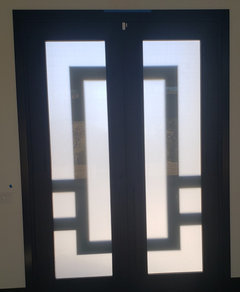
    Each of the wireless installs required visible to the eye white sensors on all exterior doors which some might find surprising and tacky in custom homes


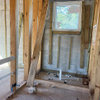
    Typical wireless contact install.


    The lower photo is an 84" x 120" entry pair for scale.


    What bothered me most is the salesperson told the client they would use the prewired contacts and prewire to control pads he had just installed and paid for. An hour later the install mgr made flimsy excuses why they couldn't (but was able to use in a prior build). Client paid $1600 to the wireless company.


    NETWORK

    Home uses a hardwire camera system hardwired network w repeaters.


    All clients are set up to work from home using their cell phones, so high quality wireless network is also critical.


    MISC

    "Smart" aftermarket doorbells w cameras don't connect the same as typical door bell buttons. Typically the units need an internet provider installed, up and running and the transformers in the doorbell system need to be modified, replaced, etc. Cryptic translated install instructions. Similar with some smart thermostats.


  • 5 years ago

    Everything fixed should be wired if possible. Stuff that moves around (phones, laptops) s/b wireless. If you go in any higher end home this is what you will see. It's much more reliable and more secure.

    You can always add a wireless device, you cannot add a wired device without a wire in place.

    The number of connected devices in homes is growing quickly (10 years ago we had maybe 10, our current house has 188).

    Radio frequencies (wireless) have limited bandwidth and more than a few homeowners are, much to their chagrin, discovering those limits. And sometimes that discovery comes compliments of a neighbor with 90 wireless devices moving in to the home that previously had 10.