Software
Houzz Logo Print
aok27502

Goodreads user? I have a question.

last year

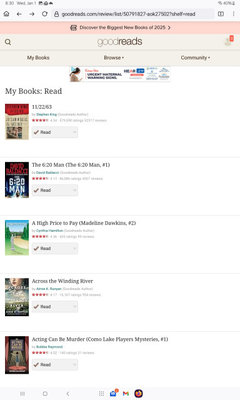
I've been using Goodreads for years, mostly to track what I've read. A year or two (or three?)ago, something changed. It used to be that you could click on "my books -read" and get a sortable list. I sometimes want to sort by author or date read. Now it just loads five at a time, alphabetical by title, with no sorting.
A few weeks ago, I stumbled on the page of old, with sorting. But I don't know how I got there, and I can't find it again.
If this sounds familiar, do you know how to get to it?

Comments (17)

  • last year

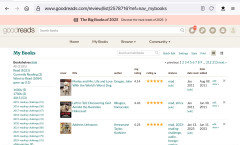
    hmmm, I am a goodreads user and have been for maybe 5 plus years. When I log in, across the top MY BOOKS---- then it comes with these headers--


    title author avg rating rating vshelves date read date added


    It looks like it might then give about 20 per page, and you can click ( for sorting)

    all of the headers, except for the shelves.


    Does that help?

    aok27502 thanked salonva
  • last year

    Salonva, that is exactly what I'm trying to get to. That's how it used to look, columns that were sortable. I took a screen shot of how it displays now. It doesn't show, but there is a box at the bottom that says load more. At 5 books per page, it will take forever to load 316 books! There must be a setting or something to change it.


  • last year

    Well, mystery solved. I just logged in on my old tablet, which uses Chrome, and *poof*, the list I'm looking for. My current tablet uses Firefox, and it doesn't work. Simple enough to work around!

  • last year

    yay! ( I am on a chromebook).

    aok27502 thanked salonva
  • last year

    Is this what you want your Goodreads to look like? This is what my Goodreads looks like using Firefox (I normally use Safari and it looks the same in both).


    aok27502 thanked 4kids4us
  • last year

    Yes, that's what I want to see. I don't understand why my Firefox looks different. But for the occasional times I want to sort, I can use Chrome.

  • last year
    last modified: last year

    Looks like the Firefox version uses the mobile view vs. the full view. Try the Firefox settings and see if you can change it. I think it is under responsive design mode and to see non-mobile view you need to turn it off.

    Note: this will turn it off for all websites too, so may be something you just change while on Goodreads and then change back.

    aok27502 thanked lyfia
  • last year

    Lyfia, I'm afraid of what else I would screw up by changing settings. My DH would roll his eyes.😆 I think I'll use Chrome for the occasional times I want to see my lists.

  • last year

    You could just download the Goodreads app too and use that instead of the browser.

    aok27502 thanked lyfia
  • last year

    🤔

  • last year

    *gasp* that worked!!! Thank you!

  • last year

    Not a Goodreads user, but just had to say -- everyone here is so help with so many topics! It's wonderful.

    aok27502 thanked jsk
  • last year

    @4kids4us - I can totally understand the frustration with it defaulting to a mobile view - however this is Firefox that is doing that as the Firefox browser default is to go to the mobile view for tablets and phones and not related to Goodreads alone.


    I actually like the app and I generally avoid downloading apps as there is one for everything nowadays and I'm more selective in that area and tend to use what is available via browser.

    aok27502 thanked lyfia
  • last year

    I tried logging out and back in, and it's still set to Desktop mode. Maybe it will stay, but if it doesn't, I know how to fix it.😁

  • last year

    @aok27502 I'm glad that worked for you.


    @lyfia I only use an IPad for all my internet surfing and mostly use Safari for browsing but occasionally use Chrome. In trying to help aok figure this out, I downloaded Firefox and opened Goodreads. At least for me, Firefox did not default to mobile view. I havent changed anything in my settings - I never use Firefox and just downloaded for the first time to try to problem solve for her. For me, it is not defaulting to mobile view tho. Maybe it depends on the version?

    aok27502 thanked 4kids4us
  • last year

    Wow, 4kids4us, thank you. That's really going above and beyond for a random stranger. I rea.ly appreciate it!