Software
Houzz Logo Print
donnas_gw

Windows Task Manager running/not responding

11 years ago
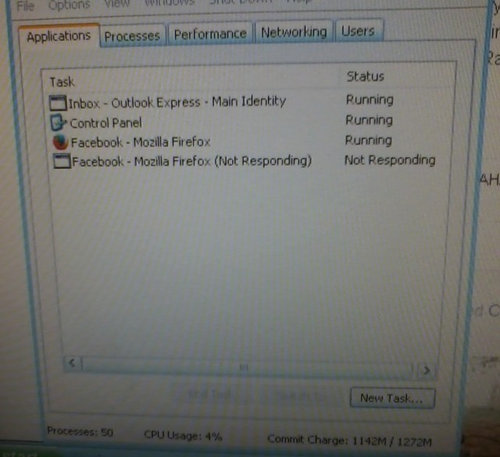
I have Firefox v. 32.0.3. I started keeping Windows Task Manager open so I can view my apps. I can see them (apps) constantly going from "running" to "not responding". Then there's the "unresponsive script" warnings that will pop up. I am wondering if they are the problem? Why does Task Manager show 2 of the same apps running at the same time, both with the Firefox logo beside each app? Other times when it shows 2 of the same app running, one will have the Firefox logo, and the 2nd (same app) will have a white square beside it, as in the picture below. I am also still using Windows XP...don't have the money for an upgrade right now. Am getting ready to take a sledge hammer to this computer because it is driving me nuts...lol.

Comments (15)

  • 11 years ago

    This image would suggest there are two Firefox windows open, one working and one not? When this shows, is the second browser window frozen?

    With an old PC, perhaps with limited horsepower, it might be less demanding to open additional views as tabs rather than windows. But I'm not sure of that.

    What happens if you use a different browser?

    If what you're using when you're doing what your doing seems to be functioning ok, I'd ignore the task manager.

  • 11 years ago

    The only other browser I have is IE, and that is too slow. IE is the reason I switched to Firefox. The 2nd of the same app doesn't always show in Windows Task Manager.....it comes and goes. Right now, there are only 2 apps listed on my Task manager: 1) Outlook Express and 2)Windows Task Manager running/not responding, which is the subject of my post. Both are running, and I do have Outlook Express open. But if I stay on here for a little bit, a 2nd app of this very post may show up up in Windows Task manager. It happens mostly on Facebook, so I'm no sure about GardenWeb. I know there are lots of times when a window pops up saying that Firefox is already running, and I need to close that one before opening a new one (not sure if that is exactly how it is worded). I never can see the one that is supposedly still running to shut it down. I have been sitting here typing this reply for at least 10 minutes, and I do not see a 2nd app opening. Seems to be just Facebook.

  • 11 years ago

    Sounds like maybe Facebook is doing something? Maybe it's a Facebook pop-up of some kind?

    If your PC is operating ok and isn't freezing, and you know that to open another browser "window" you shouldn't start Firefox a second time but rather go to File, New Window (or Cntl-N) or F, New Tab (or Ctl-T), I'd ask - why are you opening the Task Manager, and why do you care what it shows?

    If you want to try a different browser, take a look at free Opera. It's easy to use and has a light footprint.

  • 11 years ago

    Do you have the latest IE version for XP? they do make improvements, you know? faster, better.
    many folks have problems with FF, I never use it, I would uninstall all FF and if you insist you do not like IE here is a link to a nice clean, fast browser, no add on junk, and nice tools such as pop up stopper and ad blocker. Link below enjoy!

    Here is a link that might be useful: slimbrowser

  • 11 years ago

    Glad to see someone say something good about IE for a change. I have only used IE since windows 98 and it runs very fast on my computers. Currently IE 11 on windows 7 on a desktop and laptop but way back on XP it ran fine and fast. For me firefox takes longer to open and freezes when I try to use it at times but I keep it for a back up in case IE were to go down or something. I never investigated why FF does that to me since I am very happy with IE. I find it strange how FF works better for most people and IE works better for me. I don't care for chrome either and on my phone use dolphin browser instead of chrome as I like it better. Mary

  • 11 years ago

    I opened task manager one day because I was having difficulty shutting down one of the apps, and you can shut them down from there. That is when I noticed 2 of the same apps running at the same time, and going from "running" to "not responding". Now when my computer starts getting slow, I open it back up to see that it is doing the exact same thing....going back and forth from running to not responding.

    Aputernut, I have IE 8. From what I've read, Windows XP does not support IE 9. Whether that is true or not, I don't know, it's just what I have read doing a search.

  • 11 years ago

    I would delete then re-install Firefox myself. Simple to do and possibly an easy fix.

    Aputernut, you linked to Slimbrowser back along and as you have been here a while I trusted your judgement and installed it.

    To be honest I have not given it serious attention but I do get the impression it runs on the back of IE. Any comments on that at all? Seems to work well enough but basically I am a Firefox and Opera fan.

  • 11 years ago

    I have 4 PC's on my home network and I use only IE as windows operating systems intend for us to use it, and I have had no problems. I help folks with PC problems, and looked for other browsers, for folks who have problems with all of the others and this one slimbrowser fit the bill, I have it on my W8 along with IE, the PC I am writing this on.
    I must admit, now and then I open it, and I like it, but I am so used to IE so I use it everyday. It stands alone has nothing to do with IE as far as I can see. FF is often a big problem and conduit often comes along with it and it's nasty. I have heard horror stories about all of them, except for good ole IE. So you decide as I did many years ago.

  • 11 years ago

    What does it mean when I get the "plug-in container.exe has encounter a problem and needs to close" message? That comes up alot also.

  • 11 years ago

    You would probably eliminate the problem, by going down to the version of firefox, you had before upgrading. Your system is older, and some of the requirements for the newer version of firefox, you just may not have on that computer. :-))

    I also run XP, and I use firefox. I am running version 9.0 and it works perfectly. I could go a couple updates higher, but, when something is working great, best not to mess with it, especially on an older system.

    Also, notice above recommendations to update your IE. You should be aware, that some XP computers will not run IE8 very well, and some will. Most will run ie7 without any problems.

    Please check all system requirements when you decide to update or download something on a system that is using XP and enjoy using that computer for a long time yet. Good Luck to you.

  • 11 years ago

    Plugin Container is a separate memory space that FF uses to run audio/video material via Adobe Flash, Quicktime, Microsoft Silverlight and such. Purpose of it is to keep the FF main program isolated from the plugin program so FF doesn't have to close if the plugin crashes.

    What is Plugin Container?

  • 11 years ago

    cat_ky, what are you doing about security updates since Microsoft stopped sending them to Windows XP this past spring? When that little "security updates are ready to be installed on your computer" icon comes up, do you go ahead and install them even though Microsoft has nothing to do with Windows XP anymore?

  • 11 years ago

    DonnaS, why do you think notifications are still appearing?? Availability of new updates is what triggers the notification. MS is no longer issuing updates, so there aren't any more notifications. I'm running XP on the computer from which I'm posting this reply, it's working nicely.

    Cat_KY, you are running Firefox 9? The latest Firefox works perfectly fine on XP. I'm running it, version 32.0.3. You should update Firefox for as long as it's possible to do so because there are security fixes involved for Firefox and possibly for any extensions you may have.

  • 11 years ago

    I guess I'm not as smart as some of you like dadoes. Sorry I even posted. I'm out of here!!

  • 11 years ago

    DonnaS, you are doing fine. You can turn update notices off. Most here know, that I have never done any windows updates, on any of my computers, since windows 95. My computers are very secure. I go places where most people would never go and have never had a virus on any computers. I have never recommended that others follow what I do, but, it works very well for me.

    Dadoes, firefox 9.0 works just fine for me, and has for a long time, I am not about to change it.

Sponsored