Software
Houzz Logo Print
friedel26

What to do with old wired intercom system

9 years ago
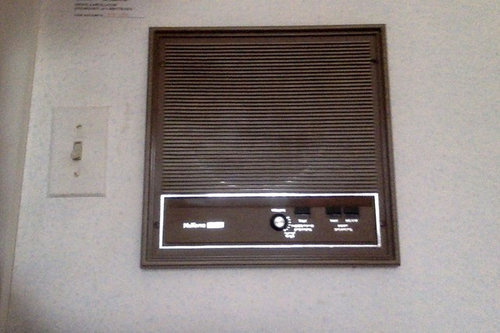
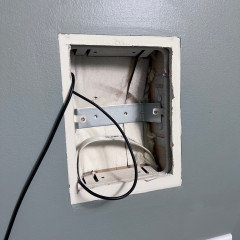
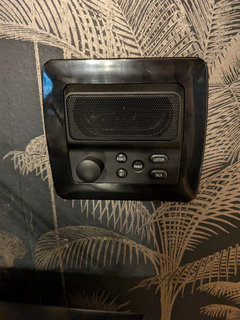
I know this subject has come up before, but I need a bit more advice on this. Our 30 year old mid-century modern house has an old Nu-Tone intercom (with radio) system. The units look pretty dated and do not function well. I know there are more modern wireless systems for music throughout the house, etc. But we still have these ugly units in the walls.


Rather than paying someone to take these out and patch up walls (including many with wallpaper), would it not make more sense to get intercom replacements that will go into the existing holes? I think from a labor standpoint it might even be cheaper, since little or no wall repair would be needed? I would very much appreciate any advice I can get on this.

Comments (213)

  • 4 years ago

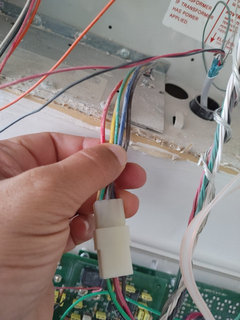
    Use craft scissors and carefully go between each wire leaving insulation on each one. I chose to use the two outside conductors, so the Blue side and the far grey. Use these for your two wire connecitons.

  • 4 years ago

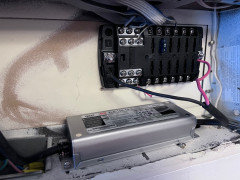
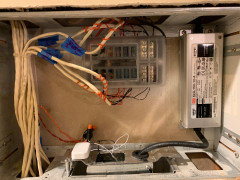
    Additionally I used a Fuse Block there at the Master Station. Use a higher gauge wire from your powersupply and then into the fuse block. Each station I connected to a separate FUSED terminal so that each station/dot would then be separately fused from each other.

  • 4 years ago

    Thanks Justin! Will do so and thank you for the suggestion of a separate fused terminal!

  • 4 years ago

    What size fuse do you reccomend for echo show?

  • 4 years ago

    @HU-801043605 I used a 15 and it worked for the Ring doorbell and the Echo Dots. On a separate note, thank you @Justin Jordan and @Ken Scott for all your help. I’ve got the power supply and fused box installed, just waiting for the custom plates!

  • 4 years ago

    Forgot to attached the photo.

  • 4 years ago

    Maybe a stupid question, but what is the functionality of having echo dots in every room? what cam they do for me?

  • 4 years ago

    this is a forum about replacing both a intercom and whole house audio platform that were installed in homes. yes there are a bunch of other products around that fill this funtionality, but they dont fill the holes in the walls of your house. this solution we talk about here is for replacing the existing platform with a similar platform and functionality while maintaining the look.

  • 4 years ago

    for me: it's whole house audio, being able to add things to lists from any room ( e.g.: "add primer to the hoe depot list") and

    occasionally as an intercom ( e.g.: "lunch is ready" )

  • 4 years ago

    Justin-thanks for that i do have such a system but wondering is it worth the expense and trouble to replace vs just leaving as it vs taking out and fixing the drywall

  • 4 years ago

    Thanks cj11363!

  • 4 years ago

    I have to echo the sentiment above. It's a huge convenience factor to ask a question from any room in the house. Or add to a to do list. Or ask for localized music. Or play something over a group, or all speakers. Vacuuming is never boring any more.

    As to the cost, if you buy almost everything on a promo or second hand, it's all cheaper than the original system. You might even find it cheaper than drywalling, mudding and painting over the intercom holes.

  • 4 years ago

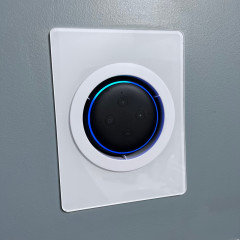
    As @Justin Jordan eloquently described, primarily we are fulfilling the functions that the old system had i.e. Music and Intercom throughout the house, with a system that utilizes the same wall mounts negating need for drywall repair and paint.

    However the Alexa system (or google if that is your preference) gives you so much more!

    I had 'smart' appliances in every room - the ability to turn on/off or dim a light - or adjust your ceiling fan speed - from a verbal command using Alexa is really nice.

    My wife is a big fan of playing 'sleep music' with a time duration rider when she goes to bed

    e.g. Alexa, play Sleep Music for 20 minutes and it auto shuts off after she falls asleep

    If you are new to Smart devices, the very simplest way to get started is just to install Smart Bulbs - most integrate with Alexa and you get immediate voice control to dim or even change colour just by your spoken command.

    I have tried a few brands and personally like TP-Link/Kasa.

    For ceiling fixtures I would replace the actual wall switch - for table lamps, I use smart bulbs

  • 4 years ago
    last modified: 4 years ago

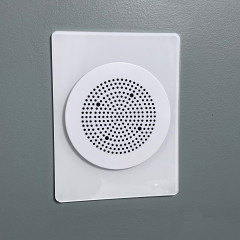
    Thought I would share a couple more pictures. there was two locations where we used the station with separate wired speakers. i used these amp products with the dot in those locations- notncheap but great quality and aound.


  • 4 years ago

    Happy holidays! Finally got all the stations done, now just waiting for the custom plate for the main and that would be another month or so cos MB is not taking any new orders for the holidays until mid Jan.

  • 4 years ago

    Very Nice @Helmie Ashiblie - the white contrast looks great against your paint, too!


  • 4 years ago

    Thanks Ken! Wife approves it so all is good on my end!

  • 4 years ago

    Hey everyone, I've been planning this exact project for some weeks now but wanted to ask if you guys have found Amazon's drop in feature on the Shows to be a bit clunky especially if you are at the device going through the menu's? Wondering if there's anything you guys have found to make it easier and quicker to intercom between the rooms and the master.

  • 4 years ago

    The drop-in feature works find for me and my wife especially since it's hands free and Alex picks up on our voice from a decent distance away. Good example.......my wife came out of the laundry room that is about 15-17 feet away from the nearest Echo and while carrying the laundry basket she connects with one of our girls and asked her to come down and grab her stuff. So yeah, we're okay with it.

  • 4 years ago

    Ordered my custom wall plates (8) from OCwoodcreations, but the inside cut orientation is wrong :’( hopefully i can get these replaced quickly so i can finally get all these devices mounted!

  • 4 years ago
    last modified: 4 years ago

    Here's another tip that you can utilize with your new Echo System - I just added this feature today!

    Of course you can already play music through your echo devices directly and the quality is decent enough for a single tiny speaker.

    But for improved quality and volume, follow this process:

    Get a Bluetooth to RCA/Audio Bluetooth receiver (e.g. https://www.amazon.com/dp/B08JXCWX6C/ref=sspa_dk_detail_2 ) and connect it to your AVR (or old school Audio-only Receiver-Amp) - pair your closest Echo Device to the new Bluetooth Receiver (all the Echo devices have built-in Bluetooth transmitter) and then connect your Bluetooth Receiver to an unused RCA Input (AUX or CD if not being utilized).

    Then play your music through your HiFi system!

    I took it a step further by connecting my Stereo Receiver AC Power Cord via a switched smart plug, so I can leave my receiver with the power switch on and enable the power to it via Alexa.

    Now I have a few spoken commands to play music through my HiFi system:

    Alexa Turn on Amp

    Alexa Turn on Bluetooth (I don't leave it paired constantly as the audio from the Echo device itself is muted when the pairing is on)

    Alexa Play xxxxx

    (you could actually make a smart routine in Alexa to do all of this with a single command - or even a subset where the amp and bluetooth turn on together with a single spoken command)

    Whether you extend your system per this suggestion, or just utilize the Echo itself to play, there is a fair selection of Music available 'free' through Amazon music or you can subscribe to 'unlimited' for much greater selection.

    Or simply pick a station of your choice to play through iheart radio (which works directly on Amazon devices) - you can look up iheart radio to see what is available, even regionally where you live.

    e.g. Alexa, play 94.7 on iheart radio - or Alexa, play soft rock on iheart radio.

    If you went with Google, I expect you can do similarly.

  • 4 years ago

    Hello everyone. I'm wanting to replace my NuTone Intercom CD Player with Google Hub Max (24v) and Nest Mini Speakers (14v). Is my thinking correct that I should use a junction block to split the main wires, to power two transformers (one 24v and one 14v)?

  • 4 years ago

    @Frank DiBenedetto I understand your preference to use the Google devices, but, from my perspective, they do not lend themselves well to this application - the Hub Max is not really conducive with a Wall Mount, certainly as far as retaining the speaker quality goes. Then the 14V distribution for the Mini's is not straight forward in regard finding a suitable power supply. The best solution there might be to get a variable output power supply that you can dial in to the minis' 14.1V.

    I'm not sure I really understand your question however - not to nit-pick but the requirement would be power supplies, not transformers and not sure to what you are referring by 'main wires' - do you mean the AC supply (that previously fed the old Nutone transformer)? If so, you can common both supplies to that same source, no junction block would be required to isolate them (nor would it anyway, since you would still have to jumper to feed both). That is no different than, for example, a dual outlet AC Wall Outlet, where independent devices can be plugged into the same outlet, while being fed by the same source wires to the dual outlet.

    If you mean the now-repurposed Nutone wiring for use as the low voltage distribution, then of course that would require separate distribution pairs for the 24V and 14V, although if your intent is to locate the Max at the old master location, this would likely not be an issue, as you will only be distributing 14V


  • 4 years ago

    Hi Ken,


    Want to thank you for posting your youtube videos and suggestions on this thread for replacing Nutone sytem with Amazon Echos. It inspired me to go similar route and along the way I came up with a few ideas that fit my needs better.


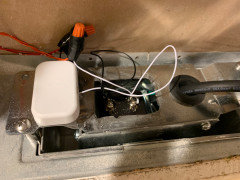
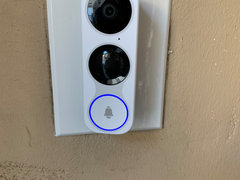
    My Nutone intercom model is IMA-4406 and during one of PG&E outages, the doorbell stopped working. I set out to replace doorbell, door chime, 6 intercoms and master intercom control unit. This project took me two months to complete.

    Looking back I must admit that there was one feature Nutone did and I fell in love with and that was their Westminster door chime. I went the extra mile to replicate the same Westminster door chime.


    I had ordered Broan-NuTone LA305WL Doorbell Kit, Traditional Musical Wired Door Chime. But in the end I ended with using Aeotec Siren 6 and VistaCam 1200 HD Wi-Fi Doorbell since I already have a complete Vera Plus setup and have been using for years. With Aeotec Siren 6, I could program the Westminster door chime and also use it a security Siren.


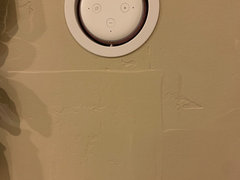
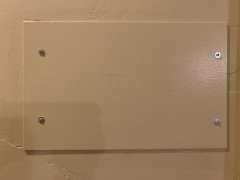
    Here are the pictures of my final setup


    Mean Well XLG-150-12-A Power Supply LED Driver 100-305Vac 150W 12.5A 12V Output


    1/8" x 10" x 16" Aluminum Plate, .125", 5052 Aluminum

    https://www.ebay.com/itm/224023298690?ssPageName=STRK%3AMEBIDX%3AIT&_trksid=p2060353.m2749.l2649


    WUPP 12 Fuse Block

    https://www.amazon.com/gp/product/B07GBST5NX


    VistaCam 1200 HD Wi-Fi Doorbell (z-wave)

    http://getvera.com/products/vistacam-1200


    Aeotec Siren 6 (z-wave)

    https://aeotec.com/z-wave-siren/index.html


    16VAC/30VA Transformer Compatible with All Video Door Bells

    https://www.homedepot.com/p/Hampton-Bay-16VAC-30VA-Transformer-Compatible-with-All-Video-Door-Bells-HB-130-03/309792479


    Kyle Door Speaker Wall Box Cover 6.4" + Doorbell Hole 4.5" Screws

    https://www.kyleswitchplates.com/door-speaker-wall-box-cover-6-doorbell-hole-4-5-screws/


    Wago 221-412 2-Conductor and 221-413 3-Conductors Connectors


    Flush Mount 3 for Amazon Echo Dot 3rd Generation

    https://mountgenie.com/products/the-flush-mount-3-for-amazon-echo-dot-3rd-generation


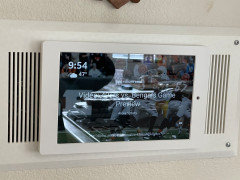
    Amazon Echo Show 15

    https://www.amazon.com/introducing-echo-show-15-smart-display-with-alexa/dp/B08MQLDFF6


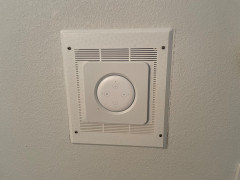
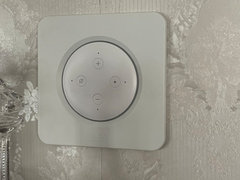
    As for mounting Echo Dot on top of existing intercoms, I was about to order same acrylic wall plate as Ken from Etsy, but I realized that metal bracket didn’t seem to fit from flush mount from MountGenie. I then decided to patch up the drywall and learn the process to do that properly. The positive side of doing this the long way is that I finally got Kelly More to do a custom match of my interior house paint and we finally got an exact match !

    https://www.etsy.com/listing/608708481/nest-wall-plate-rectangular-nest-2-nest


    Initially I was planning to hang my Amazon Echo Show 15 on the aluminum plate. But I ended up using it somewhat frequently on the kitchen table that I decided to leave the aluminum plate as is.

  • 4 years ago

    @Charles Yin Nice job and nicely documented! Congrats and enjoy!

  • 4 years ago

    Is there a way you could repost the video i cant seem to find it

    Thanks!

  • 4 years ago

    @Rhea Zwerin not sure to whom your request was intended

    Here are my video links

    https://youtu.be/JrkmQbOvO0c

    https://youtu.be/VoU0jSvtVVQ


    If you were requesting of another member, you should include their name for attention.

  • 4 years ago

    It was for you Ken. Thank you!

  • 4 years ago

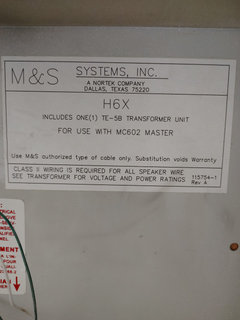
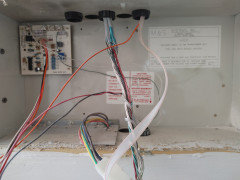
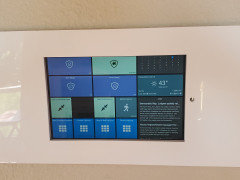
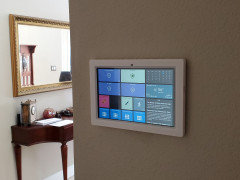
    Thank you everyone for great ideas , I am new in this chat , recently moved and have in my house working M&S 602 intercom system with 7 stations + 2 doors speaker/microphones and maser unit in a kitchen , i thought to replace that 7 stations with seven echo show 5 ( 2 gen ) , 2 door speakers replace to Ring pro wired door bells , and finally kitchen master unit replace to Echo show 15 .i am trying to avoid putting power outlets for echo show 5, 15 and ring

    I am trying to figure out how to use existing wiring from master unit as a power source for echo show 5 , 15 and ring devices , not really sure what supplies to buy for that project stan

  • 4 years ago

    Echo Show 15 uses 18V; Echo Show 5 uses 12V (same as the Dots)

    The Rings use AC Voltage from the original transformer (you may have to install one specifically recommended for RIng as they are 'picky' about the delivered voltage).

    As I've suggested previously, when you go with a wired Ring you are typically stuck with the old location of the bell push which may or not be ideal for a video doorbell. You have possibly already considered this, but a reminder if not.

  • 4 years ago

    I have a question with a slightly different twist on this conversation. Is there anyway to simply use the the existing speaker wires that go to an old M&S MC602 intercom with AM/FM by hooking directly in to a receiver or amp? My goal is to be able to play streaming music (pandora, Amazon, Apple, etc.) through the existing ceiling and wall speakers using the receiver I have or an amp I would buy (either Juke or Sonos or something similar). I don’t really care about the intercom features because we never us those. I just want to leverage the whole house speaker system already in place but play the music I want instead of just am/fm. Does anyone have ideas on this. I am not an AV person so if this is a silly question, feel free to let me know that.

  • 4 years ago
    last modified: 4 years ago

    @zandl that's not really practical for a number of reasons. First, the wires are not really adequate for an amplified speaker signal; next you would need some impedance matching to be able to use multiple speakers on a single channel output from your amplifier (and you would likely want local switching and volume control in each room); and may or not be a concern, but you would pretty much be looking at mono only at each location anyway.

  • 4 years ago

    Ken Scott, thank you for your quick reply! I really appreciate it even if it is not what I wanted to hear! :-)

  • PRO
    3 years ago

    @Ken Scott hope you've been well. I am finally getting ready to start this project and can use some advice.

    I will be installing 2 (10") Fire HD, 5 Eco dot (3rd Gen) and 2 video door bells..... Will a 12 volt wire supply suffice? Also, what else would I need for the power of the 10" fire HD and video doorbells?

    Thanks in advance


  • 3 years ago
    last modified: 3 years ago

    @All Pro Renovations 12V supply should be good - you will only need the pigtails for the Dot connections; for the Fires, you will need 12V to 5V converters - install each locally at the actual device (I imagine one is at the console and the other remotely, so send 12V to the second one and the 5V converter at its location) Often the wall mount suppliers will have direct option at purchase for the 5V converter along with the mount.

    A reminder on the Fires - you absolutely want to 'tune it up' with the Fire Toolbox at XDAForum

    https://forum.xda-developers.com/t/windows-tool-fire-toolbox-v28-9.3889604/

    For the doorbells, it depends on what you are using; Rings use AC supply so you would need a transformer specific to that. And of course you need to specifically identify which wires at the console will be going to the doorbell.

    Honestly it is just much simpler to go completely wireless (rechargeable) for the doorbells - not only is the installation easier, it also gives more flexibility to the placement of where you will mount it - often the pushbell button/intercom is not necessarily in the best location for a video bell.

    I've said before I'm NOT a Ring fan - when I moved into this new-to-me house it had a Ring and I promptly swapped it out for a Eufy (which has not only better video image, the Battery Life is MUCH better vs the Ring which I relocated purely for use as a video monitor)

  • 3 years ago

    I'm looking to replace our old M&S system and the solutions in this chat are great both for bringing our 20yo home into the smart age but as well as a more economical solution. My husband had one question that I cannot answer as I'm not techy and it may be a simple response: If we replaced the system with tablet and echo dots in the rooms with just speakers no intercom (ie living room) would we still be able to choose the speakers from the master unit and still be able to control the volumes from the individual room volume controls?

  • 3 years ago
    last modified: 3 years ago

    I'm looking to replace our old M&S system and the solutions in this chat are great both for bringing our 20yo home into the smart age but as well as a more economical solution. My husband had one question that I cannot answer as I'm not techy and it may be a simple response: If we replaced the master with a tablet and the room intercoms with echo dots, what in the rooms with just speakers no intercom (ie living room) would we still be able to choose the speakers from the master unit and still be able to control the volumes from the individual room volume controls?

  • 3 years ago

    No, the retrofit is purely to provide in wall power to the echo dots, they would not have any unique connection to the tablet. Think of it the same way as having the echo dots all plugged into outlets in those rooms

  • 3 years ago

    Thanks 😊. That makes sense. What about the rooms with just speakers though that play the music from the main system? Would they still work and would I be able to control the volume from their individual controls....as my husband is more against having to replace all the speakers in the ceiling. As long as we can still use those he would be more inclined to go this route.

  • 3 years ago

    We didn't have speakers, just speaker intercoms, but you would need to adjust the plans to account for that as most of the plans here would not support those speakers without additional configuration. Without knowing exactly how they are connected they would either need to keep the master unit in place or add an additional unit to feed those speakers (like a receiver)

  • PRO
    3 years ago

    @kenscott Hi how's it going a quick question about the power supply, does the voltage down need to be turned down on the power supply? If so does it have to manually be dialed down to 12v output, the lowest I can get it is to 20v (as read with a multi meter) or am I not understanding things here. I've fried 3 Echo dots so far, lol, because the voltage is too high.

  • 3 years ago

    Can you post a link to your Power Supply @Eclectek Solutions - it seems like you must have purchased a (variable but nominal) 24V supply instead of a 12V, per those I had linked in my posts?

  • PRO
    3 years ago

    Hey @KenScott Thanks for the response, this is one I ordered after the the 350-24 version fried a couple Echo dots.

    Mean Well LRS-200-12 Switching Power Supply, Single Output, 12V, 17A, 200W, 8.5" L x 4.5" W x 1.2" H https://a.co/d/7CD85AT

  • 3 years ago

    @Eclectek Solutions that model should definitely be a 12V supply and good for the job - I'm re-reading your last post again and think you're saying you DID initially have a 24V (the 350-24) but have now ordered the 12V model you linked to replace it?

    It's unfortunate you had initially selected a 24V supply, but not surprising that it blew out the dots. You don't really have any recourse there (although with Amazon's warranty you could probably get them replaced, even if it was your own fault :) ) Your tablet was likely saved from similar fate by the 5V converter for that device.

  • 3 years ago

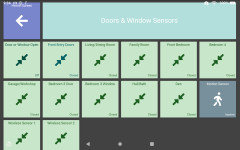
    Can anyone help with Kiosk mode? I have everything I need to replace the intercom with a new Samsung A8 and eleven Echo dot 3's. One for each room. My problem is I was going to use Fully Kiosk. I have all my apps from Ring, Thermostat, etc. on the tablet. After downloading Fully Kiosk I found it very confusing. It wants a link? and talks about raspberry pi, Lovelace, and Home Assistant. Is there easy step-by-step help available? I am completely lost.

  • 3 years ago

    Can anyone help with Kiosk mode? I have everything I need to replace the intercom with a new Samsung A8 and eleven Echo dot 3's. One for each room. My problem is I was going to use Fully Kiosk. I have all my apps from Ring, Thermostat, etc. on the tablet. After downloading Fully Kiosk I found it very confusing. It wants a link? and talks about raspberry pi, Lovelace, and Home Assistant. Is there easy step-by-step help available? I am completely lost.

  • 3 years ago

    Check out this video from Justin at SimplySmart123 - https://youtu.be/buM4W8XDVmo

    I can also heartily endorse Sharp Tools as the BEST Tools interface. Sharp Tools also has a great User forum where you can get lots of tips from their Staff and other members, and lots of threads/FAQs/Articles on how to integrate different Apps


  • 3 years ago

    Hi Ken

    Do you have a new link for the screen saver coral reef?

    The link dies not work

  • 3 years ago
    last modified: 3 years ago

    I don't know about "Coral Reef" - I used some 'smoke' videos I got from here - https://www.pexels.com/search/videos/colored%20smoke/


    Wow - this one is really cool! https://www.pexels.com/video/clouds-of-paint-underwater-7565985/

  • last year
    last modified: last year
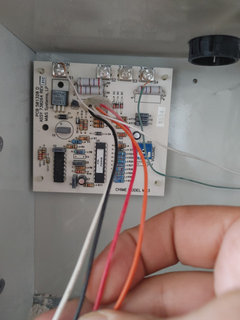
    Looking to see if there are any other options these days other than the Echo Dots and if the dots would work well here. I have master + doorbell + 13 room/patio stations + external speakers connected to master (volume control) + external speakers connected to 2 rooms. The system was changed to the Intrasonic Retro 5 years ago with some remodeling and it's been nothing but problems, I need out of it. But many rooms are wallpaper and wood paneling (one has a sprayed lacquer wall finish!) and recently finished. Although my spouse does drywall and painting for a living, this would be very difficult. Would the solution with the Dots still be the best option here?


    I curious if these in wall amps for the dot would support attached external speakers. https://www.sdilink.com/item/SPOTFD1/Amazon-Echo-Dot-in-wall-amplifier-and-control/