Software
Houzz Logo Print
editoria

Need help in connecting DVD player to TV, please!

8 years ago
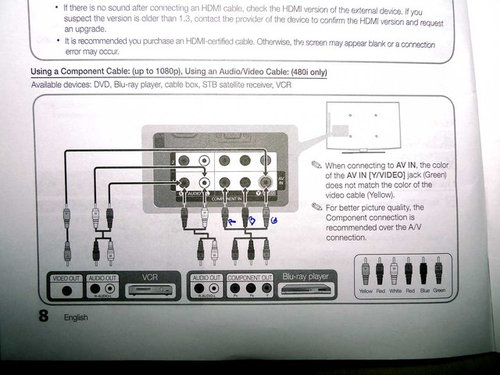
The Sony DVD player hasn't been used in a while. I bought it in 2002. I hope it still works, because it plays VHS tapes too, and I'd like to review some home movies before deciding what to do with them. The TV is more modern LCD (or LED?) Samsung. I'll post pictures of the back of each unit.


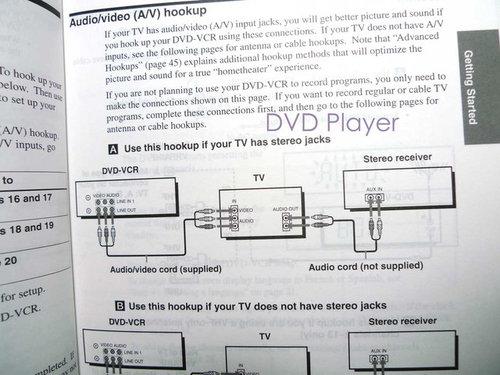
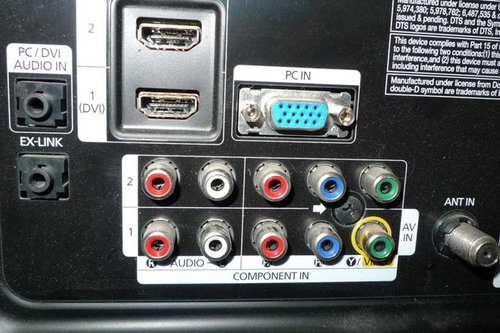
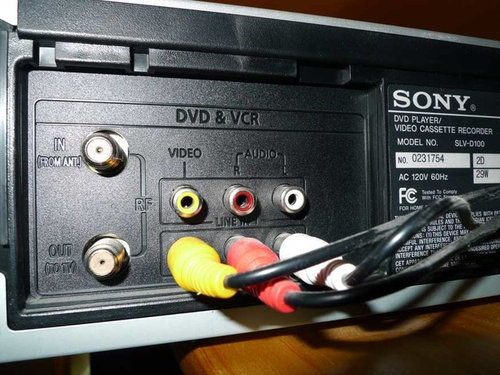
The cable has three connectors: red, white, and yellow. Does this sound like an Audio/Video Cable? I'd like to view the best resolution, and in order to do that I'll need a Component Cable, according to the TV manual. The illustration says the Component Cable is red, blue, and green. I looked up component cables on Amazon, and found lots of cables in four or five colors. All very confusing! Your help is appreciated.


Instructions from TV manual:


Instructions from DVD Player manual:


Back of TV:


Back of DVD player:


Comments (17)

  • 8 years ago

    I was afraid of that, Steve. I'll get a new one. Thanks!

  • 8 years ago

    Steve is technically right, but I doubt that your old video tapes have the quality for you to notice the difference. Remember, pre-HD TV was broadcast in composite mode. DVDs are a different issue, they are higher quality than VHS tapes, but still you might not really notice the difference. On the other hand, disc players can be very inexpensive. I would get a Blu-ray player, also probably available for under $100. When I go to the library for a movie, often the Blu-ray versions are on the shelf while the DVDs are checked out. Your TV has HDMI inputs, so make sure your new player has HDMI outputs and you get an HDMI cable.

    Alisande thanked mtvhike
  • 8 years ago

    Thanks, Mtvhike. I wasn't planning to watch a lot of VHS tapes; I just want to review them, and I can do that before I switch out the old player to a new one. I have quite a few DVDs I've never watched. I don't know if any are Blu-ray, but I'll get a Blu-ray player, assuming they can play non-Blu-ray DVDs.

    The above will be in my bedroom. My living room TV, which is fairly new, gets its reception from an outdoor antenna on a tower. I can tell you that I see a big difference in picture quality between the new and the old TV shows. Also, one (or more) of our stations broadcasts at a lower resolution all the time, and I notice the difference there too.

    Good to know about Blu-ray. I looked at some DVD players on Amazon today and was wondering about that. Now to see if my old Sony DVD/VHS player still works....

  • 8 years ago

    Is your LR TV receiving the broadcasts digitally? Most stations have discontinued analog broadcast, but some still use SD (standard definition, 640x480) videos (as do regular VHS recorders). Full HD is 1920x1080, which is also wide screen. Regular DVDs (wide screen) are 720x480.

    Alisande thanked mtvhike
  • 8 years ago

    Yes, we receive digital channels--about 14 of them. It's pretty clear (literally) which shows are in full HD--it is not kind to faces with wrinkles! Reception from the antenna fluctuates a bit depending on the conditions, but that doesn't bother me. I wish I could get PBS all the time, but as long as I have NBC to watch Jeopardy every night (plus Amazon Prime!) I can't complain. :-)

  • 8 years ago

    You could always buy a converter: https://www.amazon.com/CSRET-Composite-Converter-Upscaler-Supporting/dp/B0152E8UEG It takes the signal from the old player and converts it to a signal suitable for modern TVs. Whether that is money well-spent is an entirely different question though. As others have said, you are much better off buying a decent Bluray/DVD player; that'll cost just a little more, but it'll give you a much better picture.


    That leaves the question of what to do with your old VHS tapes. If it's just a small number, you should probably convert them to DVD. Lots of places can do that for you. Costco is one of them. But it's not particularly cheap. So, it doesn't make sense if you have a larger library of videos that you all need converted.

    Alisande thanked M
  • 8 years ago

    Hi, M. Thanks for the suggestion. I discovered that the Sony plays DVDs, but the VHS side doesn't work. That's okay, as I'd already decided to get a new DVD player. As for my VHS tapes, I converted most of them to DVD myself, using a Panasonic DVD recorder (DMR-EZ37V). I did this some years ago, and have no idea if the unit still works. But I'll try it. If not, I guess I'll take the remaining tapes to Sam's Club.

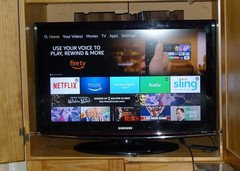
    But I'm back with more questions. Once concerns space around the TV. I just discovered that the manual recommends at least 4 inches of space on all sides. My 32" set is set in a corner armoire. It has about 4" of space on top and about the same on the bottom, but very little space on the sides--less than 1/4". The good part is that most of the back of the armoire is cut away, and because it's in a corner, not flush with a wall, there's a lot of air circulation that way. Do you think this is okay? I'll post a picture.

    The other thing is the new DVD player. I was interested in a couple of Samsungs, but I know I'd find it irritating that they have no light to indicate the power is on. Then I looked at some other models from other manufacturers, but most, including the Samsungs, have streaming capability. This seems like overkill to me because, as you can see, I've installed a Fire Stick on the TV. I also don't need 3D. I could get one of these models anyway, but I'd rather not pay for features I don't need.

    I can pay a lot less for a non-Blu-Ray DVD player. I seriously doubt any of my DVDs are Blu-Ray. Other than being able to play Blu-Ray discs, is there any advantage to getting a Blu-Ray player?

    Thank you for taking the time to read!


  • 8 years ago

    Spacing around the TV might be OK. It really depends on why the manufacturer recommends it. If its for proper ventilation, then there could be a concern. But I suspect with the rest of the gaps, you are probably OK. Modern LCD TVs don't get that horribly hot.


    It's possible that this recommendation was made because you now block the speakers. That could make it more difficult for the sound to propagate properly. And you might not get particularly good stereo. But if it doesn't bother you, then that's OK. And if it does bother you, you could always get external speakers that you mount on the walls.


    As for the BluRay, that's an entirely different story. For better or for worse, it looks as if the industry is moving away from physical media. I am not a big fan of this trend, but there is nothing I can do about it. Some of the higher-end manufacturers already stopped making both DVD and BluRay players (RIP, Oppo :-( You'll be missed). Other manufacturers are trying to survive for a little longer by bundling streaming media with their players. That's why you will be hard-pressed to find a BluRay from a mainstream brand without built-in streaming features.


    If you only ever want to play your old media, than a $20 DVD player is all you need. But if you think you'll keep occasionally buying new media (as long as that's still possible), then a BluRay player is more future proof. It's quite likely that some movies won't even come out on DVD, but might have a limited BluRay release.

    Alisande thanked M
  • 8 years ago

    Thanks, M. I doubt I'll acquire much in the way of new media. Even now, the only DVDs I buy are used--and I do it rarely. The DVDs that are most important to me, of course, are my home movies from when the kids were growing up. I don't know how I'll preserve them if/when DVDs become obsolete.

    The spacing around the TV was recommended for ventilation, so I'll assume it'll be okay..

    Here's something amusing (or weird--take your pick): Several years ago my son bought me a refurbished DVD player to use with the kitchen TV, and he mounted it underneath the butcher block. When I use it, which isn't often, I use the remote to bounce a signal off the stove. It just occurred to me to grab a flashlight and take a look at it. Yup, it's a Blu-Ray player. And (I'd forgotten this) it has internet streaming capability. I used to use that part when I had Netflix. I think my son paid around $35 for it, but the current Amazon price is $299. :-)

  • 8 years ago

    "I don't know how I'll preserve them if/when DVDs become obsolete."


    Unless the DVDs of your home movies were produced with copy protection (which shouldn't have been done but is possible), it's not too hard to "rip" them to digital files that can be stored and played on standard PC hardware. Stored on a thumb drive, a hard drive, an SD card. It's a directly comparable process as is used to rip a CD for storage and use from a PC or PC-compatible media, just using different software.

    Alisande thanked Elmer J Fudd
  • 8 years ago

    Thanks, Elmer--good to know.

    BTW, I looked at a number of options--Blu-Ray, certified reconditioned, etc.--and decided on a new Panasonic non-Blu-Ray, upscaling DVD player with Dolby sound and HDMI, for $49. Looking forward to its arrival. I figure if I ever need to play a Blu-Ray disc I can always play it in the kitchen. :-)

  • 8 years ago

    I believe for $70 you can get a Smart Blu-Ray player. It will play Blu-Rays, DVDs, CDs. I have a Samsung Smart TV, but my streaming device works better, and there is a lot of FREE stuff out there.

  • 8 years ago

    Thanks, Mike, but I bought the Panasonic I mentioned above. Happy with it so far, although I'm more likely to use the Fire Stick, and haven't used either one very much yet. Not used to having a TV in the bedroom. :-)

  • 5 years ago

    Thanks, but I posted about this over two years ago. I still have the DVD player I mentioned above, but the TV has been replaced with a smart model. The two units work well together. They don't get much use though. I'd still rather read in bed.

  • 5 years ago
    last modified: 5 years ago

    "BrandonArnold" is a well-known necrospam editor. Just flag it.

    ETA: spam deleted

    Alisande thanked sushipup1
  • 5 years ago

    Huh?

Sponsored
More Discussions