Software
Houzz Logo Print
wjane59

Why isn't my post showing up?

7 years ago
last modified: 7 years ago

I posted a question about 30 minutes ago. I saw it when it first posted, and now it's gone. Is there a moderation time period until someone has made a certain number of posts?

I think I posted it right and in the right forum, but maybe I posted it somewhere else?

The post I made is: [https://www.houzz.com/discussions/is-this-the-place-to-ask-about-cookware-enameled-cast-iron-dsvw-vd~5428800[(https://www.houzz.com/discussions/is-this-the-place-to-ask-about-cookware-enameled-cast-iron-dsvw-vd~5428800)

Comments (30)

  • 7 years ago
    last modified: 7 years ago

    [this is it[(https://www.houzz.com/discussions/help-pick-my-ceiling-fan-my-brain-is-fried-thank-you-dsvw-vd~5444482)me too. last night (and just now ) I did a new post which does not show up. I then added to an old post of mine, and I can link it but it does not show up. I am so confused with this it is like I am in my own universe. I give up but I really was seeking assistance and guidance.

  • 7 years ago
    last modified: 7 years ago

    Having the same issue. Sigh.

    Will likely have to wait until Monday for some help.

  • 7 years ago

    I’m unable to post any pictures all of a sudden. Wondering if they are having technical issues?

  • 7 years ago

    and I thought it was moi.


  • 7 years ago
    last modified: 7 years ago


    Test: photo is of various WH china (several administrations) OR do you mean including a photo when you create a brand new post?

    ============================================

    I can add photos; I cannot type in a comment on my phone (android) but works normal on my laptop.

  • 7 years ago
    last modified: 7 years ago

    Everything is working OK for me, now, but a couple of nights ago I wasn't able to use the back button. I had to scroll to the top and click the forum heading icon. It was also taking a lot longer to post pics.

    Scardy Kat, you might try posting that question in the cooking forum. Lots of helpful folk there. Use Appliances as one of your choices, too, since your question pertains to induction.

  • 7 years ago
    I just added a post and it’s nowhere to be found. Did it a second time and that one is missing too. I give up for tonight.
  • 7 years ago

    Same problem. Post written, post completed, post shows up in browser history - but not in any of the forums to which it was posted!

  • 7 years ago

    Carol -- I assume you mean you started a new thread, is that correct? I.e., you didn't post to an existing thread, you started a whole new thread.

    What forum did you post it in? One forum? Multiple forums?

    Do you remember the title?

  • 7 years ago
    last modified: 7 years ago

    Today I couldn’t post in Safari, I would type, hit Submit, and all that I typed disappeared. Switched to Chrome and it appears to be working.

  • 7 years ago
    last modified: 7 years ago

    Yes, Buehl, it was a new thread, posted to multiple forums. Yes, I know the title and can still see it in history but not in any of the forums. Other people are having the same problem with new threads.

  • 7 years ago
    last modified: 7 years ago

    I was going to see if I could find it for you, that's why I was asking.

  • 7 years ago

    Happened to me too. And replies that don't show up.

  • 7 years ago

    I posted on a thread today that if I view it on my phone it’s there, but if I view it on my tablet, it’s not there. I have no idea why.

  • 7 years ago

    Have some fun. See if you can figure it out. Thank you!


    [And why doesn't this post appear?[(https://www.houzz.com/discussions/and-why-doesnt-this-post-appear-dsvw-vd~5472221)

  • 7 years ago

    Carol - that link doesn't work.

  • 7 years ago
    last modified: 7 years ago

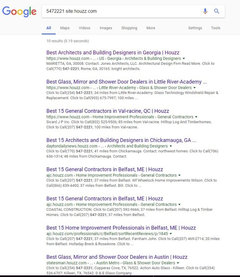
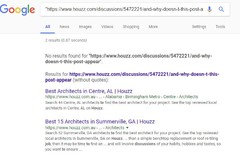
    Carol, is your link supposed to go to something about 'best architects? Clicking your link don't work for me but asking Google to find it for me locates two threads on best architects.

  • 7 years ago
    last modified: 7 years ago

    Carol -- what's interesting is that per your Houzz page, you have no "recent" activity, yet it lists one thread you commented on this past Monday.

    What it does not include, is this thread, of which you have commented on several times over the past few days!

    Based on the above and the fact that others seem to be having various problems, clearly, Houzz is having yet more issues. *sigh* I miss GardenWeb.

    FYI...I don't think the Houzz IT team does much, if any regression testing to ensure their changes did not break anything. What testing they do do does not appear to include testing on all popular browsers: Google Chrome, Mozilla Firefox, Internet Explorer, MS Edge, and Safari. Silk should probably be added to the list given the growing popularity of Amazon's devices.

    It would make their lives easier if they invested in automated testing tools. Then, they could setup a test suite to test all browsers and regression test all changes to ensure no issues were introduced. They do not appear to be making many changes in the user interface, so automated testing would work

  • 7 years ago
    last modified: 7 years ago

    Albert, I think the links you're finding are just Houzz lists of "Best" and "15 Best" -- see below -- all appear to be the same phone # with the 7-digit # in the link Carol provided.

  • 7 years ago

    This as well

  • 7 years ago

    I'd suggest trying to contact Support, but I have had zero luck with Houzz Support. They have NEVER responded to me other with their auto-responder telling me "we received your email and will be contacting you..."

    Emily Hurley (Community Manager) may or may not respond if you do a call out thread. I've had mixed luck with that approach.

  • 7 years ago
    last modified: 7 years ago

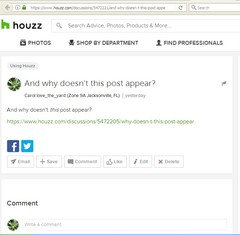
    Thanks for all of the help, everyone. Although not working for most/any of you, the link I posted above still works for me and shows the post I made. Here is a screen shot:


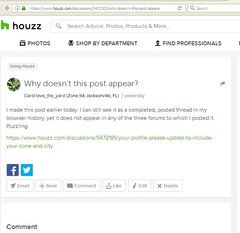
    And not only that, the link shown in that missing post (above) also still works for me and shows the post I made just before that. Here is a screen shot:


    And not only that, the link shown in the also-missing post (above) also still works for me and shows my first missing post - the one that started all of this. Here is a screen shot:


    I wonder what would happen if I replied to one of my own missing posts?

    Carol

  • PRO
    7 years ago

    Hi there, It sounds like your post may have been caught in our automatic filter for moderation. When that happens, you will still be able to see it and edit it if you would like to, but it is not public. I can see now that your post is public, however. Hope that helps!

  • 7 years ago

    Well, that's just great. My NEW post finally appears... but shows as posted THREE days ago... so it's waaay down in the thread list where it will hardly be noticed or read. What a colossal waste. This kind of stuff makes participating on Houzz such a disappointing and frustrating experience.

  • 7 years ago

    OK, so what's the solution? I'm still waiting for my new thread to show up in Home Decorating Conversations, Title: Las Vegas around Christmas time: Are we crazy?


    What's the word that triggered your filters?

  • 2 years ago

    OK - I KNOW this is old, but I'm at a loss.


    Why are the threads I'm starting today NOT posting publicly? They're posting, because I can find them on my profile, but they're not posting on the discussions pages.


    This one:


    https://www.houzz.com/discussions/6445624/our-1963-red-brick-ranch-before-after


    Then this one trying to figure out what's going on with the original (very long) post:


    https://www.houzz.com/discussions/6445643/very-frustrated-with-houzz


    Can anyone help me out here? Thanks.

  • 2 years ago

    The 6445624 red brick before and after does show up. I can't know what order you had, but it does show up.

    the other - the original- when I click the link it says page not found.

  • 2 years ago

    Thank you for taking the time to help me. I can't explain it, but the "red brick before" is now showing up exactly where it should be. I did delete my questioning comment on that thread. I'll delete the other thread I started about the issue too.


    There was definitely some type of crazy glitch before but all seems good now.


    Thanks again.