Software
Houzz Logo Print
sublimeus

Should I have my contractor do low voltage prewire or pay more?

7 years ago


Hi,

I am really having a dilemma. My contractor explained he can prewire all the low voltage but he recommends I purchase the wiring and tell him where I want it. I understand what i want for the end result but I need some consulting. If i go with him the price is 50% less but lose in confidence. What do you recommend?


Thinking:

  • 5.1 speaker for tv in Main Family Room and Coax and Cat6.
  • Cat6 and Coax for possible future television in Master Bedroom
  • Cat6 and Coax in Office
  • nothing in other rooms.
  • For Additional Dwelling unit. Cat5 and Coax in family room for TV
  • Prewire 2 doorbells with Cat6
  • Swing Frame Rack and 16-port unmanaged switch


Professionals are charging about 5k for this work

Contractor about 2.5k


Thanks,

Meghan

Comments (25)

  • 7 years ago

    Bruce that is a great idea. I have not done that.

  • 7 years ago

    Meghan, why the distinction between Cat5 and Cat6? And why not Cat7? In the big picture, the wire itself is a small part of the cost.

  • 7 years ago

    Great advice from Bruce. but know what you are getting into, the technology changes fast. I'm waiting for a friend to go to lunch and she's got the installer at her house AGAIN to make everything work right after one upgrade. IMO, go wireless as much as you can.

  • 7 years ago

    @mtvhike All good questions. I have no idea and hence why having my contractor leave it to me if I want him to install is a bit overwhelming.

  • 7 years ago
    last modified: 7 years ago

    Meghan:

    1. I'd just put in a few cat 6 cables for ceiling-mounted wireless access points (WAP) and route the cables back to the equipment room where you'll put your router. Then use wi-fi for the devices.

    2. You probably won't need an Ethernet switch. The router will probably have enough ports for the cables. If not, you can always buy one later.

    3. I don't see a reason for a rack. I'd suggest putting a plywood board on the wall of your equipment room to hang all your devices, (router, power supplies, power strips, etc.) on. Many network devices have keyhole slots on their bottoms that allow them to be hung vertically.

    4. Do not use Cat 7 cable for this application. Cat 7 cable does not use RJ45 connectors so the cables cannot not be plugged into WAPs, TVs, computers and other devices you will have. Cat 7 is really for data centers, not residences.

    5. Pre-wiring for the speakers makes sense. Remember to put power outlets wherever you intend to put the receiver or amplifier that will power the speakers. If you intend to use any powered speakers (e.g., a powered subwoofer) you will need outlets for them.

  • 7 years ago

    > 2. You probably won't need an Ethernet switch. The router will probably have enough

    > ports for the cables. If not, you can always buy one later.

    Actually, you may indeed run out of ports on the router. I've got nearly an entire 24 port switch full (and that doesn't even count the additional switch in my office).


    But you are correct, don't buy stuff you don't need, YET. It's just going to get cheaper/better as time goes on.


    > 3. I don't see a reason for a rack. I'd suggest putting a plywood board on the wall of your equipment room to hang all your devices,


    If you have a lot of equipment that is rackable, the rack certainly makes things easier. For instance, I have the Control4 controller, a couple of audio amp/matrix switches, the switch, and the router in there.


    However, if you only have a dumpy ISP-provided router, it probably doesn't rackmount anyhow that and a small switch, as Lawrence says, mounts well on the wall. You can paint the plywood backboard to make it neater in appearance. They also make a bunch of wriing devices you can screw to it to keep the cables neat.

  • 7 years ago

    Lawrence, thanks for the heads-up. I thought each generation of ethernet cable was upwardly compatible, I didn't know Cat7 doesn't use RJ45 connectors.

  • 7 years ago

    Cat 6 all around. There's no reason for Cat 5.

    I'd do 7.1 audio for the family room just to future-proof it, and 2 wires running to the rear ceiling for Dolby Atmos or DTS:X, which both add height signals to the mix.

    And, yes, do it now while the walls are open.

  • 7 years ago

    "I've got nearly an entire 24 port switch full..."

    I recommend that she use a few ceiling-mounted wireless access points (WAPs) and connect her devices to the network via wi-fi. If she does that, she will have few ethernet cables and won't need a switch.

    An alternative to WAPs is a mesh system such as the Netgear Orbi. Chief advantage: no pre-wiring would be needed because the system is itself wireless. See Small Network Builder for ranking and reviews.

  • PRO
    7 years ago

    So this response is going to be bit biased as this is one of the services we provide (we are fully licensed, bonded and insured C7-low voltage contractors). To throw in the physical wires is relatively easy and any good electrician can do so with relative ease. The hard part is the design, connecting everything, getting it all online and making it one or a series of cohesive systems that work together in your home in harmony together. If your GC says "I can do it just tell me what you want" that is a very strong indication that you SHOULD NOT move forward. The reason for this is that he likely has no ability to translate the wants, needs and features of what you want to engineer a wiring plan to provide these wants, needs and features. Additionally, a low voltage contractor worth their weight will design a wiring plan for multiple system at different price points. Thus, when you spend the extra $30k on those kitchen cabinets you want so badly and then say to your AV contractor at the end "we don't have the cash I thought we would to add all this AV gear so we have to cut back" you will still be Ok. So let's say you do move forward with your GC-- he puts in wires various places and then when the house is built you try and connect equipment to it. You find out it is not run to and from the right locations, or the gauge of wire is too thin for the speaker you want to drive, etc., etc. the builder is going to say "well that's what you wanted so I'm covered." You may even try and go after him for defects in construction if it is really bad, but you won't get very far as there is very little code requirements for low voltage wiring, no requirements for optimal placement of speakers, wifi access points, network jacks, etc. So you will save some cash but ultimately you will be met with frustration and disappointment when it is too late to do anything about it. Believe me-- we get a lot of business from new homeowners who buy spec houses from developers or house flippers only to find out their low voltage pre-wire is pretty much useless. They then have to spend thousands more ripping open new walls to install the wire they do want in place.


  • 7 years ago

    Given the uncertainty, this is what I'd do.

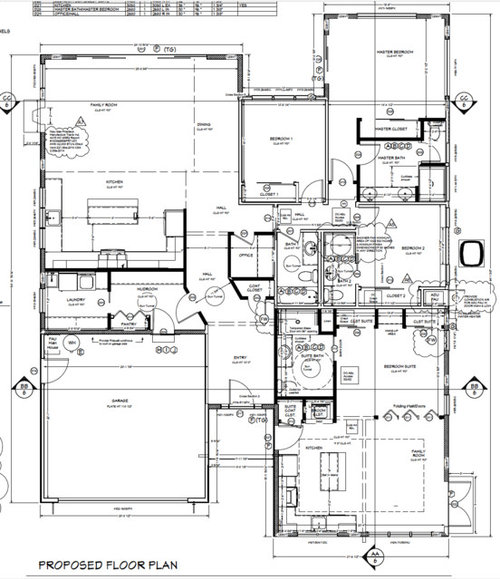
    1. Run Cat 6 cables for ceiling-mounted wireless access points (a) near, but not in front of, the fireplace in the family room, (b) to the hallway to the master bedroom, and (c) in front second family room folding doors.

    2. Run a Cat 6 cable to a wall jack in the office. You want at least one hard-wired connection to your network equipment (modem, switch if any, etc.) and don't want to rely on wi-fi.

    3. Skip the Cat 6 cable to the doorbell. A quick search shows that the video doorbells use wi-fi, not a wired network. DO install the typical doorbell copper wiring, transformer, and doorbell (ding-dong). The video doorbells are designed for retrofit and are powered by the standard doorbell transformer.

    4. I have no opinion on the coax. More and more people are using smart TVs, computers, or phones that are connected solely to their home networks (hard-wired or wi-fi).

  • PRO
    7 years ago
    last modified: 7 years ago

    Hire a professional we just had to cut up and patch all the walls and ceiling in a home because of a contractor install. 2500.00 would not touch the amount it cost for that mistake.

  • 7 years ago

    If you use hard-wired Cat6, and you UPS the switch and router, it won't go dead at a power outage.

    Think about where that TV is going to go, wall mount or whatever. Then where the cable box, BlueRay or whatever will be, then power and HDMI for all of them.

  • 7 years ago

    Regarding wireless vs. wired, if the device is intended to stay in one spot (e.g., TV, Blu-Ray player, desktop computer, server), connect it via ethernet. If the device is mobile (e.g., laptop, tablet, phone) use wireless.

    Sure Netflix streams ok via wireless, but the wireless spectrum is crowded, and once you start doing things like streaming larger bandwidth media (e.g., Blu-Ray over network, 4K video, HDHomeRun devices, uncompressed audio), wireless can become problematic.

  • PRO
    7 years ago

    In my opinion using the general contractor is not an option for this kind of work. If the low voltage guys came in and said they could also frame your house you'd probably say no without a second thought. Each trade specializes in their respective disciplines and while I acknowledge a little bit of crossover of scope, you really do get what you pay for.

    With that out of the way, consider getting a second professional estimate if you have any doubts about the "honesty" of this company's proposal. If you get a bad vibe or suspect them of being a fly-by-night company do further research. A good method to determine the legitimacy of a low voltage contractor is to see what brands they carry. Crestron, Control4, and AMX are pretty picky about who they allow on board as dealers and is a good place to start. Do they have a showroom? Do they have branded work vehicles? While none of these are required to be a legitimate low voltage company they are easy things to look for.

    Wireless communication should be a last resort for any device in your home. Try to reserve wireless for devices that need it. Mobiles devices, thermostats, door locks, etc. Think about how internet gets into your home. It's by wire. Why? Because it's faster and more reliable. Ever seen a wireless access point in a restaurant or hotel? Those are wired back to a switch because that traffic needs to get onto a wire as soon as possible for the best performance. Imagine two roads that go to the same destination. If you split all the traffic between the two roads both roads will flow better. Ignore that one of those roads exists (wired) and the other road will be cluttered and slower (wireless).

    Also, everything that Technospeak Corporation said is spot on and MS Colours Inc example is unfortunately too common.

  • PRO
    7 years ago

    Great Advice! As a General Contractor I would never handle running the wiring to technical equipment. There is way too much technical knowledge that affects performance. And I hope my AV guy wouldn't offer to design a kitchen or bathroom.

  • 5 years ago

    I just built a new house and paid for pre-wiring only for ceiling speakers and volume controls throughout the house. Now a couple weeks before closing I learn that the audio installer did not cut holes where the speakers would go. Is this the norm for home audio if you order only pre-wiring? I was expecting there to be a hole with a plate over it like if you have a room pre-wired for a ceiling fan.

  • 5 years ago

    Makes sense. Cutting the hole would be part of the speaker installation. If you changed your mind you wouldn't be stuck with an ugly holes, covered or not. The installer also wouldn't have known what size holes to cut. In contrast, the electrical code requires that electrical boxes remain visible, hence the covers.

  • 5 years ago

    Makes sense. Thanks!

  • 5 years ago

    So yes it is very common, NOT to cut the speaker holes during new construction. Whether you were aware of it or not, the Audio Subcontractor took pictures of the stud structure and his wire when it was exposed for future use. So, if and when you do decide to finish the install off with a speaker, he or she can cleanly cut the speaker hole, pull the speaker wire through, connect it so the speaker and mount it. All speakers have a bezel that is wider than the hole being cut for a nice installation. If you did decide that you wanted speakers from the start, the audio sub-contractor would have used something called "speaker rings" which tell the drywall contractors the exact size whole to cut. But yes if you decided to bag the speakers due to price when that was already the plan in the beginning, you would have some holes in the ceiling. There are certain high end speakers that do have blank caps that go over the speaker holes in these cases, but they are not used often as they are expensive. As the speaker wires are considered low voltage (assuming they are not 70V or 100V speakers, they do not need a back box in MOST cases. The only exception to this would be in some cities, inspectors will require back boxes on all speakers that sit in the attic due to the heat transfer that happens between the room and the attic. I believe it's a fire prevention measure as well.

  • 5 years ago

    Thanks!

  • 5 years ago

    But the speaker wire has to be fire rated (CL3?).

  • 5 years ago

    Yea there are different minimum rating requirements depending on what kind of wall or ceiling they are going in. A general rule of thumb is that the wire insulation can't burn any faster than the surrounding materials. For residential, most of the time CL2 or CL3 rated wire is fine.

  • 5 years ago

    A couple of things to consider....

    Where does all this communication wire terminate? You will need a centralized connection center that you can patch lines in for use or remove when not in use. Especially coax and to a lesser degree data cables. Coax runs that are unused just degrade and create noise in your signal to the devices you do use. Its great to have coax to every possible location you may want to use it, unless you're going to design it that its all connected together with no access to change the termination and connections. Bring that wire into a central location, in a star pattern with the option to connect and disconnect the runs that are not in use, it is worth it.


    Give consideration to WiFi coverage, homes are never setup to install a wifi router in a central location for the best coverage, and most people have horrible wifi coverage in their homes due to the limited locations they can install a wifi wire to connect it with the data and coax connections needed for it and the cable modem. Imagine if the kitchen is in the center, there being a coax, several CAT connections and a 120VAC outlet above a kitchen cabinet to install all that for the best wifi coverage and its up out of the way.


    Another factor, would every consider installing satellite TV service in the future, or have it as a selling point for future owner of the home? If so, now is the time to setup your coax network for a Satellite install if you elect to do it. If you install the correct wire in the correct way, satellite installers will not have to crawl all over you home destroying it with their hack installation of their coax wiring, they simply have to install the antenna, connect it to the cable you have pre-installed and reconfigure the central hook up for the satellite stb's to be installed at your existing coax drops.....


    Most people are using the quality RG6 for CATV that meets the spec for satellite, its just good measure to assure reliable CATV and cable modem performance. But what they fail to realize is satellite requires one more thing over CATV, it needs to pass power over the coax cable to power the satellite dish. Currently most DIY'er and Contractors and Retailers are using Copper Clad (coated) steel core (central wire) in their RG6 coax cable. The signal mostly travel overs the surface of the wire, so the copper coating offers the same performance at a much lower cost, than a solid copper core. The solid copper core does offer the tiniest bit less signal loss, but its so little it will never make a difference, so it doesn't justify the higher cost of a solid copper core. EXCEPT, if you using it for Satellite that almost all use power passing over the coax cable to power the satellite dish.... ....electrical power is transmitted through the entire wire not just the surface like the rf signal, and copper is lower resistance than steel, so a copper clad steel core will have a much bigger voltage drop at the end of the coax cable to the Satellite dish and it will perform poorly. So if you want to build in the option for possible satellite, make sure that all the coax is satellite rated (3GHZ swept) and the coax runs to the satellite dish and to the main stb in the places you're likely to install it are solid copper core coax for the power passing. Some satellite systems inject the power at the main splitter/switch for system, which the perfect location for that would be at that central location for all the wiring I spoke of earlier....

Sponsored