

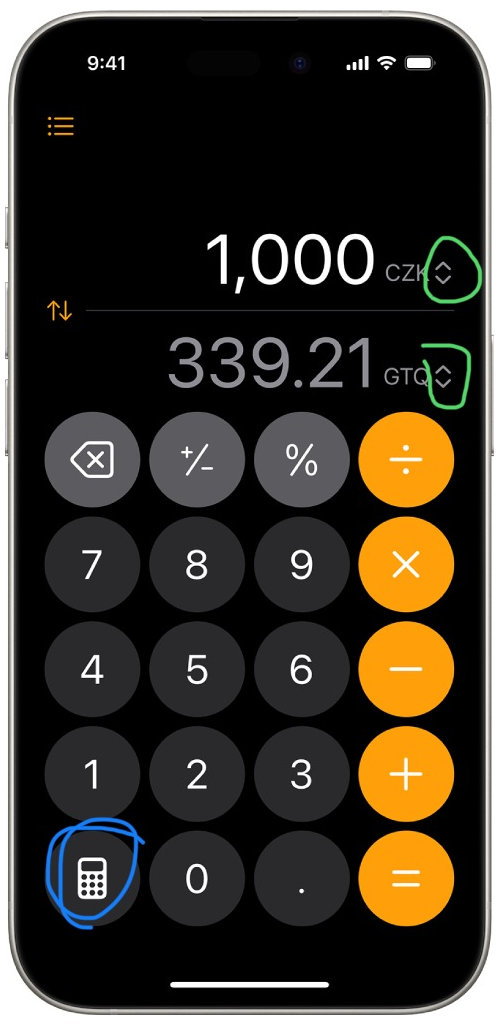
Travel Hack: Foreign Currency Conversion on iPhone
last year
last modified: last year
Featured Answer
Sort by:Oldest
Comments (8)
Related Professionals
Topeka Furniture & Accessories · Owensboro Furniture & Accessories · Merced Furniture & Accessories · Honolulu Furniture & Accessories · Anniston Interior Designers & Decorators · San Bernardino Interior Designers & Decorators · Olympia Interior Designers & Decorators · Wilmington Architects & Building Designers · Tampa Architects & Building Designers · Owensboro Architects & Building Designers · Cumberland Architects & Building Designers · Tyler Architects & Building Designers · New Haven Architects & Building Designers · Lansing Architects & Building Designers · Gillette Architects & Building Designers


Related Stories

TRAVEL BY DESIGN10 Ideas for Packable Decor From Your Travels
It's fun to decorate with finds from a trip — but not so fun to lug them home. These ideas are affordable and easy on the suitcase
Full Story
HOME TECHWhy Google Just Paid $3.2 Billion for a Company That Makes Thermostats
Smart home technology just got a new champion — and everyone is speculating about the reasons
Full Story
FUN HOUZZGuessing Game: What Might Our Living Rooms Say About Us?
Take a shot on your own or go straight to just-for-fun speculations about whose homes these could be
Full Story
MOST POPULAR4 Obstacles to Decluttering — and How to Beat Them
Letting go can be hard, but it puts you more in control of your home's stuff and style. See if any of these notions are holding you back
Full Story
MOST POPULAROvernight Guests Coming? How to Be a Great Host
Ensure a good time for all — including yourself — by following these steps for preparing for and hosting houseguests
Full Story
PETSSo You're Thinking About Getting a Dog
Prepare yourself for the realities of training, cost and the impact that lovable pooch might have on your house
Full Story
ACCESSORIESCollective Wisdom: Display Ideas for Collections of All Kinds
Show your interests without exposing clutter by going for artful arrangements with a unified feel
Full Story
DECLUTTERINGEscape the Inheritance Trap: What to Do With Sentimental Pieces
Too meaningful to toss but too hideous, precious or unusual to display? These ideas can help
Full Story
LIFEHow to Decide on a New Town
These considerations will help you evaluate a region and a neighborhood, so you can make the right move
Full Story
MOVINGRelocating Help: 8 Tips for a Happier Long-Distance Move
Trash bags, houseplants and a good cry all have their role when it comes to this major life change
Full Story
Kswl