Software
Houzz Logo Print
margaret17

Looking for professional-quality drawing & rendering software

13 years ago
I am designing my own house and am looking for software that I can use to create all the final architectural drawings as well as do 3D renderings. Additionally, I’d like to be able to pull in an AutoCAD file of the topo survey. Right now I’m using a consumer software package and it’s very limiting with regard to what I can do.

Alternatively, are there drafting companies that could do the drawing and 3D rendering for me?

Comments (21)

  • PRO
    13 years ago
    Hi There, I use Chief Architect Premiere for all of my work. I got started using it for personal use (building my dream house), and am now making a business out of it. It's fantastic software, and they have different versions for different types of users. It can do everything that you need, as well as pull in Cad files, and Topo surveys. I have done this easily for some clients of mine.

    Check out their site, download the trial if you wish ... or if that's too much work ... I would be happy to help :)

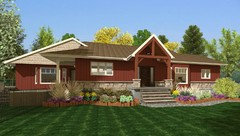
    I've attached my dreamhouse!
  • 13 years ago
    Thanks! I had actually looked at Chief Architect when first looking for software and went with TurboFloorPlan 3D because the user interface seemed more intuitive. Now I'm regretting it because it won't let me do a flat room (1 degree pitch is the flattest I can go), floor to ceiling windows, or glass railings, and all the furniture and cabinet libraries are traditional design with very few contemporary options.

    Does Chief Architect allow you to print proper construction blue prints, cross sections, etc. that can be submitted for permit approval?
  • PRO
    13 years ago
    yes it does ... it is a full solution
  • PRO
    13 years ago
    If you're thinking of buying it, you should compare their products thought ... The premiere (which is what I have) provides a full solution ... Their home designer line may not allow blue print design ... on their website they have a tab that lets you compare products so that you know what you're getting, and what the differences are.
  • PRO
    13 years ago
    If you don't want to make the investment, I would be happy to help you prepare plans, and visualize your new home. I'm a 3D architectural designer, not an architectural technologist, so you will still need to get your drawings stamped/approved. I can certainly do all the rest (full length windows/glass railings/contemporary options), as well as any perspective you want to see (including walk-thrus)
  • 13 years ago
    Thanks HG3D, I may take you up on that. I really enjoy doing the drawing myself, but it's an issue of having the time to do it.
    BTW - did you ever look at Autodesk Revit LT or Sketchup Pro? Both are cheaper than Chief Architect Premier and seem very powerful, with their own sets of advantages (Revit LT is AutoCAD, Sketchup has Google Earth integration, etc.).
  • PRO
    13 years ago
    Your Welcome!

    I started with Chief's Home Designer Professional software for DIY enthusiasts. It was an easy leap for me to go to Premiere when I wanted something more robust, since the interface was the same. I haven't used Revit, though have read on the Chief Forum reviews comparing products, that Chief is Superior. You can check out their forum if you're interested.
    Sketch-up Pro is new this year, and I had already made the time and monetary investment in Chief Premier to consider abandoning it. From what i've read, the primary advantage of sketch-up pro is the 3rd party plug-in capability. I use sketch-up Make from time to time for creating furniture, or downloading others' models. These can be imported into Chief.

    Chief Home Designer Professional ($495) is feature rich, and compatible with Chief Premiere. I recently helped a client who had the Designer version. They just needed help getting started, so I created their plans for them in my premiere version, and sent them the plan file so that they could continue with the fun stuff in the Designer version. They already had it, so didn't need to make the investment.

    I enjoy the drawing too, so understand the satisfaction that it brings. If you find that the drawings are sitting at the bottom of your pile of things to do, drop me a line.

    dru@daigleng.com

    I'd be happy to provide a quote.

    Best of luck,

    Cheers,
    Dru
  • PRO
    13 years ago
    Sketchup is a great product; you can successfully create extremely accurate drawings very easily, even with the free version. Try it first before you spend thousands on other products. At a minimum, you will get an idea of what you like and don't like in a CAD program.
  • 12 years ago
    I am trying to figure out if I can do what I need with Chief Architect Home Designer Professional. What I need is something that will let me:

    1) Import a .dwg format survey for a sloped 20 acre lot.
    2) Position the lot with correct geographic location and orientation.
    3) Move the house plan to various locations on the lot to find the optimal setting that minimizes cut and fill.
    4) See the light and shadows outside and inside the house during different times of day and times of year.
    5) Generate Site Plan and Elevations for submission to county for Site Approval.
    6) Share plans with architect or interior design firm.

    Can I do this with Chief Architect Home Designer Professional?

    Thank you!
    Margaret
  • PRO
    12 years ago
    I don't know, but you can do these things with the full version of Sketchup 2014 (not the free version).
  • PRO
    12 years ago
    margaret17, Home Designer Professional will allow you to import a DXF file, but you would need Chief Architect Premier to work with a DWG file. If you have survey information you can use the tools within Home Designer Pro to create your plot plan: http://www.homedesignersoftware.com/support/article/KB-00576/.

    With the North Pointer tool you can create a shadow diagram and adjust the time and season. http://www.homedesignersoftware.com/support/article/KB-00489/

    The Home Designer Pro will also offer a Layout Page where you can layout your site plan, elevations, etc in a blue print format. The largest page size you can create to scale is 18"x24".

    You can share plans in a number of different way, but it'd be best to contact us to discuss all the options and what programs your architect and designers are using. We are open M-F 6am-5pm Pacific: 800-482-4433.
  • 12 years ago
    Chief Architect, Inc is the best program out there for anyone looking to design residental, commercial or picturing your own home. There is not a program out there that you can customize as much, yet use the defaults to do the heavy lifting of the design work... The program is fully 3D and 2D, and EASILY mixes the two together. Take a look at their program! Easy and FUN!
  • 11 years ago

    I purchased the Chief Architect Home Designer Pro package for a courtyard and deck remodel project. I'm pretty frustrated with it. While it is quite powerful, I can't make multiple versions of the project in one file and hide or reveal them. I have to use completely different files to do that. I can't put in a freestanding wall in the courtyard, at least I haven't figured out how to yet. It does explain how to make a freestanding fireplace, but I need a masonry wall. It's difficult to place the building on the lot… I'm thinking of going back to 2D and trying to find a more flexible program.

  • PRO
    11 years ago

    Joel DiGirolamo, thank you for your recent purchase! While you’re unable to have multiple decks/room built on top
    of one another and turned on/off, you are able to have multiple floor plans in
    one Plan File. Once the first floor plan is created go to Edit>Edit
    Area>Edit Area (All Floors). Then click and drag in floor plan view to draw
    a selection box around the portion of the floor to be duplicated. Click
    the Copy edit button. And Paste in a different location on
    your floor plan.

    Try using the terrain wall tool for your freestanding wall.

    We offer a Landscape and Deck Design webinar available that
    may also help with adjusting your terrain.

    https://www.youtube.com/watch?v=vc82RgVzcyE

    Feel free to contact us directly if you have any further
    questions:

    https://www.homedesignersoftware.com/company/contact.html

    Thank you,

    Emily

  • PRO
    10 years ago

    Thank you all very much for this info. I am just beginning my search for a design program and this is very helpful

  • PRO
    9 years ago

    I used to do it all by hand, and when I began searching for 3d software, I at first tried my relatives autocad which I found frustrating. I came across chief, got the trial version and loved it! Since then I can't imagine myself with any other program. I know that with sketchup and others, using 3dsmax you can get some life-life renderings but I have come to realize that with chief, if you import and customize your own materials you can get pretty close.
    Not to mention I love Chief's forum, chieftalk, so many friendly users that are always available to help you out with anything. Whenever I'm stuck, I throw a post and within a few hours I have multiple suggestions, got to love it! So with my two cents, go with Chief, try the rent system and worst case scenario you cancel and get something else.

  • PRO
    9 years ago

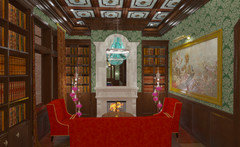
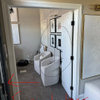
    recent rendering as an example, whether or not it's realistic enough is up to you to decide, but in my experience most clients are more than happy with the results.

  • PRO
    9 years ago

    I'm using VectorWorks on a mac , I am thinking I may try a new software program , my laptop uses El Captain , How does Chief Arch. work with your software, please note , my current cad software & desk top & plotter are kept aware from updates as they love each other now.. I'm interested in trying new CAD..

  • PRO
    8 years ago

    Chief Architect is fine for doing a one-off, but it is a horrible solution for Production Home Building. Far too limited and doesn't play well with other industry-wide and accepted platforms. If you are a start-up production builder, do yourself a favor and take a hard pass on their software.

  • 5 years ago

    I use AutoCad for 2d elements and construction detailing and SketchUp with Vray for creating visuals. If you want realistic renders, you need a program that works with vray.