
Search results for "Software platform" in Home Design Ideas
 Zimmer Design LLC
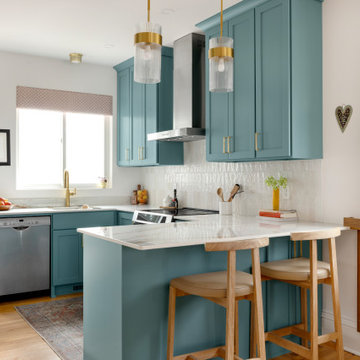
Vibrant kitchen upgrade, removing wall to open up this dated bungalow kitchen allowing east/west sun to drench the home.
Inspiration for a coastal kitchen remodel in Minneapolis
Inspiration for a coastal kitchen remodel in Minneapolis

 Betsy Bassett Interiors
Living room - mid-sized transitional open concept medium tone wood floor living room idea in Boston with blue walls, a standard fireplace and a wood fireplace surround
 EB Architecture + Design
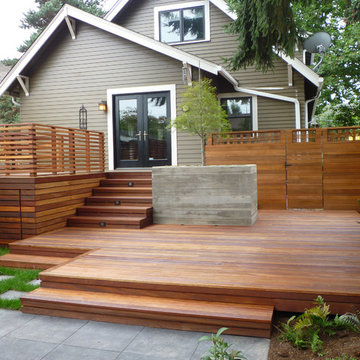
the finished new deck and outdoor space.
Deck - traditional deck idea in Portland
Deck - traditional deck idea in Portland
Find the right local pro for your project
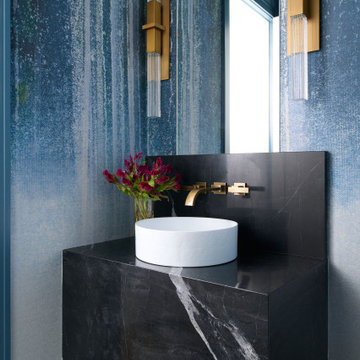
Inspiration for a transitional black floor and wallpaper powder room remodel in Chicago with blue walls, a vessel sink and black countertops

 User
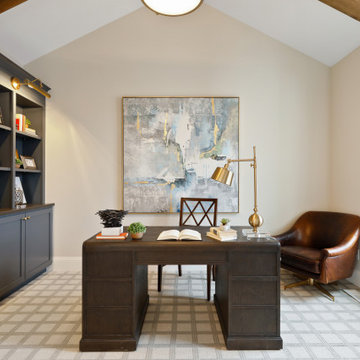
UserInspiration for a transitional freestanding desk carpeted, exposed beam and vaulted ceiling study room remodel in Minneapolis with beige walls
 Alicia Torosian Design
Located in Newport Beach’s coveted Port Streets, this family home was taken down to the studs and completely reimagined to create a layered, detail-rich forever home. We expanded key living spaces — including the kitchen and primary bathroom — to enhance both functionality and everyday luxury.
Throughout the home, thoughtfully curated moments bring personality and warmth. From the beautifully wallpapered dining room to the checkerboard marble laundry room, each space was designed to feel timeless yet distinctive. Living spaces and bathrooms were individually styled using a cohesive palette of blues, greens, and warm browns — creating a sense of flow while allowing each room its own identity.
The result is a thoughtfully tailored home that blends classic design with family-centered living in one of Newport Beach’s most beloved neighborhoods. This home was featured in the 2026 Corona del Mar Home Tour.
 THINK Architecture, Inc.
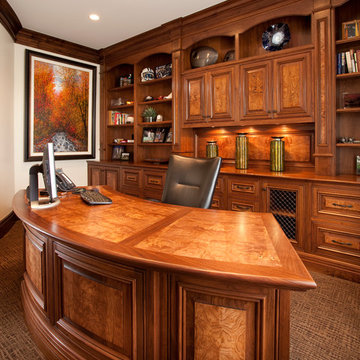
Elegant freestanding desk carpeted home office photo in Salt Lake City with white walls


 Savvy Interiors
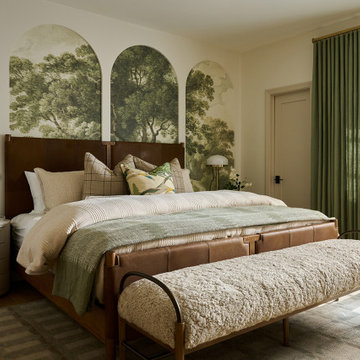
Inspiration for a timeless medium tone wood floor, brown floor and wallpaper bedroom remodel in San Diego with multicolored walls
 Mia Rao Design
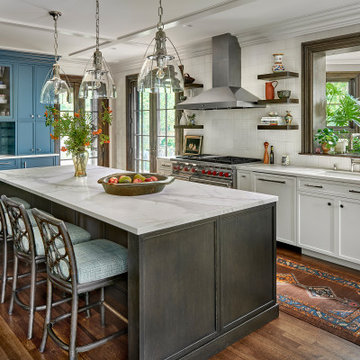
The kitchen features a sophisticated mix of clean white cabinets and a large, dark wood central island. To the left, is a built-in hutch/coffee drink station in a bright saturated teal. Luxurious white countertops with light grey veining wrap the surfaces.Three large glass cloche pendant lights hang from a coffered ceiling, adding a touch of artisan flair. The island is paired with four eclectic dark wood stools from Baker Furniture featuring an intricate lattice-back design and pale blue cushions.
 Built Tough Construction of North Georgia
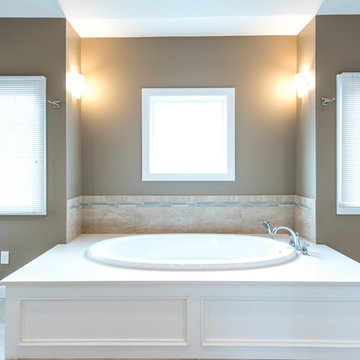
Design Services Provided - Architect was asked to convert this 1950's Split Level Style home into a Traditional Style home with a 2-story height grand entry foyer. The new design includes modern amenities such as a large 'Open Plan' kitchen, a family room, a home office, an oversized garage, spacious bedrooms with large closets, a second floor laundry room and a private master bedroom suite for the owners that includes two walk-in closets and a grand master bathroom with a vaulted ceiling. The Architect presented the new design using Professional 3D Design Software. This approach allowed the Owners to clearly understand the proposed design and secondly, it was beneficial to the Contractors who prepared Preliminary Cost Estimates. The construction duration was nine months and the project was completed in September 2015. The client is thrilled with the end results! We established a wonderful working relationship and a lifetime friendship. I am truly thankful for this opportunity to design this home and work with this client!

 safe ZOnea
In 2026, DIY home design and renovation will become easier than ever. Free mobile apps like Houzz, Homestyler, and Planner 5D will put professional tools in everyone’s pocket, letting users visualize layouts, test colors, and estimate costs before buying materials. Experts predict that over 50% of homeowners will use apps to plan upgrades. It will save money and reduce costly mistakes. Even now, about 54% prefer mobile tools.
Why Mobile Apps are Changing Home Renovation
DIY renovation has changed a lot in recent years. Homeowners don’t have to rely on sketches or guesswork anymore. Thanks to AR, AI, and 3D renderings, apps can show exactly how furniture and cabinets will fit. By 2026, many of these tools will be free - and packed with features that rival expensive software. With just a smartphone, anyone can try out layouts, test colors, and even create detailed floor plans.
The Tech Behind Modern Design Apps
Most renovation apps now leverage AI to generate design suggestions. They are based on your space and preferences. Upload a photo of your room. The algorithms will check the sizes, lighting, and features. Then, they’ll suggest furniture layouts or color schemes. Some apps use your phone’s camera and sensor. They make accurate measurements, so you won’t need tape measures or notepads.
Top Free Apps Transforming DIY Projects
Houzz continues to lead the pack with its massive photo library and ability to connect users with local contractors. The platform now gives AI design suggestions. It looks at your style preferences across millions of professional spaces.
For anyone serious about planning their next project, exploring comprehensive resources helps narrow down what works. It’s just like in iGaming, where review platforms like Slotzilla help gamblers to find casinos with user-friendly tools, bonus rounds, and progressive jackpots that will work for them.
Planner 5D shines with realistic 3D renderings and a huge furniture catalog, letting you switch between 2D plans and 3D walkthroughs - even in VR. Room Planner helps you design practical layouts. You can easily arrange furniture and check dimensions. It offers real-time 3D views and features items from real brands.
Apps for Specific Renovation Tasks
Not every project needs full 3D renderings - sometimes you just want to try paint colors or test tile patterns. ColorSnap by Sherwin-Williams uses AR to show colors on your actual walls and even matches shades from photos. Magicplan makes creating floor plans easy by measuring rooms with your phone as you walk around. Both apps help plan renovations and communicate ideas without the guesswork.
Budget Tracking and Project Management
Renovation apps do more than make spaces look good - managing budgets and timelines is just as important. HomeZada even uses AI to predict your budget and track material prices, so DIYers don’t get hit with surprise costs. Trello is a lifesaver - set deadlines, track progress, and share updates with anyone helping on the project.
How Apps Reflect 2026 Design Trends
This year’s popular apps reflect the largest home design trends. Colorful rooms are on the rise. Zillow shows a 149% increase in listings. Plus, apps like Houzz let users test bold shades before making a choice. Cozy reading nooks are also on the rise, showing up in nearly half of listings. Renovation apps now provide templates. They include tips for shelves and lighting. This helps create cozy, thoughtful spaces.
Here’s a quick comparison of what different free apps offer:
App name
Best feature
Learning curve
Platform
Houzz
25M+ inspiration photos
Easy
iOS, Android
Planner 5D
Photorealistic 3D renders
Moderate
iOS, Android, Web
Room Planner
Accurate measurements
Easy
iOS, Android
Magicplan
Auto floor plan creation
Easy
iOS, Android
Natural materials and earthy tones will lead design trends in 2026. Warm neutrals will take over from the grey-and-white minimalism of the last ten years.
The AI Revolution in Home Design
AI is no longer just a gimmick in renovation apps. Chat features can suggest furniture layouts, color palettes, and materials for your budget. It’s like having a designer on call. Renovate AI turns photos of your room into multiple style ideas in seconds, from mid-century to rustic farmhouse. It’s great for brainstorming and getting past the “I don’t know what I want” stage.
Practical Tips for Using Renovation Apps
Getting the most from design apps requires a strategic approach. Here are essential steps every DIYer should follow:
Start by gathering inspiration. Look through photo libraries on Houzz or Pinterest. Then, dive into detailed planning.
Don’t rely solely on screen colors; get actual paint chips and fabric swatches.
Save multiple design versions. Create variations of your plan to compare options side-by-side.
This workflow helps you avoid common mistakes. It leads to better design choices before you buy anything.
When Apps Aren’t Enough
Digital tools can’t do everything. Big structural changes, electrical work, or plumbing always need a pro. Apps are great for planning and talking with contractors, but they can’t replace expertise. And always check textures in real life - that sofa might look perfect on screen, but feel different.
The Future of DIY Renovation
In 2026, renovation apps will become smarter. They’ll have voice control and better AR. Improved AI will make DIY design feel more like professional services. Creating beautiful, functional spaces is easier than ever. For homeowners, it’s important to use apps that match local materials and building codes. The biggest benefit is confidence - seeing your design in 3D makes projects far less intimidating.




 Dimensions in Wood Inc
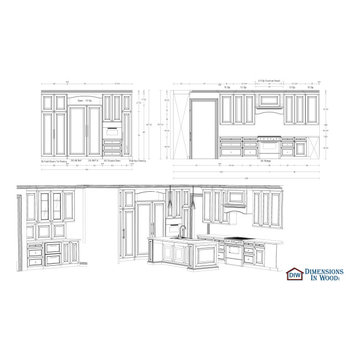
This client’s vision for their kitchen/hearth room remodel was to create a harmonious space for gathering and socializing with family and friends. Without the before and after photos, you would scarcely believe this was the same home.
This huge home renovation perfectly illustrates that Dimensions In Wood’s expert team can handle every aspect of your remodeling project. Plumbing, flooring, electrical wiring, custom cabinets, structural engineering, appliances, windows, interior and exterior doors, entertainment and more. Contact us today to discuss Translating Your Visions into Reality
The client was interested in new appliance technology, cabinetry to the ceiling, and an Island large enough to seat 3. They also wanted a built-in breakfast nook, improved pantry space, more functional storage on either side of their fireplace, and a built-in appearance for the TV above the mantel. The original built-in desk was not used, and they preferred for that space to serve as a small bar area with refrigeration and a place to store their printer. We designed several plans for the space before selecting the final layout.
The new design required the removal of the soffit over the old sink, as well as a small wall beside the old refrigerator. The wall beside the stairwell had to be shortened 13 inches and a new beam installed to carry the load of the home’s 2nd story to gain enough space for the large central island. The existing closet pantry walls were also reconfigured as per the new plan.
This serves as a great reminder that Dimensions In Wood is much more than just custom cabinets.
Central to the entire custom kitchen is an 8-foot Walnut island. The huge island, which comfortably seats three, is topped with Essenza Blue quartzite. The stone’s natural striations are beautiful. Quartzite is harder than granite, and less likely to stain than other stones because of its density. The couple had to look through multiple slabs to find a piece they LOVED. The island’s custom Walnut cabinetry, built to resemble a piece of custom furniture, was stained Bronzed Walnut by Sherwin Williams.
The 4-foot Galley Workstation in the island, handles all the kitchen’s prep, serving, and cleanup needs. The Galley’s culinary tools include an upper tier cutting board, upper tier drying rack, 2 lower tier platforms, 11″ colander with non-slip handles, and 11” mixing bowl with lid and non-slip bottom. Learn more about the amazing Galley Workstation here. A Waterstone gantry faucet in a pewter finish combines a pull-down sprayer for maximum mobility and a articulated swivel spout. A water tap with reverse osmosis filter provides the highest quality drinking water. To keep a clean and sleek counter we installed a raised air switch for the garbage disposal and integrated soap dispenser. The island also houses the Thermador Sapphire 7-Program Dishwasher with a hidden touch control panel and a custom Walnut wood front. The cabinetry under the Galley Workstation features a trash roll out, as well as storage for the culinary tools.
Shortening the stairwell wall, and reframing around the stairs, which included shortening the handrail, also made room for a bi-fold door walk-in pantry with extra roll out storage and space for a small microwave. Above the panty doors is a remote controlled, electric motor powered, lift up cabinet door which hides a flat screen TV, used while the family is cooking.
To the right of the walk-in pantry is cold food storage. The Thermador, 30-inch Freedom Collection refrigerator and 24-inch built-in freezer column with internal ice maker are covered with matching cabinetry fronts. An open display space was designed above the units, creating an aesthetically beautiful wall. To the right of the refrigerator & freezer columns is a tall cabinet designed for the built-in Thermador steam and convection oven. The convention steam oven is a relatively new technology for homes, but its versatility and food quality is amazing. To the right of this is a pull-out appliance pantry which provides easy access and storage for a stand mixer, blender, and any other appliance you do not want to clutter the counter.
The most visible wall of the kitchen features the 36-inch Thermador Professional Series Harmony Gas Range with Griddle. Between the range and custom designed wood hood, a framed mosaic tile accent in the backsplash, creates a focal point. To clear the air, the Professional Series Thermador 42-inch ventilation insert provides excellent exhaust capabilities, as well as providing multi-level, vivid LED lights for beautiful illumination.
The wall cabinetry symmetrically flanks the custom hood, utilizing deeper wall cabinetry on each end, allowing for storage of oversized dishware. The base cabinetry on this wall is made up of drawers, except for the corner, which is a Kesseböhmer LeMans II. This specially designed shelf system allows ease of access in underutilized blind corners. The dual action articulation system with soft close mechanism ensures a smooth open and close.
Rounding the corner to the outside wall, the base cabinetry was built to a narrower depth, providing additional space for the island, as well as easier access to the new larger pass-thru window which serves the screen porch. The client selected Black Vermont granite countertops with an ogee edge to contrast the Linen White painted cabinetry.
The door to the screen porch was replaced with a Marvin Exterior Door with a raised panel at the bottom of the 3⁄4 glass door.
Marvin Windows replaced the other windows in the space increasing the energy efficiency and value of the home. To establish the breakfast nook, a bench with drawers and an upholstered seat was built into the bay area of the room.
Custom bookshelves were built with open shelves, cabinet doors, and drawers on either side of the fireplace. A new stone hearth and fireplace surround were installed. Above the existing mantel we built a recessed space for the flat screen television hiding all wiring inside the walls for a completely clean look.
The space that was once a desk was transformed into a bar area. The glass shelves and glass cabinet front liquor cabinet stand out. But this bar area has hidden secrets. Tucked beneath the black granite is a Thermador under-counter double drawer refrigerator with matching wood front panels. They blend in perfectly with the cabinets. A wireless printer is easily accessed on a slide out drawer. Plus, what looks like merely wooden panels on the wall are concealing recessed storage for more bottles and glasses!
Overhead recessed lighting and speaker system provide illumination and entertainment through the entire space.
This luxury home had original, solid oak flooring through most of the first floor which the homeowner obviously wanted to keep but were in desperate need of repair and refinishing. Our master craftsmen wove in new wood flooring to match the old where needed, particularly where walls had been changed and where the floor was damaged. We sanded the floors, smoothing away years of wear and tear. The entire wood floor was then uniformly stained, making it impossible to differentiate where any repairs were made.
If this renovation has inspired you, then contact us today! There is no limit to our Dimensions.

 Electronic Design & Consulting, Inc.
This article is posted here with the consent of the author. The views and opinions expressed in this article are those of the author and do not necessarily reflect the official policy, position, view, or opinion of Crestron Electronics, Inc., or of any of its employees. Crestron Electronics is not responsible for, and does not verify the accuracy of, any of the information contained in this article.
By Jeff Singer
The “smart” revolution began several years ago with smartphones (a.k.a phones) and has extended in recent years to thermostats, doorbells, alarm systems, and kitchen appliances. Smart devices are so ubiquitous that the term “smart” is overused to the point that it is almost meaningless. Companies are eager to jump on the bandwagon and claim their products are “smart,” and consumers proudly claim they have a smart home because they have lighting control. Misconceptions about smart homes are prevalent and create confusion in the marketplace. This can have deleterious effects on businesses and underserve consumers. Here are seven of the most popular misconceptions about smart homes:
1. Apps are smart
Apps are convenient and easy to use. Yes, it seems there’s an app for everything. People expect to be able to download an app and do just about anything. App developers and many companies do not disavow consumers of this myth. On the contrary, they promote this idea with carefully worded descriptions. The promise of having the world at your fingertips for $1.99 is very enticing. Although it sounds too good to be true, it is also too good to pass up for many people. This leads to undervaluing home control and disappointment when the apps don’t work, which undermines confidence in our industry. The fact is that apps are not smart. They do not control anything. They must connect to and communicate with a control system or cloud service that processes, prioritizes, and executes commands. That’s the real magic and what most people do not understand.
2. Smart devices work together
With so many smart appliances and devices on the market today, it’s understandable that the average consumer might think that they actually communicate and work together. This is simply not the case. Smart devices are not that smart. They are designed and manufactured by different, often competing, companies. There are no national or industry standards governing these products. Even if they all operate using Wi-Fi® communications, that doesn’t mean they work together. Some companies promote a home control platform, which unites different devices from different companies – in theory. The platform is yet another third-party software totally dependent on other companies developing APIs and writing control modules for their hardware to run on that piece of software. The devices are not independently compatible. Also, when updates are made to either the hardware or the software, functionality may be affected for some period. That’s a nice way of saying the device or system won’t work and there’s no way of knowing for how long.
3. It’s a DIY project
Which brings us to the next myth, which is that the average person can do it themselves. Unless you are a skilled professional, I would not advise taking on a smart home project. You want to make a light turn on and off with your Alexa® or Google Assistant™ virtual assistant software, go for it. A smart home takes much more planning and expertise. I have no problem changing a light bulb or hanging a light fixture in my dining room; however, I am not going to rewire my house. I may change the flush valve in my toilet, but I’m not going to replace the pipes in my house. You get it. Integrating devices and systems, establishing different zones, creating scenes, designing the UI with a balance between control, feedback, and simplicity – all takes experience and skill.
4. Need a programmer to make changes
Early adopters may have experienced the pain of trying to make a simple change or update to their home control system. Years ago, if the cable provider changed the channel line-up, the homeowner would have to call the dealer or programmer to make an appointment for them to come out to the house to reprogram the system. The system wouldn’t work as expected until it was updated, which often took several days and beaucoup bucks. Not anymore. Technology has evolved so now it’s easy for system owners to change favorite channels, create scenes, rename buttons, update images, and more. While a professional is needed for the initial installation and setup, the system is easy to manage once it’s up and running. This makes life so much easier for both dealer and customer.
5. Tech becomes obsolete quickly
Similar to updating the UI, updating firmware or hardware used to be a stressful process. A smart home should be intelligent enough to update itself. Apps don’t become obsolete. Updates are constantly pushed out from the cloud, making them better all the time. The same is true for a good smart home system. New features, functions, and device support gets added in the background consistently, so the system you installed (or purchased) yesterday gets better over time. Swapping out decorative elements, such as keypads, dimmers, and touch screens is also seamless. When a new device is added, all the settings are pulled down from the cloud and it just works. No system interruptions. No sunk costs. No imposing house calls. No surprise bills.
6. Lighting control saves energy and money
Lighting control is one of the most popular smart systems, but it takes more than just one system to make a home smart. On the surface, it makes sense that if you dim the lights ten percent, then you save ten percent of energy costs. If the shades are raised during the day to take advantage of sunlight so the lights don’t need to be on (or at least not 100%), but that causes the room temperature to rise a few degrees, which triggers the air conditioner to run longer and more often, was energy usage (or cost) reduced? A smart home integrates all the various systems and technology to optimize comfort, convenience, safety, and sometimes energy.
7. Home technology is easy to hack
Security is at the forefront of people’s minds these days. Personal identities are stolen; email accounts hacked; private photos publicized; and more. A smart home must outsmart those who don’t respect privacy. Crestron control systems adhere to the strictest security standards. The same Crestron control system that goes into a home is also installed in secure government and military facilities, global banking institutions, hospitals, and other mission critical applications. When installed correctly by a trained professional, a Crestron smart home is the gold standard for security, comfort, and convenience.

 Online Solutions
Technical Support Phone Numbers @ 1-855-999-8045 : AOL mail Technical Support Number, AOL mail Tech Support, AOL mail Tech Support Phone Number, AOL mail Support Center, AOL mail Technical Support Phone Number, AOL mail Tech Customer Support, AOL mail Technical Customer Service, AOL mail Technical Customer Helpline
Professional AOL mail® Technical Customer Service Helpline Number
AOL mail is a popular e-mail client program from Perion used worldwide in order to send and receive messages to friends and families with amazing features, including animated smileys, wallpapers, and icons .This email client for MS operating system allows all users an interactive experience. Moreover, AOL mail support taken from the right resources ensures that you will bring the best out of your mails with the help of stunning elements, such as e-mail backgrounds, emoticons, e-cards, sounds animations, and 3D effects.
Technical-support-phone-number 1855-999-8O45.com understands what issues and problems AOL mail users can experience while trying to get the best out of their email clients. We know how to use all AOL mail products: AOL mail Plus, Protection Center, Gold Gallery, Letter Creator, and Smile Box. We offer instant and user-friendly AOL mail technical support to overcome all sudden and unexpected issues that prevent you from getting the best out of your email clients.
Technical-support-phone-number.com offers you instant solutions for resolving all visible problems and issues with its AOL mail technical support. These include:
• AOL mail diagnostic and secure remote access.
• Fixation of all email clients and servers.
• Configuration of AOL mail email accounts.
• AOL mail crack-up utility issues mail archives.
• AOL mail configuration, set up, and update of the email client.
• AOL mail re-storage of corrupted email folders.
• AOL mail password settings and configuration.
• AOL mail data migration from one email client to another.
If you are facing severe mail related issues and are looking for instant expert help, then simply call us at our AOL mail technical support phone number and get rid of all issues and problems, such as installation and updating of mail software; AOL mail runtime error; AOL mail tray app non-functionality; AOL mail errors 535,10061,550,2738; AOL mail setting customization; and POP3 and SMTP configuration.
AOL mail Runtime Error
AOL mail Tray Application Stopped Working
Customizing the settings of AOL mail software as per your specifications
Installing and updating AOL mail software on your computer
AOL mail Errors 535,10061,550,2738
AOL mail Tray Application Stopped Working
Configuration of AOL mail Email Accounts
AOL mail Password Settings and Configuration.
Configuration of AOL mail Email Accounts
Fixation of all Email Clients and Servers
AOL mail Crack-Up Utility Issues Mail Archives
AOL mail Data Migration from One Email Client to Another
AOL mail re-storage of corrupted email folders
DISCLAIMER: - We are an independent organization working as online third party technical support company for business and personal computer software, printers and email support. We are not in partnership with any brand or any trademark term mentioned in the blog. We solely provide technical support to users of the brands mentioned in the blog.
AOL customer care helpline number,
AOL customer care toll free number,
AOL activation phone number,
AOL activation help number,
AOL activation help phone number,
AOL phone number,
AOL support phone number,
AOL activation number,
AOL helpline number AOL helpline phone number,
AOL Mail phone number,
AOL installation phone number,
AOL installation support number,
AOL installation support phone number,
AOL installation help number,
AOL installation help phone number,
AOL installation help telephone number,
phone number for AOL Mail customer service phone number, AOL Mail customer support phone number for AOL Mail technical support,
phone number for AOL Mail tech support,
AOL Mail phone number,
AOL Mail support number,
AOL Mail support phone number,
AOL Mail support telephone number,
AOL Mail tech support number,
AOL Mail tech support phone number,
AOL Mail tech support contact number,
AOL Mail tech support telephone number,
AOL Mail technical support number,
AOL Mail technical support phone number,
AOL Mail technical support contact number,
AOL Mail technical support telephone number,
AOL Mail customer support number,
AOL Mail customer support phone number,
AOL Mail customer support telephone number,
AOL Mail activation phone number,
www.AOL.com support number,
AOL (American Online) is one of the biggest brands in United States. The Company is offering its services to the industries including Media, web search engine, IT products, and manufacturing of various tech peripherals. The company is offering webmail service namely AOL mail for the users across the world. In the initial times, it was started as a premium email account, but when the other organizations like Microsoft Hotmail, Yahoo mail starts offering free email accounts the AOL decided to change the paid version to a completely free webmail platform. Alongside of making it as free webmail, the company changed its AOL mail customer support toll free number access only for the premium email users but it is offering many AOL mail technical support helpline.An overview regarding many features of AOL mail is given below:
AOL mail Customer Support to Solve AOL Issues
My AOL mail was compromised: There are many times before the same hacking issues reported on AOL mail. But, it’s a fact that 70% of its users didn’t know- What exactly comprises means in Internet? Most of the users think that if they face any log-in errors while attempting to access the account, then it will happened because of hacking attempt. Hacking is an occasional issue, it might usually happen on revenge basis. If you believe that your AOL account hacked, then report the issue to the AOL mail customer support. The customers can contact the AOL mail technical support through their Forum, social media sites and through the help center page.
My AOL mail down right now: Literally ‘Mail Server Down’ is one of the serious issue of AOL. Many times the AOL heard blaming for email outages. You can verify the current status of AOL mail server through the third party web pages like https://downtoday.co.uk/aol-mail/, http://www.isitdownrightnow.com/aol.com.html, etc. This is a server-end issue, which means this is not only the issue of you but it’s an issue of every AOL mail subscribers. AOL customer service technicians will resolve this issue instantly.
Problems sending and composing email: Mailing and messaging are the primary purposes of every web accounts. So if any sorts of issues encountered while sending and composing email then it certainly became a painstaking thing. Some common issues of Sending and Composing Email includes- images won’t showing in the forwarded message, message composing window didn’t opening, I am getting image challenge while trying to send mail, send mail bounces back to the inbox, etc. Find all the answers for your many such mailing issues of AOL mail in its help center page, furnished with the possible causes of issues and its best solution explanation.
How to Contact the AOL Mail Technical Support?
Those who need technical support of AOL mail can contact them through the ways as explained below: Help Center: This is the best way you follow to fix your AOL mailing issue. However, you can only fix the issue through this mode if you have sound technical knowledge. Otherwise leave it and choose any one of the two other methods shown below.
Support Phone Number, Email address: AOL Technical support available through the Phone Number, and Email address. You will get an opportunity to chat/Talk with the tech Support executives if you prefer this method.
Social Media: AOL mail support is available through its official twitter handle. Mention them by using @aolmailhelp/ @ aolsupporthelp/Or by using hash tag #AOLTechnicalSupport to let them know about the issues you've.
1