Software
Houzz Logo Print
tsugajunkie

PB pix

11 years ago
last modified: 11 years ago
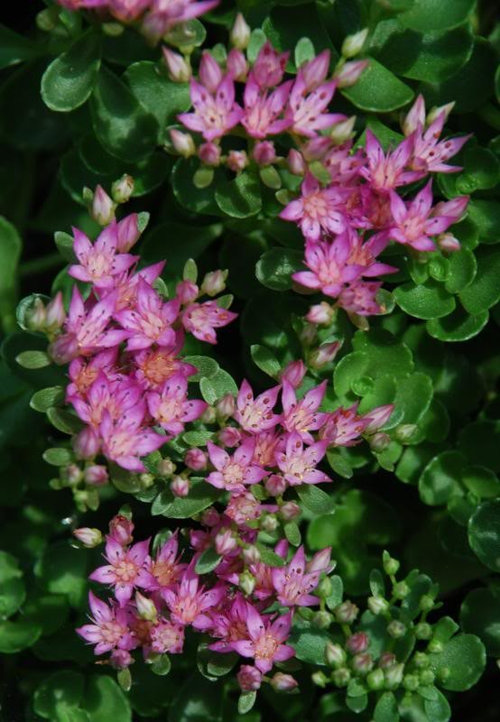
OK. Here's what I did. I clicked on the photo box and instead of
picking one of my pics I put the url of the PhotoBucket Direct Link and hit "Open"

It is the old reduced 500 pixel format if a horizontal pic and the image quality here at Houzz is very lacking, but it did work. Flickr may vary.

tj

Comments (28)

  • 11 years ago

    Most of my pics are on Flicker so I am going to try this some day.

  • 11 years ago

    Flickr will be tougher. At the link, poster Ludi has some tips but its a lot of hoops to jump through.


    PB pics


  • 11 years ago
    last modified: 11 years ago

    Wonderful! But I can't figure out how to copy the Photobuck URL into the line provided when the photo box is clicked. "Paste" doesn't work, nor 'Control V, nor "Organize".

  • 11 years ago


    This is one of bikerdoc's pix from above.

  • 11 years ago

    Did you type the code into the box provided by clicking the photo icon or is there a way to paste it?

  • 11 years ago

    I copied and pasted it like any normal copy and paste. I'm using Windows 7 and Firefox.

    tj


  • 11 years ago

    Okay, trying again with a photo from my Photobucket ...

    Whoo hoo -- it worked! Don't know why it would not work before. I used 'Control V' to paste it on the line that comes up when you click the photo icon.

    TJ, thank you!


  • 11 years ago
    last modified: 11 years ago

    Okay, I'll take a crack at it. Want to see if I can ever get a clickable thumbnail again.
    Thanks, Tom!

    Didn't work. Back to drawing board. But first, I have chores to do. :P


  • 11 years ago

    Thanks, Tom! I would never have thought of trying that.

    Btw, by repeatedly utilizing that method one can post multiple photos in a thread.


  • 11 years ago

    Are you clicking the photo icon or the houzz photo icon?

  • 11 years ago

    The photo icon, Mara.


    After pasting the direct link URL from Photobucket into the "File Name" box and hitting "open", there is a short lag before that window closes and the photo appears in the post. I assume the lag is due to the time it takes for the system to upload the photo.

  • 11 years ago
    last modified: 11 years ago

    https://flic.kr/p/pusQsL

    Nope , it did not work . when I click the camera photo tab , I do not get the "file name box" I get a "choose" and my finder page. Nowhere to type flicker URL. I tried putting the URL on my desktop and "Choosing" it of the desktop by clicking on it. You get the Url to open.

  • 11 years ago

    I'm still confused with the PB photo mutiple pic posting on the "newer forum"

    Aside from mutiple pics from PB I Hadn't had any sucess with photobucket uploading and/or any other type of HTML with the current forum

    More than one way to skin the cat thoug

    Neither of these pics where posted from Photbucket but where uploaded directly from my computer

    " Open" is only found after clicking the photo icon below Clicking the camrea/lens brings me to my computer where I can acsess my photos in photo storing folder(s) with a .JPG After I hit enter for the photo to open I mouse over to the next photo and hit open again

    The first pic was seen by me prior to me enter key/ hitting open for the second pic happy with speed


    For the Non DSL/Non Cable proider users Picture size (or pixles) More pikles take longer for slower modems/ computers to be seen and take longer to upload

    I think I've found a happy medium for both the slower non dsl modems to have the least minimal time opening and those with the highest speed cable line providers with 300 or more meg at 300 pixles ( plus or minus)per pic with out distorting the pic.

  • 11 years ago

    Okay, Mara, let's try again. Btw, I am using a PC -- I don't know if using a Mac would make any difference.

    1. Copy the direct link URL from PB for the photo you wish to insert.

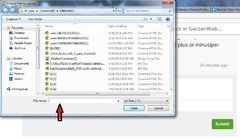
    2. Click on the Camera Photo tab. This brings you to a "Choose File to Upload" screen that looks like this:

    1. Paste the direct link URL into the "File Name" box which I have indicated by the red arrow.

    2. Click the "Open" button in the lower right.

  • 11 years ago

    The file name in PB ends in .JPEG and that is what is needed to fool this site into thinking it is a file on your computer. You do have to wait a bit while it goes out and finds the file. Mara you mentioned you use Flickr and I don't believe their links end in .JPEG. The link I put in my post right after your post up at the top has some Flickr tips.
    tj


  • 11 years ago

    Just so you know, when you delete photos from photobucket, the link used to break and the photo would disappear from here. When I tested this new way, it works, but the link also still stays when deleted. (note - I'm usually on the decorating forum, but have been focused on the picture uploading issue since the merge.)

  • 11 years ago


    I Just had to play with it a few times ended up using Direct link as a. JPG

  • 11 years ago
    last modified: 11 years ago

    Okaaay...think I found out why I couldn't get my PB links to work. When you said "direct link", I didn't recall I had changed my preferences LONG ago ~and had removed that one. I normally use the clickable thumbnail link. So, here we go again...trying the Direct Link from Photobucket.

    I followed your tutorial above, Paul. After I pasted my direct link url in that line & click open, it just goes grey/fades & does nothing. I'm at a loss...again! Argh!

    ALL RIGHT---guess you have to wait a LONG while for it to go get the pic. It FINALLY showed up!

    I guess we can't use html anymore either. Tried to make some text bold. Shows bold in my preview, but not the finished post.

    So, NOW, I'm going to try to add another pic (via editing):

    That one went faster...hmmm. It IS making my pix smaller & by hovering over them, you can view a larger photo. Is that true for others?

  • 11 years ago

    I only see larger pictures when the thread is on my 'your houzz' page - I guess meaning that I have posted on that thread. Strange, huh?


  • 11 years ago
    last modified: 11 years ago

    I don't know if this is a PB issue or some weird random happening. I see the occasional ad instead of the picture.

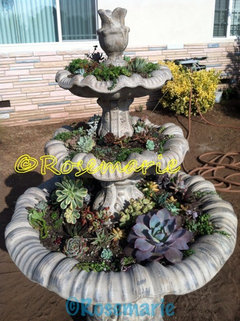
    One of Rosemarie's pix on the Succulent Revival thread and one of Hoovb's pix on the Arms thread showed me an ad with Dr. Oz instead of the picture. It's quite random. Not all pix by either of these posters do this. If I refresh the page, I see the intended pic for a couple of seconds, then the ad.

    Anyone else seeing this? I don't have a PB acct, if that would happen to make a difference.

    Edit to add - Just check this thread on my profile page. The ad does not run there, even when I hover for the larger picture. Maybe my computer is trying to tell me I'm fat. It's Dr. Oz's weight loss secret that shows up in both instances! LOL

  • 11 years ago

    It looks like we no longer need to do the "Follow Me, Follow You" thing for messages. We can edit our profile to allow it.

    Edit Profile -> Advanced Settings -> Privacy Settings (Waaaay at the bottom) -> Who can message me -> select "Allow anyone to message me"


    tj

  • 11 years ago

    Thanks, Tom! I fixed mine now. Yay!


  • 11 years ago

    My thanks also for bring this to our attention. It will certainly make things easier for plant swaps and seed offers.

  • 11 years ago

    Crenda, not sure if the ad thing has to do specifically with Photobucket or here at GW. I know I switched to a free account at PB, which means it would have ads. Here on the forum, before Houzz took over, I know they had ads/pop-ups & such. I never see them, because I use Firefox for my browser.

    I figure when it says "Your Houzz" in upper right corner, that means you're signed in. Hee hee on the ad & telling you you're fat. I don't think so! :)


  • 11 years ago

    Crenda, since you asked thought I should say that I've never see the ads in place of photos ... so I dunno',

  • 11 years ago

    Well, thank you for the comments on the ads. I was really afraid it was something goofy on my computer. I am using firefox with ad blocker, so I usually don't get any ads. Now I am noticing things on other sites, as well. I am really glad is has nothing to do with PB, but I thought it was worth asking.

    Virus and malware scans are coming up clean. So now I've called my IT kid (my son) and put him on the case. I'm his best customer. And I do come up with some unique problems for him!