Software
Houzz Logo Print

Is anyone loving this new GardenWeb look? Me? Umm...yeah...NOT so much.

HEY! GARDENWEB! BRING BACK THE OLD FORMAT!

Comments (49)

  • 8 years ago

    Whatever. I don't like the Houzz' style.

    SoCal Stewart (San Diego, Ca Zone 10A/10B) thanked Rob Blomquist
  • 8 years ago

    NO!

    SoCal Stewart (San Diego, Ca Zone 10A/10B) thanked rina_Ontario,Canada 5a
  • 8 years ago
    Gardenweb is still up?
    Why am I accessing this through the Houzz app?
    SoCal Stewart (San Diego, Ca Zone 10A/10B) thanked Sugi_C (Las Vegas, NV)
  • 8 years ago

    Yes it is cluttered with junk. Also it's much harder to switch between forums. I'm interested in more than one type of plant, so I visit different forums, which probably is a surprise to non plant people. Also it opens new tab after new tab after new tab.

  • 8 years ago

    NO!!!
    Can't Post a New Thread at All

    BRING BACK The OLD Format!!!!!

    SoCal Stewart (San Diego, Ca Zone 10A/10B) thanked ninecrow
  • 8 years ago

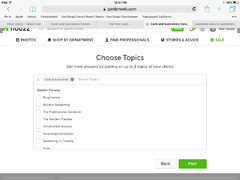
    Had a lot of trouble posting my first thread. The buttons CLOSE and NEXT appear - WTF do they mean?? Don´t like it at all - we seem to be getting further from GardenWeb and closer to Houzz´s commercial business.

    SoCal Stewart (San Diego, Ca Zone 10A/10B) thanked SpanishFly - (Mediterranean)
  • 8 years ago

    I'm not crazy about it either. I especially don't like how new threads are opened in new tabs.

    SoCal Stewart (San Diego, Ca Zone 10A/10B) thanked mesembs
  • 8 years ago
    last modified: 8 years ago

    I don't see other-older pages we were able to find at the bottom. Am I blind? Do not like threads opening in new tabs either...who the heck decided to make these changes and why??? Change may be good but only if for better - this doesn't seems to be.

    SoCal Stewart (San Diego, Ca Zone 10A/10B) thanked rina_Ontario,Canada 5a
  • 8 years ago

    I hate it. I bookmarked this forum so I can get to it quickly, but I can't easily find the other plant forums I like to look at. Guess, once I find them, I'll have to bookmark them as well. I don't want to be welcomed by some faceless entity, don't care about who's top whatever.

    SoCal Stewart (San Diego, Ca Zone 10A/10B) thanked stupidlazydog CT zone 5b/6a
  • 8 years ago

    There is a list of forums in no particular order. How can one find a forum, just get lucky? It’s a mess. I agree with others here.

    SoCal Stewart (San Diego, Ca Zone 10A/10B) thanked socks
  • 8 years ago

    socks, yes. I was looking for the Adenium forum so went to the Stories & Advice link at the top of the page. Instead of seeing the usual list in alpha order, everything was scattered about randomly on no order that I could discern. I then noticed a search bar at the top of the page and typed in Adenium and it popped right up to the top. I then clicked on the link. After getting to that forum I clicked "follow" on the right hand side which changed to "following" and "Adenium" then appeared back on "my main page" (for lack of better term) in a box on the left side that says "your topics"

    Hope that helps.

  • 8 years ago

    Can anyone explain the organization - or lack thereof - on this page? Apparently alphabetical order is a thing of the past.

    https://www.gardenweb.com/discussions/explore-topics

    Edit: SoCal Stewart - did that make your life easier? (I am mocking Microsoft et.al., not you, my friend!)


    Click on the Featured link - many are a decade old with 4 comments!


    I don't like for the page to load more results when I get to the bottom. MAYBE I want to skip to page 8, but now I have to keep scrolling and loading. Wow - that's a real time saver!

    SoCal Stewart (San Diego, Ca Zone 10A/10B) thanked Crenda 10A SW FL
  • 8 years ago

    Exactly as SoCal Stew says - I actually find this easier as now I have all of my followed forums in a list on my page and I can easily switch among them. The alpa order was not bulletproof - I wanted to follow 'Succulents' but it was under 'Cactus and Succulents'. With the search bar, when I typed in 'Succulents', I had it after two keystrokes.

    Give yourselves time to get used to it and then decide if you like it or not.

    SoCal Stewart (San Diego, Ca Zone 10A/10B) thanked Sara Malone Zone 9b
  • 8 years ago

    Crenda, HA!!! Nope! Not hardly! STILL hate it! Hate the looks. Hate the functionality. Hate the way each click of a topic opens a new page. Like Rina said change for change sake without making improvements or making it better is pointless.

    I wonder if they got any input from users or just some programmer's (non-users) idea of what they thought would make things "better". ...or justifying their positions and creating job security.

    Whatever the case, I don't like the roll out of this new format. While I would hope that GW would at least "listen" to user feedback (although each time I click on the faq link, it takes me to a blank page...AND I can never seem to get to the bottom of a page as the topics just keep filling in) I am not optimistic that GW will revert back to the old format.

    I think that it will be up to us to figure things out on this new format and relay to each other the tips and features we find.

  • 8 years ago
    last modified: 8 years ago

    Sara

    Over all, changes are for the worse. Totally cluttered and hard to find old threads (I still do not know where they are?)... Opening in a new tabs...Having to scroll down to last message...what a waste of time. I do not see any advantage in changes they made so far. I had bookmarked few forums I follow, and it was very easy to switch between them. Having 'Your topics' box on left doesn't improve the site at all.

    SoCal Stewart (San Diego, Ca Zone 10A/10B) thanked rina_Ontario,Canada 5a
  • 8 years ago

    And another thing - I am getting hacked off keep having to delete the windows that keep cluttering my top bar.

    SoCal Stewart (San Diego, Ca Zone 10A/10B) thanked SpanishFly - (Mediterranean)
  • 8 years ago

    Nope, no, NOT!

    SoCal Stewart (San Diego, Ca Zone 10A/10B) thanked aloebot
  • 8 years ago

    I don't believe that Houzz really care about us Garden Web people; they just want to get us to their household forums which are much more profitable. Discerning gardeners, especially on the hobby forums such as Cacti & Succulents, are not into spending money foolishly; it's probably time to look for a refuge elsewhere. I'm sad about this, but it's the way it's been going for a long time now. I am in several Facebook groups, such as Planet Jade tree, and there are many many cacti and succulent ones; they might not be like the old GW forums, but the last takeover did for most of those anyway.

    SoCal Stewart (San Diego, Ca Zone 10A/10B) thanked marguerite_gw Zone 9a
  • 8 years ago

    I am trying to start a new thread since yesterday but 'no luck. Perhaps I am 'thick', but can't figure it, and can't find answer on FAQ...any tips please?

  • 8 years ago

    Hi Rina. If you go to the top of this page & near the top left hand side click on “Cacti & Succulents” just under the little green house, it will take you to a page where you can begin a new conversation or ask a question. I believe it says “start a discussion”. That is how I began this one.

    Hope that helps.

    Tyler

  • 8 years ago

    Well, boogers!! Did you know that if you post on a thread that has been cross-posted with another forum, you have then posted on all forums? I just posted on the lopsided plumeria thread and now I show up on the other 2 threads as well.

    No wonder there are people showing up who tell a poster to go to the c&s thread! Fine with consolidating the threads, but how about a heads up?

    You know, a little explanation of changes and asking for some input would have worked wonders.

    SoCal Stewart (San Diego, Ca Zone 10A/10B) thanked Crenda 10A SW FL
  • 8 years ago

    Tyler

    That is where I typed what I wanted to say and attached photo. But what to do after that? I clicked on 'Next', I even clicked on 'Close' and nothing happened. I do not see 'post' button (or something similar) anywhere. My post, that I tried 5th time today, just ends up sitting there and does nothing. I can only delete it by exiting that thread...I am able to respond on any thread started already, like this one.

  • 8 years ago

    As Marguerite said, Houzz doesn't care. They just want to sell us some 'curb appeal' products or hook us up with a conrtibuting contractor. It's all in the $.

    SoCal Stewart (San Diego, Ca Zone 10A/10B) thanked aloebot
  • 8 years ago
    last modified: 8 years ago

    Rina

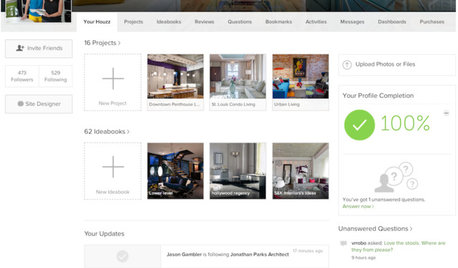
    I just performed those steps as described above. You didn't get something that looked like this?

    ...and then this? I checked no boxes. Just clicked post and that was it. Of course the pictures above and below were for demonstration purposes only and I cancelled prior to actually posting.

  • 8 years ago

    The "upgrades" are garbage. I have been trying for 30+ minutes to make a post and it's not working. The green button is just showing 3 white dots. I'm guessing I put too many or too large pictures or something but the site could at least throw up an error or something instead of sitting there "loading" for eternity.

  • 8 years ago
    last modified: 8 years ago

    I posted this in Houseplants in Tiffany's New formatting post:

    There is a forum called "Using Houzz" (who knew?) that has [THIS Thread[(https://www.houzz.com/discussions/new-look-for-gardenweb-topics-dsvw-vd~5342444?n=965) about the new look.

    tj

  • 8 years ago

    I finally got my post to go through but then it disappeared. I had to post the extra pictures in additional comments and I'm guessing the system thinks I'm spamming because the post is now gone. I'm wondering if maybe I'm shadow banned. If anyone can see this, can you reply to my comment?

  • 8 years ago

    Gardenwombat, I see your post.

  • 8 years ago

    Me too

  • 8 years ago
    last modified: 8 years ago

    What is it with people’s old names being used in the list of topics in this forum? There I see old names like milevskistefan and Petenjude151. Once you are inside a topic, the names are updated to Stefan, Spanishfly etc.

  • 8 years ago

    Thanks, I guess I just can't make new posts. :(

  • 8 years ago
    last modified: 8 years ago

    Tyler

    Thanks for trying to help. I tried again, 7th time. Nothing is happeing. Photo or not. I keep clicking on 'Next' but nothing happens. I use laptop, and never had problems before. Very frustrating...makes me want to leave.

    Same as gardenwombat. It doesn't post new thread.

    Tyler, I do not get what you showed in pic #2, regardless what I do.

    Thread tj posted link to is not helping - whoever Emily is, she doesn't offer real help. Just bla-bla-bla...And even that is very seldom regardless how mamy ppl are asking-complaining.

  • 8 years ago

    Hey Rina. I just posted to another thread saying that I've been using my iPad. Maybe there is a difference between PC's and tablets regarding the functionality of their site or they haven't worked out all of the bugs.

    Since this roll out I have gotten nothing but blank pages when I click on the faq links.

  • 8 years ago

    Maybe the FAQ is overloaded lol. Hopefully that will make them take a look and do something!

  • 8 years ago

    I got something on the faq link. Android tablet.

  • 8 years ago

    I see same q and a as before on FAQ page - there are number of them, but IMO do not offer any help. For example, does anyone here considers this to be helpful answer if you do exactly so but nothing happens???

    As I said before, I use laptop. If that is the 'problem', there should be some kind of warning, like: this works well if using I phone...or iPad...or anything helpful.

  • 8 years ago
    last modified: 8 years ago

    This may just be the most comments on any topic I’ve started thus far, although for all the WRONG reasons.

  • 8 years ago

    I like the new tab opening for a forum discussion, I don't have to hit back button now :) I peep on a lot of posts.

    not a fan of this "top commenters" box I see on the side of my home screen, must everything be a competition? and it's not even specific to the cacti and succulent forum!!

    for the life of me i just want to be able to open the cacti and succulent forum without clicking through everything on Houzz. I don't care about re-modeling bathrooms, Houzz.

    there is an app?? for android? web page wont load on my phone anymore.

    SoCal Stewart (San Diego, Ca Zone 10A/10B) thanked Gabby C (FL 9A)
  • 8 years ago
    last modified: 8 years ago

    Gabby - The app is worse than the website! At least for Android. I wrote Houzz one time and asked why my searches for simple terms like "Lithops" got no hits and they flat out told me you can't search GardenWeb forums from the App.

    You also cannot edit a post once it's created from the App.

    Oh, while I'm at it - now I can't create a new post from the App. It lets me create the new post, and if I want it to appear in some forum named "Before & After" then it creates a post just fine. If I remove the Before & After tag and check the Cacti & Succulent tag, then clicking post does nothing. If I leave the Before & After tag and just add the C&S tag (you're supposed to be able to cross post in 3 forums) - it does nothing.

    I have to leave the app and use the website on my phone to actually do anything other than read posts or reply to posts others have started.

    AND, to top it all off, the last time I posted and complained about Houzz (same topics as above, no bad language...) - the post completely disappeared from Houzz for at least a full day - so they're censoring people who don't like the changes! Let's see if this one gets to stay.

    If it wasn't for the wonderful contributors here (best I've found on the net) - I'd not only leave Houzz, I'd run screaming from it :)

    ETA - I've had NO issues with the website itself, I even kind of like the changes, being able to find my "favorite" forums easily, etc... - but the App is ridiculous.

    SoCal Stewart (San Diego, Ca Zone 10A/10B) thanked Pluto1415 (6a/b, NE Ohio)
  • SoCal Stewart (San Diego, Ca Zone 10A/10B) thanked hoovb zone 9 sunset 23
  • 8 years ago

    Rina, if your problem is when you say next, I found at that point it wouldn't do anything unless you had picked which topic you wanted to post to. Ex.; cactus and succulents. Even though you are starting the post from here, it still hopes you will post to 20 other groups. It doesn't automatically check the box for us.

    SoCal Stewart (San Diego, Ca Zone 10A/10B) thanked aloebot
  • 8 years ago
    last modified: 8 years ago

    aloebot

    It still doesn't work.

    While on any forum (usually C&S if posting about C&S; but tried other forums), I choose to start new thread by clicking on 'Start a discussion'. I type subject in top bar, and then text. Tested without photo and with a photo. They show OK. When finished, I click on 'Next' but nothing happens at all. Message seems to be OK, but it just sits there. Whole page below is gray. If clicking on 'Close' nothing happens just the same. I expect page to close but it doesn't. If I click on any topic in a box on left (I don't think that's correct, but tried anyway), the post disappears. I also tried to click on chosen topic before hitting 'Next' but message disappears.

    I tried by clicking on the houzz logo in upper left. New page YOUR TOPICS appears. Doing exactly same as described above, I can't get further than just making a post - clicking on 'Next' doesn't work...I am out of ideas.

    Maybe it is just me...

    ETA:

    FAQ added some more info in question "How do I post on Houzz". Followed exactly (same as I already tried), but same happens - nothing happens after I click on 'NEXT'...Choose topic doesn't show, regardless what I tried.

  • 8 years ago

    I fixed this problem once before after I made a new account. Have to remember how I did it..

  • 8 years ago

    I am not willing to make new account (perhaps I sound like spoiled brat); why should I just because they made ridiculous changes...

    Does anyone know how to see older posts?

  • 8 years ago

    Now when I open a new thread it uses the same tab. Hooray!!

    SoCal Stewart (San Diego, Ca Zone 10A/10B) thanked mesembs
  • 8 years ago

    I noticed it would use the same tab when I accessed from my iPhone, but not on my iPad. On the iPad, it opened a new tab. Just mentioned the brand as some people mentioned android devices, so not sure there was a difference in the way the site behaved depending on that.

    Also, when I tried to begin a new thread on my phone, I ran into the roadblock that Rina did. Hitting "post" with nothing happening. I wound up copying and pasting the text and emailing it to myself from my phone so I wouldn't have to type it all over again. I opened up the email on my iPad and copied and pasted the text from my email to begin the new thread on my iPad. I didn't run into that roadblock, however I needed to "comment" on my post in order to add the photo. I had put the photo in the original post, but when it came up, no photo.

  • 8 years ago
    last modified: 8 years ago

    mesembs

    I just noticed that too!

    Tyler

    I still can't start new post...I do not use phone or iPad, just a laptop. I don't see many complaining about same problem, and can't figure out why.

  • 8 years ago

    What browser are you using? Maybe that's the problem, I'm using safari, and the one time I started a thread it worked fine.