Software
Houzz Logo Print
mtvhike

HDMI cable connection problems

5 years ago
last modified: 5 years ago
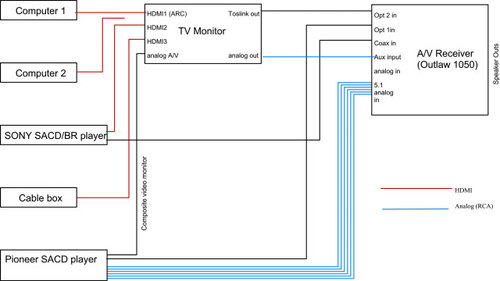
Maybe this is too much information, but here goes. A couple of years ago I started setting up an AV system in my vacation-and-soon-to-be-retirement home. I began with a TV and a sound bar. The TV has 3 HDMI inputs, so I used one for my computer. I used the second one for my BluRay/SACD player, and the third for my cable box. To upgrade the sound, I got an older generation AV receiver and speakers from a store closeout and fed the output from the TV to it. I also have another computer and wish to use that also, but I ran out of inputs, so I have to switch cables when necessary. As an aside, does it matter which one goes to HDMI1, which has ARC? The drawing is shown below:


Two problems with this system: Not enough inputs, and I am using the TV's audio system for everything, and I'm not sure if it's the best quality. So I got an HDMI switch and used that. That switch, in addition to switching inputs, also put the audio from the HDMI input into one of three different outputs - optical digital, coaxial digital, and analog RCA. The HDMI switch part worked, but non of the additional outputs, so I contacted the supplier and they sent me another one. The new one did work as expected, for awhile. Then it got flaky - sometimes it wouldn't switch inputs, sometimes the digital audio outputs wouldn't work. Often unplugging it from the power would reset it, so finally I gave up on it. The drawing for the second setup is below:


I have a few specific questions:

1. Does it matter which input I use for the TV monitor (one is ARC and the others are not)? None of the inputs in the HDMI switch are labeled ARC.

2. If I put a disc in the SONY player, it may or may not work properly, depending on the kind of disc (it always worked in the initial setup).

3. Does the quality of the HDMI cable affect the performance? Sometimes changing the cable helps, but I can't get any consistent results. All of the cable lengths are 6 feet or less.

4. Any other improvements? Maybe I need to get a different switch, any suggestions? Mine cost $59 on line.

Comments (12)

  • 5 years ago
    last modified: 5 years ago
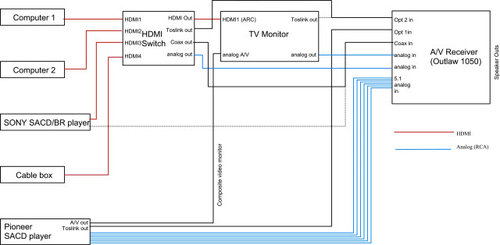
    I should start by saying I don't have a surround sound system. I do have the TV connected to my stereo with its two speakers in the room where the TV is (as well as to speakers elsewhere) but we rarely use that. If you do use the surround sound feature, what kind of a connection is needed to get the 5 track audio to the receiver?

    What for and how do you use each of the signal sources (far left)?

    Why do you need two DVD/CD players connected to the TV and the receiver?

    Why do you need duplicate connections between the Pioneer and the receiver? Ditto for the Sony?

    I'd use ARC for the Sony or the cable box, if either can take advantage of the capability. If nothing can, it doesn't matter.

  • 5 years ago

    Thank you, Elmer, for asking your questions. I don't actually have a surround sound system, but I do have the capability for such, just missing some speakers. I started out as you now do, with a sound bar as external speakers for the TV. I'm under the impression that HDMI carries 5.1 signals to devices which accept them. Since my receiver doesn't have an HDMI input, I am hoping that one of the two digital connections will do that, but I can't really test it now without the extra speakers. The Pioneer player has 6 analog connections, and the Outlaw has 6 surround analog inputs, so that's what I would use for testing, after I get the additional speakers.

    I don't quite understand your next question - computer1 is a laptop with a small screen, and computer2 doesn't have any monitor. The others should be self evident.

    The Sony player is a newer one than the Pioneer and supports more disc formats, but it doesn't have a DAC built in; it depends on the DAC in whatever it's connected to.

    Regarding ARC, I'm not sure what it's useful for in my case, but I haven't seen any effect of changing HDMI inputs.


    I need to test the differences in the various disc formats I mentioned; the most conspicuous affect is for an SACD which has surround, and that seems to mess up the HDMI switch (which does support both stereo and 5.1), and is why I removed it from the system.

  • 5 years ago
    last modified: 5 years ago

    I can't grasp what you're trying to accomplish. I've set up video, audio, and video/audio systems more than a dozen times, for myself and for friends and family. Each source should have one and only one connection. The Pioneer alone has three connections - one to the TV, and two (!) to the same receiver.

    You say the Sony doesn't have a DAC. So what? That just means its outbound signals are digital. Most sources are digital these days so that's not unusual.

    The rest of what you're trying to do makes no sense to me - why you have more than one disk player, why they each have multiple connections. Pick one, store the other. Use one connection, detach the other.

    I think I have a good understanding of connections and system setups. I can't help but think you've tied your shoelaces together with your approach. If you do one of each - device and connection - it should work fine. Using different PCs with one HDMI cable is no issue since they're different and you'd only be using one at a time.

    I can't help you beyond that. Good luck.

  • 5 years ago

    Sorry to draw you into this rabbit hole! The connection between the pioneer to the TV is just for the video (so I know what I'm playing). And, yes, there are two to the receiver. I'm still debugging. I know that the 5.1 set of 6 analog cables works (once I get some surround speakers). I just want to find out how the digital out works. Does it support 5.1?

    The Sony doesn't have a DAC and my AV receiver doesn't have HDMI inputs. Yes, I have multiple possible connections and when I decide which works best, I'll eliminate the others.

    Thanks for your inputs.

  • 5 years ago

    Connections either work or don't work - it's binary. The only difference between the result could be which route uses the better DAC or which uses the better amplifier or which of the two better compliment the particular sound source. In that you don't seem to be dealing with even mid-range equipment alternatives, I can't imagine it would make much of a difference.


    Connecting devices like these shouldn't be difficult nor should the means used matter much. I remember when I bought a new TV and replaced component analog connections from my DISH box with an HDMI cable, hoping to see an improvement in the picture. It made no difference at all.


    A question you asked above was about the "quality" of cables. Electricity flows where it can flow. If the length is not tens and tens of feet long, the connections are secure (almost always are with new cables), then nothing is gained by spending more on cables. I've seen silliness in stores like "directional cables" (with an arrow to show intended signal path), "oxygen-free cables", "high speed", and more, all of which is bunk. I've bought both HDMI and ethernet from Cables for Less online, and also basic level stuff from Amazon. It all works and it all works fine. No need to spend more than $10 for any short-ish length of cable and all work fine. I'm still using bare bones cheap RCA analog lines that are more than 30 years old - they get connected and then just work, no issues.


    "Speaker wire"? Buy simple electrical wire at a hardware or Home Depot type store, don't scrimp on the size. Larger (smaller number gauge) is always better, and the longer the run, the large the gauge to use. I haven't bought any lately but I want to say nothing smaller than about 12 gauge.

  • 5 years ago

    I agree with everything you said. Although I use 12 Ga for long speaker wires, I can't hear any difference for short runs. Thanks for your interest.

  • 5 years ago
    last modified: 5 years ago

    IMHO do yourself a favor and get a receiver with multiple HDMI inputs. All HDMI inputs should connect to the receiver, and the HDMI receiver output to the TV. ARC will then work correctly. SACD player connects to receiver audio via toslink (optical) or digital coax (like RCA but not analog) cable. You have a wonderful SACD player and missing all the great audio due to RCA connections. Cables do matter but no need to go crazy, see link below for a great place to buy cables.

    Monoprice

  • 5 years ago

    Question: Are you using the TV as a computer monitor or to play videos on the TV? If the latter maybe consider a media server on the PC (free ones like Jellyfin or Kodi) and 'cast' to the TV or a more modern receiver for music. This would avoid those HDMI physical connections if that's the goal.

  • 5 years ago

    "Although I use 12 Ga for long speaker wires, I can't hear any difference for short runs"


    It isn't so much hearing a difference but that's part of it. Speaker signals are analog. The wire gauge affects flow resistance. You lose "power" (another word for volume) and, to my ear. sound quality when the wire offers any resistance at all. I've tested it. Other than a minor cost difference, there's no advantage to using too thin a gauge for any connection and there certainly is a disadvantage. Err on the side of using too thick a wire, there's nothing to lose.


  • 5 years ago

    Badabing2 - the connections for the computers to the TV is for computer monitor use and, for my laptop (computer 1), audio. I have my music files on that computer and play them through the AV receiver. Computer1 only has HDMI (and headphone) outputs). If I want to stream or watch movies, the TV has a ROKU interface, as does the Sony player, so don't need any hi rez video from the computer (it does have 4K output, however).


    I don't want to buy another AV receiver because I have another one (a Yamaha AV 1010) in my old house which is coming to the new house within a couple of years. It has all the HDMI switching I need. In fact, everything except the Outlaw receiver came from there.

  • 5 years ago

    @mtvhike - ok, no new receiver. You could use screen sharing from the computers to the TV to free up the HDMI port (and use the headphone jack for audio). I'd then plug the SACD into the HDMI, you are really losing a ton of video quality with that composite video to the TV compared to what it's capable of via HDMI. Another thought is to use Bluetooth to receiver from computer and be completely wireless for the audio section.

  • 5 years ago

    Sorry, I didn't make myself clear. Yes, the composite video from the Pioneer SACD player sucks, but it's only for seeing the tracks playing. If I want to play a DVD (or anything with video), I use the Sony X800, via it's HDMI port (it actually has 2 ports, but I don't use the second).

    The primary purpose of this post is the strange behavior of my HDMI connections. Using the TV as my HDMI switch works fine, but I'm concerned with the audio out from the TV (and from my computer), since I doubt either have the finest DAC. I assume my Outlaw AVR has the best DAC in my stable. And, if I want surround sound, I think only the Outlaw's DAC can process it. (I can play a CD or SACD with 5.1 with my Pioneer, since it has a DAC built in to serve it's 6 analog outs.


    I'm away from that house right now, and when I get back, I'll try to more carefully evaluate my HDMI switch problem.


    Thanks, all

Sponsored
More Discussions