Software
Houzz Logo Print
hzdeleted_52636145

Seeking new construction home network design advice

4 years ago
last modified: 4 years ago
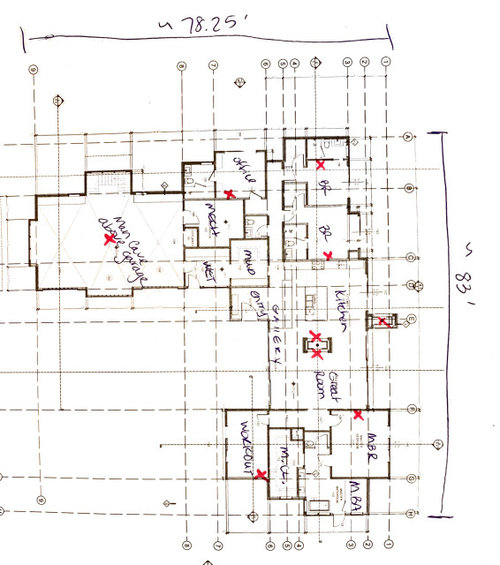
Hello, this is my first time posting here. I am looking for advice on how to set up a network (all hardware, cables, other gear, etc.) in this new construction build. The goal is to to have excellent wi-fi coverage at all the wi-fi streaming points needed (identified by an X) in the image


Thank you in advance for your advice.

Comments (24)

  • 4 years ago

    Is this for your personal residence?

  • PRO
    4 years ago

    Yes, this is our personal residence. My husband and I are gc’ing the build.

  • 4 years ago

    So we have TV’s and gaming hardwired in the rooms they are in. Everything else is wireless and supported by boosters. We have our router in the garage, one booster on main floor, one downstairs. It took a bit to figure out but works great and outside too. If I had to do it again I would get a mesh system though.

  • 4 years ago
    last modified: 4 years ago

    I'd recommend a mesh system. I'd put the router in the mud room in a cabinet on the wall with the entry way (remember to wire for power and a coax cable for the incoming internet source). Then I'd put a satellite in the master closet, for a signal path mostly down the gallery from the router (remember power need there too). If you wanted to be certain, plan on an Ethernet line from the mud room to the space above the garage, or use another satellite up there. You'll unlikely have any weak signal areas but if you do, you can always add another satellite. Good, cheap, and reliable.

    Or, another approach, forget about ethernet to the space above the garage and put a satellite in the office where the X is as well as in the master closet. One router, two satellites.


    I have a mesh system - one of the early ones. An Orbi, now 5 years old. Purchased to replace a top quality router and a repeater. Performance with just the single Orbi router and one satellite in a long, narrow house (over 130 feet long from end to end) is outstanding. Completely counter to what you'd choose to do with new construction, my router is on the far end of the house and the satellite is about 80 feet away. Strong signals and high speeds throughout, and outside too.

    There are other brands and models available now. PC Mag website has objective product test data and recommendations you can rely on, that are kept current. I think most of the different products perform pretty well.

  • 4 years ago

    Thirding the mesh recommendation. We have Google Nest gear - the network points double as reasonably nice speakers. We have them all over the house. The new house will have cat6 to each room we could potentially have a TV in, but for day to day internet access, we’ll continue using the Google wifi gear.


    (disclosure: Our elder son works for Google, so we do get a discount on the gear. It’s great stuff, though.)

  • 4 years ago

    Get a Ubiquiti system with wired backhaul. Yes its a mesh system, but you don't sacrifice bandwidth for the meshing capability. You can power the good ones with PoE so you don't have to run 120v circuits to them.


    Any device not mobile needs Cat6A ran to its location.


    If you are really serious have a pro run a simulation on your layout for wifi coverage. If you don't want to go that far put an in ceiling WAP in every major room making sure to keep at least one-two room between at least as buffer, too dense a coverage is as bad as too little. Always assign a different channel to each AP, 1/6/11 for 2.4Ghz. 5Ghz you have more freedom.


    Looking at your layout I would do mancave, hall outside guest bedrooms, kitchen, workout room, MBR. Run all those cables to a central location to a switch. Manage that switch with a Dream Machine Pro.


    Now is the best time to also run ethernet to any location you want a security camera too.


    Get Wifi 6 capable APs.

  • 4 years ago

    Or if affordable go for WiFi 6E (newer extended spectrum). Google it. New standard so might be a bit more pricey.

  • 4 years ago
    last modified: 4 years ago

    I disagree that fixed locations need to be wired. Based on my own experiences with now older technology over long distances and through many walls. Wifi connected devices - a desktop all in one as an example - tests out to 65+ megs of internet download connected to the Orbi satellite, whose signal passes through a 4 inch thick glulam and two walls to get to the PC and 3 walls on the backhaul to get to the router. The satellite easily serves two streaming content TVs and other users at the same time. Again, how much bandwidth capacity is needed?

    Ubiiquiti tested to mediocre performance in the attached NY Times article. I've not heard it being widely recommended, and it's not mentioned in the PC Mag review linked above either. I also think cobalty is overcomplicating the approach. Unless this new house has interior brick or concrete walls, the layout isn't that large or difficult. .

    If you want certainty, hire an expert to design the layout, choose the equipment, and be responsible for the result.

    Good luck.

    NY Times mesh tests and recommendations

  • 4 years ago

    We are doing MESH as well. I asked my IT dept. at work and that is what they recommended to me.

  • 4 years ago

    We noticed a huge improvement for gaming when hardwired. Just our personal experience. We got the advice to hardwire from our internet provider.

  • 4 years ago

    So you say you have the router in the garage - note garage drywall is thicker and so walls are thicker than interior drywall walls and they're also insulated. Both hinder the RF signals. How far and through how many walls did signals travel to get to users and game players?


    And a "booster" - was that a "repeater"? If so, repeaters are known to decrease wifi "speed" (really capacity) by 50 percent because each signal is broadcast over the main frequencies twice.


    Am I on the right track or not? Mesh equipment might have solved the problem.

  • 4 years ago

    Like I said if I could do it again I would have done mesh. But what we have cost us nothing extra and works well now. Took some troubleshooting but we are content.

  • 4 years ago
    last modified: 4 years ago

    Cobalty, Ubiquiti used to be big in the long range wifi space. At one point, nearly every cruising sailboat had some of their gear. Nice to see they’re still around. They made quality stuff.

  • PRO
    4 years ago

    The OP has left Houzz.

  • 4 years ago

    @Elmer J Fudd


    If all your stationary devices are hardwired then a wired backhaul on your mesh network isn't needed necessarily. Unless you have 4 teenagers or whatever....


    Speed isn't everything to a home network either, although in the latency test in that article you listed the UAP Lite smoked everything else.....


    Ubiquiti offers features that I cannot live without:


    GeoIP blocking.

    VLANs on multiple subnets - Network segregation

    RADIUS for VPN

    Port Isolation

    Custom firewall rules - Very important


  • 4 years ago

    For this house that looks to be certain caliber, I would agree with Cobalty. First, you need to map out your connections - beyond just phones in your hand and computer in your lap. Security + cameras, tvs, home automation, appliances, gaming, speakers, etc. And decide not just how good access is from each room (yard included), but how critical attained speed is to you, because that will determine your level of wifi equipment (lots of gaming, downloading movies, video conferencing, # users, etc).

    There should be a minimum of homeruns from each connected room back to a control center of Cat6 (for PoE and lesser) and coax (for tv broadband cable or antenna) just as a fallback. If you know you will have security cameras or built in speakers, review the general ranges of products to know what and where to physically run wires, because they can vary between wireless, Cat6, or coax to connect them.

    Mesh is hands down the way to go for a long drawn out floorplan. For comparison and learning, research 3 "tiers" of products that have good info available: Eero, AmpliFi (Ubiquiti), and UniFi (Ubiquiti). These tiers vary the level of control and sophistication you have or want. They are all very good products and extremely popular (UniFi commercially).

  • 4 years ago
    last modified: 4 years ago

    cobalty, the features you describe as essential to you are ones that the vast, vast majority of consumers neither know anything about nor feel the same way about. I'm not an engineer or a tech person but I've spent my adult life in Silicon Valley and it's hard to out-geek me so long as a discussion doesn't get deep into the technicalities.

    Backhauls don't need to be wired.

    Latency simply means delay, not speed, as I'm sure you understand. For the vast, vast majority of internet users, the greatest factor impacting latency is the signal pathway to/from the internet after leaving their homes. And, for this same vast majority, their normal internet use is wholly unaffected by latency. As I'm sure you know, what ISPs and equipment companies describe as internet "speed" is really capacity - how much the truck can carry, not how fast the truck is travelling. Internet signals travel at the speed of light- congestion, distance, and equipment processing speeds, among other things, are what contribute to latency. What better way to limit a teenager's time wasted playing games than to have equipment that offers only limited or moderate response times because of latency.

    People I encounter who proselytize for Linux take a similar approach - look at all the things "my" approach offers and your's doesn't. Except, how many of those things does the buying public think to be essential or are able to deal with as the softrware and hardware require? Answer- few or none.

    Home IT equipment is a plug and play ecosystem. To the extent possible, products configure themselves with onboard setup software. They're shipped with programs consumers can use to receive setup steps and configuration items that can't be automated - to enter passwords, etc. Few ever access access the innards again. If you ask someone what the password is to access their router, the response will usually be incorrect, responding with what the Wifi password is. Often that even needs to be looked up or was written on the bottom of the router. And Wifi passwords? No, they don't know how to change them or set the channels used. It's why people buy iPhones instead of Android ones, Macs instead of PCs, iPads instead of competing ones. . They want to use the technology without having to setup, configure, troubleshoot, adapt or fiddle with it.

    I have no doubt the equipment you prefer does what you want it to and that's great for you. If the market found Ubiquiti's products as compelling as you do, they would be more than just the very small player in the marketplace for home equipment that they are. They're not more and I think enough said.

    I do agree with the suggestion to give thought to wiring for things like cameras. The rest of it is optional, the world runs on Wifi these days and the infrastructure equipment that serves it is more than up to the task.

  • 4 years ago

    @Elmer J Fudd


    I agree with the paragraph you wrote about ease of use. It took me many many man hours to get my network how I want it. Ubiquiti understands this and rolled out their Amplifi line for those consumers. But their core business revolves small-med businesses that cannot afford Cisco.


    I still disagree about thinking Wifi trumps Ethernet especially in a crowded environ such as a large family home, or where large data transfers are needed between home devices. This will have to be a choice the OP makes in regards to the desired performance required for their lifestyle.


    Also a wireless backhaul literally sacrifices a band of your AP or wireless router to do just that.


    Oh and this is from your article LOL


    Tested for an earlier version of this guide, a wired Ethernet connection was more than seven times faster than the highest throughput of any wireless network. No matter what misleading hype you may see on the box, Wi-Fi cannot outrun Gigabit Ethernet, period.


  • 4 years ago
    last modified: 4 years ago

    Again, it's capacity, not speed. A backhaul needs no more capacity than the quantum of the signals it passes. Tell me how much that's likely to be in a home environment? A three bedroom house. Maybe wires for cameras and where the main TV will be but beyond that, I'm not sure.

    Remember the conversation was in response to the original question, from someone perhaps who's moved on but the discussion will remain for others more is needed.

    We can agree to disagree, I think your suggestion is akin to sending a truck and trailer to pick up a purchase of a candy bar and a can of soda. Overkill.

  • 4 years ago

    Yeah, we’re running cable to everywhere we might possibly need it.

  • 4 years ago

    One big advantage (for me) is that wired Ethernet doesn't require passwords. Of course, WiFi does, for security.

  • 4 years ago
    last modified: 4 years ago

    It's hardly a burden to enter a Wi-Fi password once for each device.

    If you're security and performance conscious, you have your PC browsers set to clear cache, cookies, and the rest of the garbage that accumulates in use, when the browser is shut down. If so, each time (each day, or a few times a day) you go to a particular website that has a log-on, you need to enter a password. Do you find that burdensome? I don't. And that's recurring, where a Wi-Fi password is done once and once only per device (if the password remains unchanged).


    A suggestion, for those who find Wifi passwords burdonsome. Not infrequently, passwords provided by ISPs and others are long strings that look like *$mm&huOmPw*Y38ZQjj" or something similar, overkill and difficult to work with. Try something nonsensical but easy to remember with intentional mispellings, like

    88fiskandHOOTbeer (instead of "fish")

    and you'll have the same security and something easy to remember.

Sponsored
More Discussions