Software
Houzz Logo Print
bunnyemerald

Mac trade-in works!

4 years ago

A couple of weeks ago I bought a new MacBook Pro. My old one was 7 years old. I cleaned it up and took it into the Apple Store and they gave me $260 for it, a 7-year-old laptop that was beginning to delaminate around the edges of the display. The reason I'm posting this is that when I bought the new one, the Apple guy in the store told me that they tended to rate the old machines more generously in person than if you send them in to Apple.

Comments (18)

  • 4 years ago
    last modified: 4 years ago

    My daughter has an M1 MacBook Air (gold) and she loves it. The only reason I didn't consider it was because I wanted more ports.

    One of the things I love about my new 14" MacBook is that it's physically the same size as my old 13", but the narrower bezels give another inch of screen space. I can use my old carrier!

    P.S. $2.99/month gives you 200 GB of iCloud storage.

  • 4 years ago

    hmm, what do you use the ports for? like flash drives? or to hook up to a monitor? Good reason to keep my old one around.

    Bunny thanked mtnrdredux_gw
  • 4 years ago

    I have an external drive for Time Machine backups (always plugged in), use a ring light for Zoom. There's also HDMI and a card reader. I like having 3 Thunderbolt ports. If you're not interested that much in trade-in value, keep the old one around.

  • 4 years ago

    I too use a port for back up and I have a card reader which is how I transfer photos from my digital camera.

    Bunny thanked Annie Deighnaugh
  • 4 years ago

    Can you tell me more about how/what you use for backups!

    Bunny thanked mtnrdredux_gw
  • 4 years ago

    Mtn, I use a portable hard drive. I recently bought a new one (G-drive off A, for around $100) which has two connector cables. One is a USB which is compatible with my current Macbook and another is the new Thunderbolt, or whatever they call the new port. I bought it in anticipation of getting a new Macbook in another year or two. I think the new Macs have much more built in storage, like 2-3 TB, and my portable also has 2-3 TB, can’t remember. More than enough for a while.

    Besides having things in the cloud, I drag and drop personal files and photos onto the hard drive about once a month.

    Bunny thanked OutsidePlaying
  • 4 years ago

    I have a 2015 MacBook Air, orginal battery, and I have been considering a new one. I hate to be left without one when they die. I probably just jinxed myself. Congrats on your new baby.

    Bunny thanked Allison0704
  • 4 years ago

    Another Macbook Air owner here. I just checked and mine is 2012. I got a new battery just before Covid hit. It was a good investment. I should probably get a new one, before this one kicks the bucket. I'd love to hear how you like your new Pro (and mtn, your new Air review, too).

    I also get the annoying disc almost full message. I think it is probably because I run MS on it and it takes up a huge amount of space. I'm not a tech person, so I might have this wrong, but when I go into look at what to remove, the MS seems to be a hog.

    Bunny thanked daisychain Zn3b
  • 4 years ago

    While we are talking about MacBooks, has anyone upgraded to Monterey and not had issues?

    Bunny thanked Allison0704
  • 4 years ago

    Monterey here, no issues that I'm aware of. This M1 with Monterey feels rock solid.

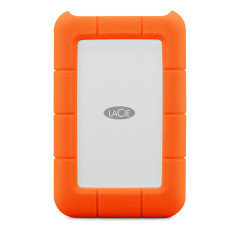
    This is the external drive I got. I love that it's orange. It's about $85 for 1 TB and I don't really need anything larger. Plug it into a Thunderbolt port and tell Time Machine to start backing up. The first complete backup took about 70 minutes. Now it does an incremental backup every hour or so of new/changed files.

    I had a 4-year-old Western Digital drive with my 2015 MacBook. I was able to migrate everything over to my new MacBook. Then the crashes began. It was the old USB WD drive. I was lucky to have gotten the restore. When I disconnected it the crashes stopped. The LaCie has been trouble-free. And it's very cute.


  • 4 years ago

    Thank you for this tip, Bunny. I have an aging MacBook plus the one I retired before this one. I had no idea store trade-ins were preferable.

    Bunny thanked Feathers11
  • 4 years ago
    last modified: 4 years ago

    Feathers, when I was planning my new purchase I did an online assessment of what my old one was worth on the Apple website. No scratches, dings, or signs of wear, battery good, etc. But depending on how they considered my display it meant the difference of over $200. When I was in the store buying my new one, I asked the guy about it. He said, they tend to be more forgiving in-store than wherever the devices get sent. I figured it was worth a try and there's an Apple Store not far from where I live. It reduced the price of my new MacBook by 13%. I don't think you can just bring in any old equipment, that it has to be in conjunction with a purchase. They told me I needed to do this within 2 weeks of my purchase.

  • 4 years ago

    Apple also does education and 10% military/veteran discounts.

    Bunny thanked Allison0704
  • 4 years ago

    Bunny, we've also had good luck taking our Macs in for warranty issues in person. A couple of times we were told if we were to send it in, the problem would not be covered by warranty and we'd have to pay out of pocket. However, when we took it to the Apple store, they fixed it for free. These were not small $ amounts.

    Bunny thanked daisychain Zn3b
  • 4 years ago

    Thanks Bunny, my LaCie is on its way.

    Bunny thanked mtnrdredux_gw
  • 4 years ago

    I don't have a MacBook and I will confess that I prefer using my desk-top over my laptop much of the time. (My sister informed me recently that no one uses a desktop anymore.) I need it for husband's business and I am usually just more comfy with my setup, big screen, etc. unless just scrolling the web. I also use an external hard drive. They are small and convenient. I'm not good about storing things in the cloud LOL. I also keep a flash-drive plugged in for photos. I don't save all photos to my computer.


    Enjoy your new computer @Bunny, sounds like you are pretty computer savvy!

    Bunny thanked Tina Marie
  • 4 years ago

    Mtn, those LaCies are indeed rugged. Throw it on the floor! Don't, but you could.

Sponsored
Haus Studio
Average rating: 4.8 out of 5 stars28 Reviews
Franklin County's Preferred Custom Cabinetry & Design Studio