Software
Houzz Logo Print
letstrydiy

How to bring light into this corner?

4 years ago
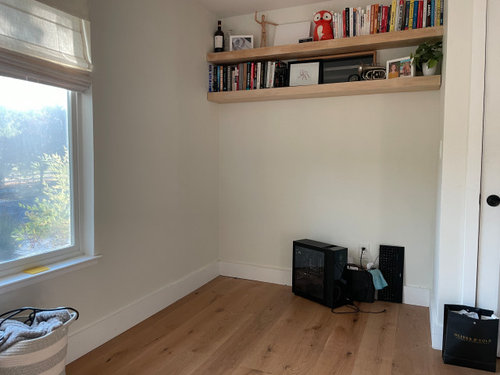
Hi all, I have a desk space that I'm building into this little converted closet but I'm having doubts because of the lack of natural light. My face is very dark in video calls (I WFH) and I don't have an easy way to look out into the distance to reduce eye strain. I really want this to work but I need to fix the lighting issue.


I thought about hanging a long horizontal mirror under the shelves, or adding some mirror decals (meh) to reflect some of the light back from the other side of the room into my face and to give my eyes a place to focus, but I'm curious if anyone has better ideas.


I don't want to use an artificial light source if I can help it. It wouldn't address the second challenge of having a place to refocus my eyes every now and then. Thanks for your thoughts!


Comments (25)

  • 4 years ago

    You are facing the wall? If so don't do that!

  • 4 years ago

    yeah, facing the wall. It’s a small room so I’ve tried facing the desk out into the room but it takes up a ton of space.

  • 4 years ago

    You should be facing the window for natural light on your face and to be able to look into the distance occasionally when doing calls. Could you place the desk right of the window with the "camera" near the window so you could face the window and "camera" at the same time? Or you could float the desk directly in front of the window. Dress the shelves more professionally and paint the wall that will be your background a color that is flattering to you. In other words, Work on an angle in front of and not in the former closet.

  • 4 years ago

    That’s actually how I had my desk most recently, but I didn’t like feeling stuck in the closet — it was a bit confining.

  • 4 years ago
    last modified: 4 years ago

    I bought similar to this recently, but a 6 inch.

    Vivitar Ring Light, Full Color, 8 Inch for $14.99

  • 4 years ago
    last modified: 4 years ago

    Another help is to place both hands, cupped, and cover eyes to create darkness and rest for your eyes.

    There are blue-light glasses... helpful idk.

  • PRO
    4 years ago
    last modified: 4 years ago

    What else is the room for? What purpose?

    Buy a desk. Put the desk PERPENDICULAR to the window . Or pick a different room. The answer to darkness is electricity or daylight. You're sitting facing a wall.....why? Put your back to the closet wall, it's a natural space to back up a chair, get a view out the window, hang art behind you for video calls. Lose the wine decor on the shelf, unless you write for the source !?

    Failing that? Post a drawing ( tape measure, pencil and paper, you do not need an APP) of the room, with all dimensions, and the dimensions of whatever you're trying to fit in there.

    Beyond that, it is impossible to help via so little information.

  • 4 years ago

    You posted a dilemma 10 months ago pretty much about the same thing.


    I think you said you work for a creativity company, then why not put up the company logo somewhere so it can be seen during zoom calls. You'd think my manager was in the office, but he has a wall with the company logo behind his desk(nice and creative).

  • 4 years ago
    last modified: 4 years ago

    @JAN MOYER all fair points. Let me see if I can provide more information.

    This is my home office. It's the only room available to me so I can't choose another.

    - I have a large bookcase, a recliner and my desk in here, primarily.

    - the window is only 20" off the floor, so if I'm in front of the window I'm on display to the street

    - if I go perpendicular in the middle of the room, I'm pretty much using all of the available space in the room for a desk (I have a long 70" desk that I love) -- however, I do love the feeling of this while sitting at my desk

    - I face the wall because I have a large 32" monitor I use for work and anything not against the wall makes the monitor stick out

    - I make wine, so I like the wine decor.

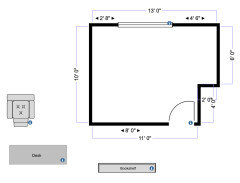
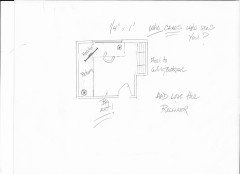
    Here is my best drawing of what I have to work with:


    @shirlpp I did. My biggest problem is really laying out the room to feel functional and not crowded.

  • 4 years ago

    Is it possible that you can take pics of what the room looks like?

  • PRO
    4 years ago
    last modified: 4 years ago

    Too many demands on a small space. A return can have files. But a buy or build right to the desk you love.

    Make sure your swivel chair, is comfy. Take your wine thing, out of the video conferencing view. And relax somewhere else. Sp WHAT if someone sees you working from the street??? Not to mention, you can get shades rising in direction from bottom TO the top, and block your knees or "jammie" bottoms.


    letstrydiy thanked JAN MOYER
  • 4 years ago

    @JAN MOYER thanks, Jan. That would be a tremendously large desk and overlap the bottom half of the window, but I think the seating location makes great sense without bringing too much glare into the background.


  • PRO
    4 years ago

    That's a 70 x 30 x 30 inch desk centered on the window. The left return butts to it. Make it anything you want. the point is to get the monitor into a corner, give yourself light, and a view.

    If the desk is open beneath? It is no issue.

    Stop making Cad drawings, show the room and the furniture you have, all of which I would guess are too heavy and bulky for your space.


  • 4 years ago
    last modified: 4 years ago

    I have my monitor facing the window. My office gets about the same amount of light as yours, and I used to have the desk facing a different wall. It felt too dark and depressing like that. Now that I face the window, I feel awash with more natural light, which is great for combating the blues on dim winter days. And of course looking outside is great for resting my eyes, and the light is flattering for zoom meetings.

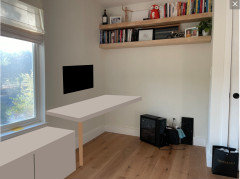
    You could accomplish this in your office if you put a small desk off to the right. For a custom size, have a countertop or butcher block cut to fit the space, and attach four legs, or wall mount it with one leg (like below).

    If space is really tight, consider a shallow desktop of about 22" deep, and wall mount the monitor (be sure it's about arm length away from where you are sitting). A mount like this will allow you to push it against the wall, or pull it out so you can access the ports on the back.

    Be sure to install something under the desktop that tucks cables out of sight. Find a low cabinet to place next to it. It will double as an extra surface area to spread out paperwork or whatnot.


    Here is what I built for my tiny office (the storage unit is a TV stand). Your window is lower than mine, so you would probably want to do a separate desk with a lower storage unit off to the left. But I'm showing you this to give you ideas. I run all of the cables behind the unit, and my printer, router, and snarls of wire are hidden behind those closed doors.

    Quite honestly? You could put something just like this in your office and block the bottom few inches of your window. It would be fine.


    letstrydiy thanked User
  • PRO
    4 years ago

    IMO this makes no sense why can't you face the window I need to ssee what the issue with pics of the whole space and the desk.

  • 4 years ago

    Following

  • 4 years ago

    Sirwoodland, I've had difficulty adapting to the zoom era too. Lighting can be a challenge. As with photography, I've found diffused or bounced light to be helpful. Too much direct light is as bad as too little, making you look scary and making it hard to see details in screen sharing. Also, you don't have to be pressed up against a window to benefit from the view and light. 


    You said you love the feeling of your desk being in the middle of the room perpendicular to the window. From your desk, you have a view out the window, to the door, and to the former-closet-corner where I envision your recliner? At an angle? I could imagine you grabbing your laptop and taking it over there for a different position for awhile. I suppose the bookcase could go there too, or against the wall with the door or behind you at the desk. I also could imagine, if the bookcase were behind you at the desk, you could have a big-screen tv in the former-closet under the shelves so you could cast your zoom meeting from it for a more social effect. Good to have the screen sheltered in there. I could also imagine a large decorative mirror on the door wall reflecting light from the window back into the center of the room, so that you would be getting light from the left and the right while on zoom. 


    You said the problem is your big monitor. First, it's an office, so is it really that big a deal if everything else is "right"? Is there room behind your monitor for anything to screen it? If not, how about bringing in a narrow console table or low shelves on which you could place an object or objects to screen your monitor? It might be useful for hiding cords too, if it has a solid back, or a solid decorative something could be slipped in-between it and the desk. It's all minor, as my point is that if everything else is a good feel for you, it can be done.

    letstrydiy thanked kl23
  • 4 years ago
    last modified: 4 years ago

    @kl23 -- you hit the nail on the head, you get it. I appreciate your thoughtful comment. Thank you. What you're describing is exactly what I'm going for and what I plan to do. I shuffled the furniture around the room yesterday and what feels best is the desk in the center of the room facing the former closet. The recliner and bookshelf in the former closet, as you've noted. I also went out and purchased a large mirror and placed it near the near across/perpendicular to the window and it floods the rest of the room with light.

    For my profession, I spend 10+ hours a day at that desk, so it needs to be comfortable and I think I've now achieved that. Thanks for the input, all.

  • 4 years ago

    Great! Glad you are happy with it. Care to share pictures?

  • 4 years ago

    Good that the set up works for you. For anyone else reading, I have my desk facing the windows and have shitters so I can adjust it and am not on display. Also have a nice front yard that is pleasant to look at. If facing a wall, I would put up art that speaks to me...

  • 4 years ago
    last modified: 4 years ago

    @kl23 -- absolutely! I am going to move everything around next week so will share out when done ;)

    @ladybug A 9a Houston area what I learned early on WFH during the pandemic was that I missed the open nature of an office (being able to look around, having big windows everywhere, etc). I have a very clear idea of what my dream home office would look like but I can't accommodate it here in my smaller room (long rectangular desk perpendicular to a large window, a nice couch in front of it to block wires, my feet, etc, shelving behind me, and a tv for presentations and virtual events in front of the couch. A very straight forward set up but practical for my needs.

    I tried the window behind the desk and two things happened -- to reduce glare, closing the blinds defeated the purpose of the natural light and limited the view for me. Even with a little light coming through, I still had too much glare behind my monitor and out of the corner of my eye. I also became constantly distracted by what was going on outside because it was in my direct line of sight. Everywhere I've read says that getting your desk perpendicular to a window is the optimal setup, and at this point I'd agree.

  • PRO
    4 years ago

    Put an LED strip light under the bottom shelf and get yourself a good ring light to stand on your desk for video calls.

  • 4 years ago

    Sirwoodland. I saw this and thought of you. I still like the idea of bookcase(s) behind the desk and a big screen tv on the former-closet wall that you can "cast" onto from your computer. But I like what you have too.

    Check out this photo from houzz - https://www.houzz.com/photos/ksmid-studio-eclectic-home-office-atlanta-phvw-vp~2404470

  • 4 years ago
    last modified: 4 years ago

    @letstrydiy - I'm glad you found a setup that works for you. I can't wait to see pictures! one other thing I forgot to mention: keyboard trays. If, after a few weeks you decide your setup is too tight, consider a smaller desk with a pull out keyboard tray, it's a major space saver.

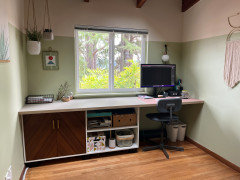
    This one is a super simple design, but what I like about it is how wide the keyboard tray is -- I like for my mouse area to not be too cramped.

    Also, if the desk is in the middle of the room, consider a monitor stand with storage underneath.