Software
Houzz Logo Print
webuser_661970833

Which USB electrical outlets?

6 years ago

I am considering using the one from Costco https://www.costco.com/feit-electric-wall-receptacle-with-usb-ports%2c-4-pack.product.100482403.html with fast charging. Would anyone recommend something else instead (and why)?

Comments (33)

  • 6 years ago

    I don't have any of those receptacles and never plan to. I recommend using a plug-in power supply. USB power supplies are electronic devices, and they eventually fail.

    Then you have to go open the breaker, unscrew the cover plate, unscrew the receptacle, loosen the terminal screws, unbend the wires, bend them around the terminals of the new receptacle, tighten the terminals, make the new one fit into the box, screw it in place, put back the cover plate, put in the screw(s), tighten, go close the breaker.

    When (not if) your plug-in charger fails, you just plug in another one.

    Joe Macker thanked DavidR
  • 6 years ago

    I agree with @DavidR

    Also, USB 2 and 3 could easily be phased out in the coming years.

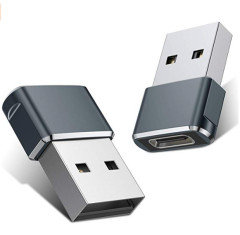
    Apple has gone to USB C for their computers now... which would require an adapter to use those outlets. Easier to use to use a plug-in charger or even a power strip that has USB slots.

    Joe Macker thanked mgs137
  • 6 years ago

    While I agree with the above, there are also situations where these outlets could be handy.

    If you are comfortable doing your own electrical work, then it isn't a big deal to switch these out in the event that it breaks or gets phased out. It isn't like it's a weekly event. If you have to pay an electrician, it isn't worth the hassle and cost.

    If you have a place that you always charge your device and don't want the clutter, these are nice.

    If you have teenagers or spouses that walk off with your chargers, these are nice.

  • 6 years ago

    If you don’t have to pay an electrician to change them out later, then out thrm

    in and don’t sweat it.

  • 6 years ago
    last modified: 6 years ago

    Plug in power supplies occupy one 110v recep each... these Feit devices occupy NONE.


    DEPENDS on your SUB and reception requirements.

  • 6 years ago

    The USB charge ports shown on the Costco outlet is USB-A which a majority of the charge cables are on one end.

  • 6 years ago

    Are there any risks of damage to the device when using one of these? We have a couple in our home and I always wonder about it.

  • 6 years ago

    Assuming the receptacle isn't some cheapo no-name (maybe from a China-direct seller on the big auction house and giant e-commerce websites), there are no more risks of damage than from plugging your gadget's charger into the receptacle.

    On the other hand, charging your gadget's charger into a good surge-suppressor plug strip is significantly safer for the gadget than either of the above. That's what I prefer to do.

    Joe Macker thanked DavidR
  • 6 years ago

    We have a Leviton (sorry, I don’t know the model number) with two USB-A slots in a duplex receptacle. Works just fine for phones and an iPad. I can’t say it would work any better (or worse) than the Feit model. You might want to look at output amperage to ensure it will charge whatever device(s) you have. Obviously the design allows for the charging of two devices via USB while still being able to plug in two 120v devices.

  • 6 years ago

    Feit is a brand I have used for years and years. You don't need a"better brand" for a simple product such as a USB Charger....

    For chrissake! lol

    Joe Macker thanked Stax
  • 6 years ago
    last modified: 6 years ago

    I don't have any of those receptacles and never plan to. I recommend using a plug-in power supply. USB power supplies are electronic devices, and they eventually fail.

    Eh, they're not really any different from electrical outlets. My daughter has an outlet similar to this right by the bar in her college apartment, and they use it constantly to recharge their phones.

    Also, USB 2 and 3 could easily be phased out in the coming years.

    This IS a real concern, but you really only need a few of these outlets throughout the house -- and if USBs are "phased out", the rest of the outlet still works.


  • 6 years ago

    Eh, they're not really any different from electrical outlets.

    They sure as heck are different! They have electronic circuitry to reduce line voltage to the 5 volts required for USB power.

    Most notably, they have electrolytic capacitors. The rated life expectancy of a mass production electrolytic (the time by which you can expect that 50% of the units will have failed) can be anywhere from 10,000 to 50,000 hours, depending on its quality. How close to its max ratings it's used is also a factor.

    There are 8,760 hours in a year. You do the math.

    And trust me, the USB recepts you buy at a big box store, where price is the most critical factor, are NOT built with high quality, lightly stressed components.

    On the other hand, a conventional receptacle will last upwards of 70 years.

    So, yeah, different. Sorry.

    Joe Macker thanked DavidR
  • 6 years ago

    This Device will likely outlast the phone. lol

  • 6 years ago

    While I certainly understand that the lifespan of USB charging components in these devices is significantly shorter than that of the receptacle itself, for those of us with limited receptacles in a given area they seem to make some sense. I suppose that I could carefully cut out a tile backsplash and increase the size of the box from two gang to three. Our USB receptacle has lasted at least 3 years now. If the device failed tomorrow, I’m pretty sure I’m heading to Home Depot for a replacement rather than pulling out the grinder and diamond wheel...

  • 6 years ago

    You won't get proper fast charging with Type-A USB. It's a legacy format. Go with Type-C USB.

    Also, in my area, kitchen outlets must be 20A (NEMA 5-20R) rather than 15A (NEMA 5-15R), so keep that in mind when placing.

  • 6 years ago

    Leviton has a USB-C with PD (power delivery) that's about $35 each. We installed two and like it for our phones and Macbook Pros. https://www.amazon.com/Leviton-T5635-W-Delivery-Charger-Tamper-Resistant/dp/B07PTWG5DV

  • 6 years ago

    @mike_kaiser_gw The suggestions in this thread are mostly to use an extension cord that provides many USB outlets and even regular 3-prong outlets. Given the changing nature of the USB technology and the fact that is has a much lower life than a regular receptacle, I think it makes sense.

  • 6 years ago

    Meh, don't care what Joe says. If you want a USB combo outlet, go USB Type-C. 20A if kitchen.

  • 6 years ago
    last modified: 6 years ago

    I got tired of USB cords and got a wireless charger for my phone and watch. Love it.

  • 6 years ago

    If USB-A connectors are going to be obsolete, why do all new cars have them?

  • 6 years ago
    last modified: 6 years ago

    Some car manufacturers are providing both A and C outlets. You can also use an adapter.


  • 6 years ago

    I'm putting a few of those in the bedrooms. Seems the biggest complaint is the childproof outlets. Big fingers meant big problems it appears. I've used Costco outlets that plug in, with success. I figured these would be fine. It's just a quick charge outlet. If it doesn't work, my husband will change it out.

  • 6 years ago

    Personally I'm not a fan of any charger that doesn't use Qualcomm's quick charge and smart charge technology. My house uses multiple devices of android and apple and very few chargers out there can properly charge multiple different devices at a proper charge rate. I've seen too many devices fried because of cheap chargers.

  • 6 years ago

    Type-A is low power and requires orientation. Type-C fixes that, and has other great features.

  • 6 years ago

    Most of the computing and mobile equipment that I have bought in recent years has all been USB-C. But it's not just USB-C as in what you can get from a USB-A to USB-C adapter. It's USB-C with PD (power delivery). This is something that a USB-A port can never do, and you can't get it from an adapter either.

    So, all of those fancy USB outlets are completely useless for the majority of my equipment. Instead, I have been buying high-quality USB power supplies that can take up only a single outlet but can power multiple USB devices. With modern GaN transistors, those power supplies have gotten really small. Here is a particularly nice model: https://www.kickstarter.com/projects/hypershop/hyperjuice-worlds-first-and-smallest-100w-gan-charger

    But you can find others that are maybe a little larger, but also noticeably less expensive.

    Finally, I solved the problem of always having too few outlets by changing (almost) all of my outlets from single gang to double gang. I am surprised this isn't standard in new construction.

    Joe Macker thanked M
  • 6 years ago

    I don't understand the problem with USB-A connections (for charging applications). I appreciate the concern with build quality on cheap receptacles, but Leviton ones seem fine (I have used cheaper ones with no problems, however). My primary concern is that they are always connected and the possibility that the leakage power may add up. The link M provided is for a 100 watt device, but what would require that much power?

  • 6 years ago
    last modified: 6 years ago

    Just to clarify, USB-C is a connector type. USB-1, 2, 3, 3.1, and USB-4 are signal and, sometimes, charging specifications. USB-PD, QC, Warp and various others are purely charging specs.

    All USB connectors other than USB-C are effectively obsolete.

    At a minimum you want a charger that is USB-C and supports USB-3.1-PD. Ideally it should support USB-4-PD and QC.


    If USB-A connectors are going to be obsolete, why do all new cars have them?

    Legacy auto manufacturers aren't known for their ability to keep up with technology. Just look at how they've let Tesla eat their lunch year after year after year. They're all scrambling to catch up.


    Joe Macker thanked opaone
  • 6 years ago
    last modified: 6 years ago

    I still don't understand. All chargeable devices (phones, etc.) which don't have their own proprietary charger come with a cord with what I think is a USB-A plug on one end, and a wall ward with a USB-A socket. What do you mean by "a charger that is USB-C"? I have a fairly new laptop with 2 USB-A ports and one USB-C port. I have a device which expands that USB-C port to 4 USB-A ports and one USB-C port.

  • 6 years ago
    last modified: 6 years ago

    USB was originally only specified for 5V and 0.5A -- and even that was only available, if you plugged in an "active" device that had a small CPU in it. That means, you could never run more than about 2.5W through it, and passive devices would only get 1/2W. That's enough for the USB-powered alarm clock on your nightstand. But it would be painfully slow for charging phones.

    Very quickly, cell phone manufacturers decided they needed more power, but the legal framework in the EU forced them away from proprietary connectors and towards USB connectors. They worked the system by coming up with proprietary solutions for negotiating higher currents with the charger. You'd typically see increased current from anywhere in the vicinity of 1A all the way up to maybe 2.5A. Anything higher than that, and the connectors and wires would risk getting damaged. These tiny little devices really weren't meant for this. The specifics depended on the manufacturer (Apple, Sony, Google, Motorola, ...) until eventually a single standard became popular.

    But at best, you'd get about 12W. That's still not a lot considering how much power a phone needs, and it definitely isn't enough to charge computers.

    Qualcomm realized this, and came out with yet another proprietary solution (Quickcharge) that it licensed to a lot of other companies. It increases voltage instead of current. This is safer for the wires and the connectors, but it has the potential of damaging the electronics in your device. So, it requires a much more complicated protocol to negotiate the needs/capabilities of all the components that are involved (i.e. charger, mobile device, and ideally also cable). Quickcharge initially only supported 10W, but gradually went up to 36W, and there now even is a specification for 100W. But I am not sure if anybody implements that.

    Eventually the organization that standardizes USB woke up to this need and implemented their own system. It's called USB PD (power delivery). It is much more elaborate than Quickcharge and only works with USB-C. But it also gets a lot of things right that Quickcharge couldn't do because of limitations in the USB-A system. These days, all modern equipment seems to have moved towards USB-C and takes advantage of PD. Only older designs or devices that need very little power still use USB-A.

    In fact, since PD is spec'd all the way up to 100W, you are now seeing many new laptop designs using USB as the power connector of choice. No more bulky proprietary chargers. I simply carry a single universal charger when travelling, and it charges all the devices that my family brings with them.

    On the other hand, if you have a specific low-powered device that you want to use in a particular location in your home (e.g. string of Christmas tree lights, task light, alarm clock, ...), then by all means, install a USB-enabled mains outlet. These things do have a purpose. They might not be the universal charging solution that you should spread through your home, but on a case-by-case basis they can be very useful.

    Joe Macker thanked M
  • 6 years ago

    OK, thanks, M for the clear explanation. I didn't know that any product had these higher power demands. So, for example, my laptop has a proprietary pin-in-cylinder charging system; would that be replaced with the USB-PD system?

  • 6 years ago
    last modified: 6 years ago

    Yes, most laptops these days have dropped their power requirements. You can still find occasional gamer laptops that need 130W power supplies. But that's not super common. So, instead, you frequently see extra light and energy efficient laptops that make do with anything between 40W and 60W. And those power supplies are increasingly provided as USB-C devices. It just gives you a lot more flexibility.

    Also, USB-C PD can work bi-directionally. You can use the USB-C port to charge your laptop in the morning. And later in the day, you plug your cell phone into your laptop to top the cell phone off, because the laptop has a bigger battery. So, it becomes a fancy power bank.

    While in the office, you might decide to have a USB-C hub that is permanently attached to a power supply, to the office network, to the monitor, to your headphones, to your camera, and to mouse and keyboard. When you work in the office, you plug a single small cable into your computer and it provides all of these connections. And when you go home, you grab your computer and take it with you. Takes mere seconds to unplug that one cable.

  • 6 years ago

    "The nice thing about standards is that there are so many of them to choose from."

    -- Computer Scientist Andrew S. Tanenbaum