Software
Houzz Logo Print
lynn237

Mac question, help needed

2 years ago

I have a mac desktop. I have a folder on my desktop with many photos that I would now like to transfer to a flash drive.

I know it was not possible for many years but people now say it is and you either have to buy the right flash drive or thenright cables.

I am trying to understand exactly what Ihave to buy, can anyone help me.

I have read so much and I am still confused.

Comments (14)

  • 2 years ago

    I think it is easier--or at least it's recommended by Apple--to use an external hard drive rather than a flash drive. Here's the section from the Apple support site about storing photos from the Mac:

    Move your photos library


    I know it is frustrating to deal with these issues. Even within the Mac family, a new iMac doesn't have the same USB ports as an older iMac. It's always something!


    If you contact someone at the Apple store or their online support, they'll need to know your exact model since there are so many different options out there.


    Lyban zone 4 thanked heather483
  • 2 years ago

    You can go to best buy...the folks there will be helpful.

    I have an external drive that I plug the small disk like chips into. It takes multiple sizes to accommodate those from cameras and things.

    Lyban zone 4 thanked Annie Deighnaugh
  • 2 years ago

    If you have the right connections (e.g., USB-C, etc.) and enough storage capacity on the destination drive, I don't see what the problem would be.

    Lyban zone 4 thanked Bunny
  • 2 years ago
    last modified: 2 years ago

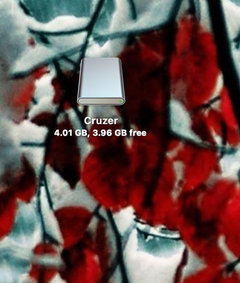
    I use flash drives all the time to transfer files - mostly photos/images - from my home iMac to the one at work and vice-versa. It's really easy on a Mac - you simply drag the files or the folder to the device icon on your desktop that appears after you plug it in.

    Here's one on my desktop - the name will be different, depending on the brand.


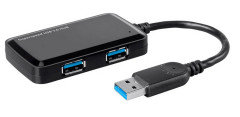
    They make flash drives now with up to a terrabyte or more capacity. And if you don't have a free USB port, you can get a multi port USB hub that plugs into the USB port on your device. They're usually not very expensive. I keep one plugged in on both computers and I have a SD card reader that plugs into the USB port as well.


    You can find these things in most stores today, you don't have to go to an electronics store.

    Flash drives @ walmart.com :

    https://www.walmart.com/search?q=flash+drive

    I got my USB hub and card reader from monoprice.com for less $$ than most vendors - their stuff is usually good quality too.

    And when you're done, you need to eject the flash drive before unplugging - which can be dragging it to the trash or clicking the eject icon, then waiting for it to disappear.

    HTH

    P.S. Having a hub also makes it easy to access the ports, rather than having to fumble around in the back of the computer.

    Lyban zone 4 thanked carolb_w_fl_coastal_9/10
  • 2 years ago

    Thankyou so much for all this information.

    what i need to do is on my mac desktop i have a folder with about 200 photos on it.

    i need to get these on a thumb drive to give to someone to use in a presentation.


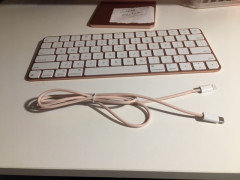
    i am not very good with computers. i am going to add photos on here of the back of my computer showing 2 thunderbolt ports, as you can see one is being used by my time machine which is always plugged in and it backs up my mac every few days.


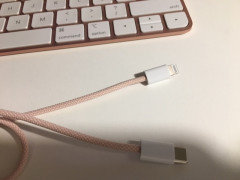
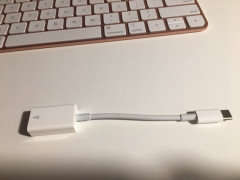
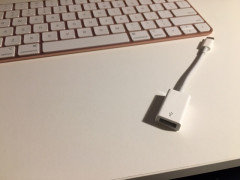
    then there is a couple of pictures of cables i have. i do not know if any would be what i need.

    i will go to store tomorrow to pick up the thumb drive if someone can tell me what kind i need to connect to what i have.


    is there such a thing as a thumb drive thatvwould just plug into one of the thunderbolts or do i need one of my cables or do i buy a cablecalso.


    I hope these photos help. did i mention i am not good with this stuff..

  • 2 years ago
    last modified: 2 years ago

    Are the last 2 pics of the same connector? It looks like what you need to use.

    You should be able to plug a flash drive into that and connect to your computer.

    You can check the total size of all your photos to know how many gigs you need in a flash drive. That info can be displayed when you select 'Get Info' from the File menu to show the details. If you click on/select the folder on your desktop and then press the command and 'i' keys at the same time, that will also show you the info.

    Lyban zone 4 thanked carolb_w_fl_coastal_9/10
  • 2 years ago

    Yes the last two are the same. so the small side goes in my thunderbolt at back of computer and the other side would go into whatever thumb drive i buy. is that correct

  • 2 years ago

    First part correct - second the other way round - the thumb drive plugs into the port - the one with the USB symbol...


    Lyban zone 4 thanked carolb_w_fl_coastal_9/10
  • 2 years ago

    If you are giving them to another person to use in the short term, a flash drive or SD card would be fine. If you were going to back them or your entire Mac up, I'd get a solid state external drive. You can get a 1TB one that is about the size of a business card case. What you need to connect the two depends on the connections on your Mac. With mine, I need an adapter, but different models have different connection options. It's the one thing I least like about Apple products.

  • 2 years ago

    200 photos should be more than fine on a flash drive.

  • 2 years ago

    I'm going to agree with lascatx as to short term storage is ok for a flash drive. For longer term storage we've been using these little Samsung t7 SSD drives. As with all storage drives, I suggest you store important files in more than one location, as all storage systems are prone to eventual failure.


    I've linked below to the Samsung t7. It comes in several storage sizes and it's pretty inexpensive. It's about the size of a credit card, just a little thicker, but easy to transport to transfer files by sneakernet.

    Samsung t7

    Lyban zone 4 thanked blubird
  • 2 years ago

    Thanks again everyone. i do have a LaCie 1TB Mobile SSD Secure USB-C Drive connected to my mac which backups all on my mac every few days.


    i went to walmart and bought a usb stick and then went to apple and got a connector for my ipad.

    i then transferred my photos from mac onto usb stick. it worked easily, then with new adapter from apple i was able to go to my ipad and see them.


    i am now confident that i can now hand them over for the presentation.


    thank you all for your help, especially carol from Florida. i feel so good being able to do this now.

  • 4 months ago

    I'm sure this was resolved -- two years ago.