Software
Houzz Logo Print
marguerite_gw

Trouble with reading and writing posts

The ends of posts are missing on Martin's Bonsai Jade thread, and also, I can't post a comment there this morning. Does anyone else notice this? The white area on the right of the page is encroaching too much on the thread part of the page.

Comments (59)

  • 11 years ago

    Chris
    It's not on every thread, but on many and also on other forums.


  • 11 years ago

    Yes, but I couldn't reproduce the problem on the specific thread that was mentioned as problematic. Also, I've been on the forum pretty much daily for a while now, so I should have seen the problem by now if it affected me. You guys are obviously having a problem, but it doesn't seem to be affecting everyone. It's strange, though, that you had the same problem on multiple computers and browsers.

    -Chris

  • 11 years ago

    Hi folks - I'm trying to replicate this issue, but not having any luck. I went to the bonsai thread and the thread is displaying properly for me - both on my laptop and on my iPad. Nothing is overlapping and the last post that I see was from Martin, yesterday at 2:02am.

    If you are still having this issue, can you give me more information? What would be helpful would be the url of the post, what type of device you are using and if you are able to grab a screenshot, that would also be great. You could post here or you can email me at tamara.amey (at) houzz.com.

  • 11 years ago
    last modified: 11 years ago

    Hi All,

    I've been on the site the past few days and nothing of this sort has occurred - I'm mystified as to what it is that you're seeing (not doubting, mind you).

  • 11 years ago

    yes, I've noticed this. But it went away when I maximized my browser window.


  • 11 years ago
    last modified: 11 years ago

    Tamara- I reproduced it by adding a pic that was a large landscape pic. When I deleted the landscape and replaced it with a portrait pic the issue corrected.

    Put this link in photo File Name and see what it does for you.

    http://i336.photobucket.com/albums/n325/tsugajunkie/2012pix/serv2.jpg

    Also, check THIS OLD THREAD and see how it looks to you. It appears any revived old thread with landscape pix from PhotBucket has this happen. Any updates done in the last 2 weeks?

    tj

  • 11 years ago
    last modified: 11 years ago

    Here's another with the screen shrunken and turned vertically. That doesn't make the problem go away.

    Curiously, that screenshot I just uploaded is cut off on the top and bottom - cropped by Houzz as it uploaded. I have never seen that before, and don't know how to get it to ipload the full photo. You can see what's goIn on though.

  • 11 years ago

    Its been fixed on mobile for me! (Now if only there was an actual mobile site, lol)

  • 11 years ago

    It's corrected for me on my iPhone too. :-)

  • 11 years ago

    This issue should now be resolved, but if you are still seeing it, please shoot me a note!

  • 11 years ago
    last modified: 11 years ago

    Yes, still apparent. I posted a new pic and comment on my own thread and while typing the cut-off appeared in right side. As I typed the window extended to accommodate and the submit button was nowhere to be found, until I filled the screen with the page. Weird, because frame always accommodated whatever size I had the browser window at. So yeah, still happening.

  • 11 years ago

    Hi aztcqn - This sounds like this might be a bit of a different issue. Are you saying that once you submit you are still seeing the cut off threads or only when you are typing and then it is fine after you submit? Can you show me the thread?


  • 11 years ago

    Tamara will be fed up with me soon, with my various issues, but regarding this one, I have found that the problem exists when I use any Internet Explorer browser, I have 9 and 11, and is still a problem for those, but when using Mozilla Firefox there is no problem.

    I haven't tried it with Chrome yet..

  • 11 years ago

    Hi Marlorena - I could never be upset with such a lovely English rose. ;) It does sound like there is some issue with your browser settings. Have you contacted your Internet service provider? They should be able to walk you through some trouble shooting steps to see where the breakdown occurs.

  • 11 years ago

    ..thanks Tamara, how sweet of you.... yes I ought to contact them but probably like most other people, contacting ISP's is something to be avoided at all costs... especially the one I'm with... but certainly if the problem re-occurs I might have to do just that...

    ...thanks for much for your time and trouble... things are mostly working fine for me right now... so I shall keep my fingers crossed...

  • 11 years ago

    The problem seems to be fixed right now, but the ends are still missing on the old post. I'm no techie, so maybe posts can't be fixed retrospectively, if that's the right word. If the problem is fixed for current posts, and it seems to be, I'm happy.

  • 11 years ago

    Hi Marguerite --

    Can you tell me which posts you are seeing missing information?

  • 11 years ago
    last modified: 11 years ago

    Sure, Tamara. On this one anyway :

    http://forums.gardenweb.com/discussions/2936596/crassula-bonsai-lover?n=62

    Martin's post re. his bonsai jades.

    Also, I just discovered, on this one :

    http://forums.gardenweb.com/discussions/1821182/aztcqns-spiky-and-fat-herd?n=41

    Thank you.

  • 11 years ago

    The problems persist on earlier posts when updated, such as this from this morning: http://forums.gardenweb.com/discussions/2809712/variegated-jade-legolas?n=46


  • 11 years ago

    Marguerite, you say the 'ends' are missing on these posts. Do you mean there is missing information at the bottom of the page? Or, do you mean that it cuts off on the sides? If you (or anyone else) can grab a screenshot of what you are seeing, that would be so helpful. As I look at all of these posts, the page renders fine for me on my Macbook and on my Android phone. It could be that the pseudoephedrine that I've been taking for this killer cold is messing with my brain, so I want to make sure that I'm not missing something.

  • 11 years ago
    last modified: 11 years ago

    Tamara, I screen-captured what I'm seeing, I ignore if there is a link with Marguerite's problem :

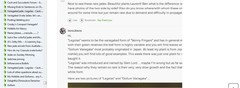
    When my personnal bookmark sidebar is open on the left, the text remains complete if the thread has been posted on the new Houzz-Gardenweb version.

    But with a thread posted on the old version of Gardenweb, the right part of the text is missing when my personnal bookmark sidebar is open. I must close it to get the complete text back.

  • 11 years ago
    last modified: 11 years ago

    Thank you, Laurent, that's what it looks like. On new threads, it doesn't happen with me, but on updates of old threads where it was happening before, it does. Tamara, Laurent means he doesn't know if our problems are linked, but it seems obvious they must be. It was not happening when GW first became Houzz and we were posting on old GW threads. Whip1 also has the same problem, obviously.

    I'm so sorry, Laurent, for thinking you are female. It was your name which I thought was female (as Lauren or Laura in Ireland) that led to the mistake. I just looked up your profile, perhaps I should do that more often before I post.


    Sorry you are ill, Tamara. Get better soon.

  • 11 years ago
    last modified: 11 years ago

    Marguerite, don't be sorry. Laurent is a french name for a boy, for a girl it's Laurence or Laure.

  • 11 years ago

    And Laurence is a male here :)

  • 11 years ago

    This post was at the top of the page, and the text is also cut off on the side.

    http://forums.gardenweb.com/discussions/2809712/variegated-jade-legolas?n=55


  • 11 years ago
    last modified: 11 years ago

    Rob, I went to your link to see what this continuing problem is, and there's no problem on this end - I checked each post and nothing was shortened (I'm using an HP laptop with Windows 7 wirelessly). Were you looking at it on a phone? I wonder of that's the problem....I don't access the Web usually on my phone (pictures and phone/contacts usually).

  • 11 years ago

    Laurent's screenshot was really helpful because I think it might have something to do with add-ons or having other elements open on your screen. Laurent, are you using Firefox with a bookmark sidebar add on? For anyone else who is still seeing this issue - can you take a screenshot of what you are seeing when the sentences cut off and tell me what type of browser you are using?

  • 11 years ago

    Jeff, were you looking at current threads, or ones a bit older? Those latter are where I see the problem, one can't read the ends of posts. The problem no longer exists when posting on more recent threads, which means that eventually, as those threads are archived, it will not be so important.

    But what is it about those older threads that is causing this, even when one adds to the thread by updating? I think an IT scientist should be able to sort this out. Saying that such and such a person does not see this happening, does not solve the problem, it exists. And I would not be wasting my time posting about it, I assure you, if it wasn't happening.

  • 11 years ago

    Marguerite - I don't see anyone named Jeff on this thread, so I assume you are responding to me. ;) By no means am I minimizing the effort and time you have spent posting about this issue. It's important and I'm trying very hard to help resolve it. I've never once said that because someone isn't seeing it, that must mean that it no longer exists. Please keep in mind that If everyone had the problem, it would be much easier to solve. But, because only some are seeing it, this is why I'm asking for details such as browsers, add ons, and screenshots, etc. I understand that you are frustrated and want this resolved. Me, too! :)

  • 11 years ago

    Hi gang - It looks like this is something that is an issue on FF and the fix should go live sometime tomorrow. Stay tuned!

  • 11 years ago
    last modified: 11 years ago

    Tamara, I'm using Firefox 37.0.2 with its bookmark sidebar.

    When my bookmark sidebar is open, there is still a problem with this thread : http://forums.gardenweb.com/discussions/2809712/variegated-jade-legolas

    But there is no problem with this older thread : http://forums.gardenweb.com/discussions/1845087/diminutive-denethor?n=11

    Marguerite, I will start a new Legolas thread ;)

  • 11 years ago

    Thank you, Laurent, that's kind of you.

    Tamara, I wasn't being shirty, just explaining that I wasn't flippantly complaining. By the way, I am not using Firefox, but Internet Explorer.

    I always thought cactusmcharris was Jeff, from GW. My mistake. But that is to whom I was responding.

  • 11 years ago

    Thanks, Marguerite. I just found out the fix should be the same for IE. So, hopefully this will all be fixed tomorrow!

  • 11 years ago

    I'm using a desk top computer with Windows 7 and Firefox. I'm not using the sidebar.

    I took a screen cap, but it won't load...... I'll work on that later.

    cactusmcharris is Jeff.


    Rob


  • 11 years ago
    last modified: 11 years ago

    Marguerite, I wasn't saying it wasn't happening - I was saying under what conditions I wasn't seeing it. New posts, old posts, they all load fine for me. I think you might want to reread what I wrote. As an aside and a suggestion, IE is a very old browser and there are better ones (Chrome, for one).

  • 11 years ago

    Rob, many thanks :)


    Jeff, I am a very old browser myself, so I can't afford to be snooty.

    I actually have Firefox and Chrome but just prefer Internet Explorer.

    I understood what you were saying, but mainly that you thought it was a phone problem and it was fine on your computer. I was trying to explain my frustration. and perhaps I sounded a bit terse, I didn't mean to, but if I upset you, I apologise.


  • 11 years ago
    last modified: 11 years ago

    Not upset, just wondering about the terseness. I'm an old browser too yet still manage to learn new tricks.

    Snooty J (my ranch's brand)

  • 11 years ago

    It happens (and is still happening now) when I zoom in even one click on some posts. If I zoom out the print is fine but my mature vision suffers. This did not happen prior to around Easter so it makes me wonder if it is an "undocumented feature" of some recent update that Houzz did.
    I use Firefox or IE on a PC.

    tj


  • 11 years ago

    tj, have you cleared your cache memory in either browser?


  • 11 years ago

    Just tried it after clearing the cache and it still cuts off words (and larger pic, for that matter) if I zoom in.


    tj

  • 11 years ago

    Oh, I can manage it, I just like IE. Call me sentimental. (Nicer than terse).

    Maybe snooty means something else in Canada?

  • 11 years ago
    last modified: 11 years ago

    I don't know how you used it, Marguerite, but I its use baffling as well. Perhaps some things aren't meant to be understood. I don't know its particular Canadian meaning, but I was piggybacking on your usage of it. I'm fully aware of its American usage, as that's where I learned it - 'showing disapproval or contempt toward others, especially those considered to belong to a lower social class.' It's a bit of self-deprecation and a bit not.

  • 11 years ago

    I mean I'm puzzled about a snooty ranch? Otherwise the meaning here is as you described.

  • 11 years ago

    ..I don't know if this helps anyone, but I have just discovered something to my satisfaction.

    ...I use 3 browsers at different times, IE, Firefox and Chrome. I only have the problem of text missing on the right hand side of page when I use IE. On IE I also have my 'favourites' as a column on the left hand side. If I remove this column then all of a sudden I can read the whole text... in fact I don't even have to remove my 'favourites' column altogether but merely narrow the vertical margin by moving my cursor onto the line, then seeing and little right and left arrows, and moving the line further to the left, until I see the page corrects itself, and I can read normally...

    ..Tamara mentioned something about this earlier. It's a simple workaround when using IE on some threads here...

  • 11 years ago

    Corrected for me. Thank you very much Tamara !


  • 11 years ago

    Yes, thank you, Tamara and all the team.

  • 11 years ago

    Yep, corrected for me as well.


  • 11 years ago

    ..yes, me too, without having to do anything to my 'favourites'...

    ..well done..!