Software
Houzz Logo Print
webuser_885293527

Samsung Dishwasher Normal Light Flashing

4 years ago

This is about a Samsung DW80M2020US/AA 00 dishwasher. It is less than 3 years old.

A few days ago, as a part of regular maintenance, I flushed my Rheem hot water heater for the first time (also less than 3 years old). Everything went well, and after the tank filled up again, I ran all the faucets in the house to get any/all air out of the system.

I realized within ½ an hour of completing the maintenance the “Normal” light was blinking on my dishwasher. I looked it up, and saw this is an error message to indicate a leak. I removed the base plate and didn’t see any water or feel any moisture. I assumed then that air must have gotten into the inlet hose and the machine mistakingly took this as a leak. These are all the things I’ve done to try and remedy the situation:

  1. Turn the unit off and on several times, thus forcing it to flow, flush and drain water in an attempt to push any air out of the system.
  2. Turned the unit off at the circuit breaker and let it sit over 24 hrs to drain all electricity and reset itself.
  3. Left the door open 12+ hours to allow the unit to completely dry.
  4. Detached the water inlet hose from the supply line (not from the machine itself), allowed it to drain and completely refill.

The light is still flashing, and I’m unsure what my next steps should be (yes, I’ve already called Samsung). It seems highly unlikely to me, given the timing, that the hot water heater flush and this error code aren’t related; however, at this point, I’m open to anything.

Obviously, I would love a solution that doesn’t require me to remove the unit from under my counter, but if I must do that, I would prefer to have a plan a, b, and c for ways to try and fix the problem so that I won’t have to move the unit multiple times. So, any and all ideas are very welcome and appreciated!!

Comments (8)

  • 4 years ago

    Did you read through the whole post? I know it thinks there's a leak, and I've reset it several times already. That still hasn't fixed the issue.


    The main PBA mention was helpful, though, and at least a clue towards why this might have happened...in flushing my hot water heater the water's temperature going to the dishwasher defeinitely fell significantly, so maaayyybbeeee that's what happened? However, the temperature has been restored to an appropriate temp now, and the machine is still angry.


    So, even if there is a problem with the main PBA, how do I fix it?

  • 4 years ago

    Water temperature has no relation to dishwasher leak detection, and probably neither does air in the supply line. I didn't look up the details on your Samsung but leak detection typically is via a float or sensor in the machine's base pan. Power-cycling the dishwasher doesn't clear or evaporate water that may be in there ... although you did say you checked and didn't find any water there. Next thing is check if the float may be stuck in an upward position.

  • 4 years ago

    Thanks for the guidance! I'll give that a try. If you have any readily available info regarding where that float is, I'd appreciate it. If not, I'll do some googling. :)

  • 4 years ago
    last modified: 4 years ago

    Couldn't tell from a quick search if the leak detector switch (a/k/a leak detection sensor) might be in low spot on the pan so a little water might be collecting there without being noticeable at the front of the pan when you've removed a kick panel. Can you reach back there from the front, maybe using a flexible grabber with a paper towel to see if it picks up any moisture? Maybe you already tried that?

    That part does seem to be one that fails with some regularity. At least that's what I conclude from a couple of my usual parts supply sites listing those Samsung leak detection sensors as one of the three most popular replacement parts for your model dishwasher. The part is only $14 to $20 (depending on from whom you buy it),.

    So, if your DIY skills allow, it might be worth trying to replace it and see if it fixes the problem. It will, of course, require removing the machine but a quick search turned up a Repair Clinic video on replacing one for what seems to be a similar Samsung model: https://www.youtube.com/watch?v=r-METNuGa08 

    If the detector isn't the problem, then that leaves a coincidental main board failure. IME, diagnosing main board faults (let alone fixing them) is beyond my modest DIY skills and tools.

    Samsung has had a pretty poor reputation for post-sales support, and wasn't helpful on your first call, but maybe if you try Samsung tech support (yet again), you might get somebody to offer any special tricks or insight if you ask specifically about the mainboard. (I've found a couple of times that calling Samsung back might get you a different support person who might prove more helpful than the one who answered the first call or chat request.)

    Otherwise, a quick search on replacement mainboards for your model shows they are available for between $100 and $170 depending on from where you buy it. (some of the usual Covid price inflation and or gouging may be at play here). If you would consider DIYing the repair, another quick search turned up short videos on how to do the replacement on other, seemingly similar Samsung models. Maybe your own search could turn up one for your specific model?

    Or, you might well decide at this point that you just want to be done with this and just get a different brand of dishwasher. That presents the oddity of what is and is not in stock in your area.

  • 4 years ago
    last modified: 4 years ago

    Hmm. This is odd. I'm no longer seeing Stax's previous post, the unhelpful one to which the OP responded and to which Stax is now responding with an RTFM.

  • 4 years ago

    The individual sometimes does that.

  • 4 years ago

    OP update…

    Thank you all for your ideas and advice! Dishwasher still not working, and these are the next steps I’ve taken and things I’ve discovered:

    1. Took dishwasher out of counter. Tilted it to the back. No water came out. Confirmed no moisture on the bottom of unit with paper towel.
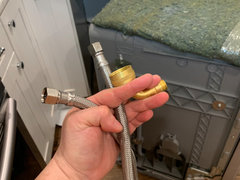
    2. Completely disconnected hose from dishwasher and hot water line. Checked and flushed hose.
    3. Took inlet valve off dishwasher; checked and flushed.


    4. Found scale debris on screen to dishwasher. Have washed and removed. Photo is of screen BEFORE i cleaned it.


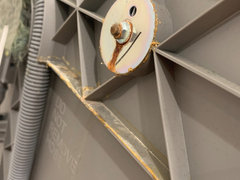
    5. Removed side insulation. Noticed corrosion on one of the bolts. See photos.

    Other side for reference:


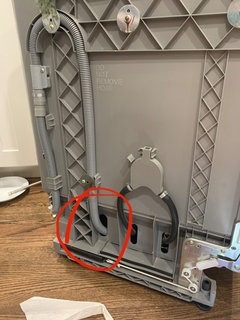
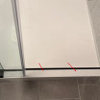
    6. Looked through openings at base of dishwasher. Noticed what I thought was adhesive, however I pushed a piece of paper towel into opening to confirm. It was water. :( See photos.


    ^ The opening where I pushed paper towel through and found moisture.


    Soo, now I have a couple of theories and any further guidance would be GREATLY appreciated!

    Theory 1: There actually is a leak, and it was EXTRAORDINARY timing. I need to call a plumber to find it, or just bite the bullet and buy a new dishwasher.

    Theory 2: The sediment on the screen caused the leak and I need to clean it more thoroughly.

    Theory 3: The corrosion on the side bolt is indicative of a leak much higher up on the unit, that has somehow activated the leak detector sensor. I need to replace the bolt and washer.


Sponsored
Custom Home Works
Average rating: 4.6 out of 5 stars10 Reviews
Franklin County's Award-Winning Design, Build and Remodeling Expert