Software
Houzz Logo Print
melissa_schopfer

hidden desk cabinet design ideas

5 years ago
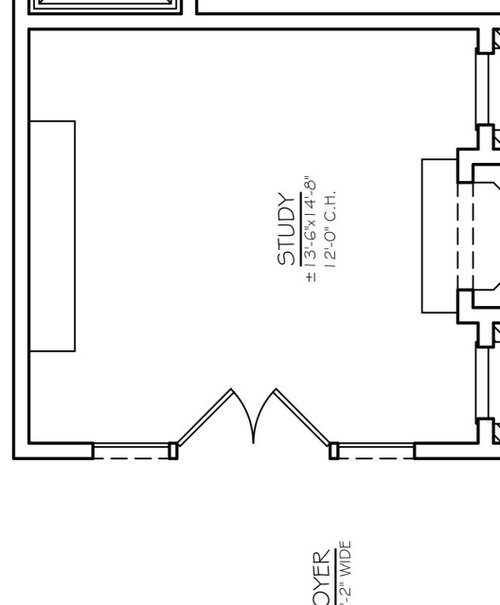
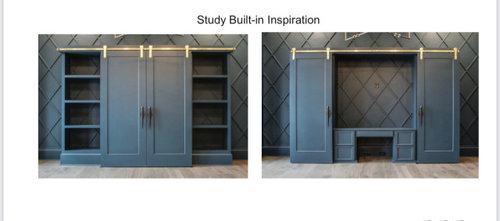
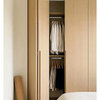
My office is the first room when you walk into my house. I’d like to be able to have my desk and printer hidden away when I’m not working. Do you have any design ideas for the hidden desk cabinet that could hold the double monitor, docking station and printer? The pictures are the room layout and general cabinet design idea but I’m worried about the functionality.

Comments (7)

  • 5 years ago

    I could draw one that suited me but i doubt it would be what you have in mind. I'm one of the few people using an antique roll top so my ideas run quite different to the masses. I reccomend taking pictures of your stuff making rough sketches with diamentions and give them to a retail store and office funiture builder.

  • 5 years ago

    I would try working with a custom cabinet builder, I really like your inspiration photos close it all off...no fuss no muss!

  • 5 years ago
    last modified: 5 years ago

    I think what you are showing looks great.

    Another possibility if your house style is very modern is to do very open shelves but with box inserts where the front of a box can be dr opped down to make a desktop for a keyboard, with the monitor inside the box. Or the front of the box raises on hinges to reveal the printer. Something like this, but you can design them to appear more like bookcases or media units, and include a fireplace or tv


    15th Street Residence · More Info


  • PRO
    5 years ago

    How much time will you spend in there? What kind of work do you do? I don’t like to face a wall so I would have the printer hidden on the back wall and a floating desk in the middle so I can face out into the house. Who cares if the monitors show, it’s an office.

  • 5 years ago
    last modified: 5 years ago

    The pictures are the room layout and general cabinet design idea but I’m worried about the functionality.

    What worries you about the functionality of your proposed set up? Hallett & Co raises good questions. You need to know how YOU work to know how functional the set up will be for you. Depending on your tech set up, easy access to cables, adequate airflow and light control are other things to keep in mind. Glare on some monitors can strain the eye (or make seeing the screen very difficult). Depending on its size, a printer can be tucked from view on a low shelf even when working. It's the dual monitors and all the cords that designers love to hide in photo shoots. (Very few office inspo pics look like realistic home offices.) Even wireless setups have cords and chargers. If the room has a door, keeping it closed might be an option.

  • PRO
    5 years ago

    The cold hard facts are there are wires that need to be dealt with no matter what so IMO as much as I love the look of a desk in the center of the space it is best next to a wall as for hiding it the pics you show seem to be good ideas . I like to be able to access my desk all the time with as little hassle as possible If you post a pic of your spce that would be very helpful.

  • 5 years ago

    I like your idea. My desk is organized chaos when I'm working on a project, it would be nice to instantly "tidy up" just closing some doors, then opening them back up and picking up where I left off.


    I agree with Tartanmeup, planning your electrical now will help you have a much cleaner look.


    You can consider mounting your monitors on the wall with articulating TV arms which will get them off your desktop and allow you to raise and lower them. Hide the cords by dropping them into the wall near the mounting brackets, fishing them out and plugging them into a power source below (again, like a TV, not a big deal.)


    Remember task lighting above so you don't have to have a lamp on your desktop, You could also have spotlights on the sides to illuminate the shelves. Glass shelves would cast the light lower.


    Instead of full length bookcases, adding cabinets to the lower portion will allow you to tuck your printer away and add storage for files or bulky office supplies like reams of paper, ink cartridges, etc. The printer can go on one side on a slide out tray that can support its weight, covered by a door with a pressure latch so you don't have hardware interfering with the slide of the larger doors. Deep drawers on the other side.


    I have a built in power strip on my slide out keyboard tray so it's easy to charge my phone and temporarily plug things in such as portable hard drives, etc. I also have a built in power strip in the cabinet with electronics. It's not a big deal to add them, even desks from Target will include them. Measure your cords for proper placement and get extra wall outlets installed.


    Your inspiration photo has a knee space -be sure you have one, even if you have a slide out keyboard. You'll be hunched over your desk if you don't. If you spend a lot of time at your desk, you may want to consider options that allow you to stand and work. There are so many possibilities depending on your needs and budget!


    Add a writing table in front of your desk, slide the desk doors shut, slide your chair under the table - instant clean up!