Software
Houzz Logo Print
webuser_102546186

DESPERATE! apps or websites for help?

last month

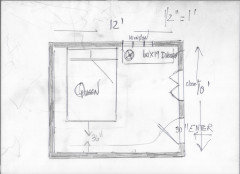
Does anyone know a place to input dimensions of a room along with placement of windows and doors that will generate furniture placement suggestions? I'm purchasing new furniture for a very small bedroom for a teenage boy and the placement of the closet door, entry door, and window is making it very difficult.
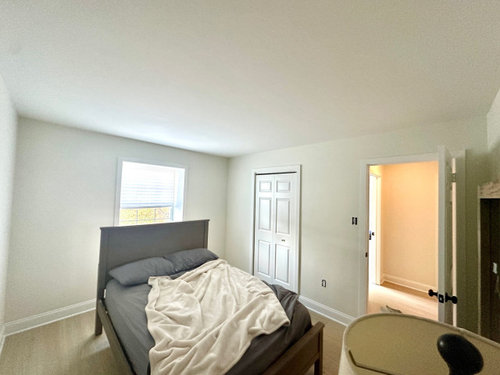
I will attach a picture in case anyone would like to provide help! The room is freshly painted so the bed is pushed away from the wall.
For reference, the room is 10' L x 12 W. There is one window on the north wall (10') and there is a closet door on the east wall along with the entry door. The south wall is empty (other than the needed space to open the door as it swings in to that direction), and west wall is empty as well.
The picture was taken at a wide angle in order to help see everything, and I'm standing in the SW corner completely backed up to the wall.
I would be so appreciative of any help no matter how small! Again, website suggestions are appreciated as well! I've downloaded several apps to my phone, but I haven't found one that will simply allow me to input dimensions along with placement of window(s) and doors. I've found things that provide one or the other, and I've tried the ones that ask for a photo, but for whatever reason I haven't had any success with that as they come out distorted or changed in some odd way.

Comments (11)

  • last month

    Draw a pic with all of the windows, doors, and wall sizes in inches. Add in the sizes of the furniture and you will get some good recommendations on here. Beverly is fantastic at layout. Hopefully she will see this.

  • last month

    Another picture standing at the entrance would help. does he want specific pieces like a chair and desk for using a computer for gaming?

  • PRO
    last month

    Chispa does exactly what I suggest and please get your son involved and listen to him. This is his space it does not have to go with any other part of the home

  • last month

    Have you tried ChatGPT? While I did not want to give into it but you’ll be surprised what you can do with it or better yet what it can do for you. Paste pictures or the room and furniture you want to place in there, and ask it to arrange it for you. You can play with it until it gives you what you want. Let me know how it goes.

  • PRO
    last month
    last modified: last month

    Aurrggghhh

    Which orientation

    Below 1/2 " to one foot guesswork........


    To all who pass. I am not yelling : )!! lol

    You have no business on Chat GPT or any computer app, for space and what fits until you understand it is nothing more than this:

    Math and scale.

    A piece of graph paper 1/4 " boxes. If you want a bigger picture use 2 boxes to one foot. Or a scale ruler. You need the sturdy tape measure, and you draw the room, a simple sketch with a pencil. Every solid wall, every window, every opening to a bath, or a closet or an ENTRY has its own dimension!! Every. single. one!!

  • PRO
    last month

    Seriously, by the time you figure out how to use those apps, you could draw the room with pencil and graph paper. It's not that difficult. It's not that big a room, so there are limits on what you can furnish it with. Looks like the wall opposite the entry door is the most logical place for the bed and one nightstand (a one-person room doesn't need two), and then a dresser on another wall. Done.

  • PRO
    last month
    last modified: last month

    ^^*

    If you're wondering why this concept of draw and measure is important? It is essentially one thing:

    Understanding the space you have. How big is "big" and how "small' IS the small! How do you move through it, without bumping into things, how does the door swing and not hit a bed?!.

    Why do humans need 36" to pass in hallways?

    (answer: Has to do with shoulder width of the average man)

    By the time you've drawn, measured, used a scale ruler, or simple graph paper? You know the space like an old friend. Or you LEARN to know it. It becomes 3 dimensional, even though it is lines on paper.

    You walk before you RUN.

    You don't get to drive a car, simply because you know how to start it.

    It's all the same....understanding first.

    Call us old or old fashioned. .........it works and we will wear the shoe as it fits: )

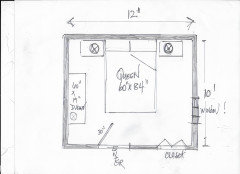
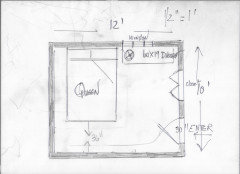
    Homework?

    Go back to these below, and add every dimension on the correct orientation.

    Every solid wall, each window, the entry. the closet? Each has a dimension.


  • last month

    I will answer your question. I like using Sweet Home 3D. You can input your rooms dimension, add doors and walls and it even has a library of furniture sizes. I still have it on my computer but have not used it in a few years. I know there are many aps on the market so you may have to try a few to find one you like.

  • last month
    last modified: last month

    I use magicplan on my phone quickly sometimes to help with scale and placement. It is very simple and when i got it years ago it was free. It allows you to alter their choice of furniture and rugs to custom sizes as well.

  • last month

    I suggested cahtGPT earlier. But upon looking at your picture again, it looks like the room is pretty small and in reality you only have two walls to work with. One is wider than the other. So if placing the headboard against the wider wall (please do not block your window!) allows ample space to walk around and to open the door, then this is the wall I would choose. It would also help to know what other furniture you are thinking of purchasing and placing there. You can only do so much in the small room.