Search results for "Analyzing" in Home Design Ideas
Inspiration for a mid-sized contemporary light wood floor and beige floor great room remodel in Orange County with white walls and no fireplace

Inspiration for a mid-sized transitional dark wood floor kitchen pantry remodel in Orlando with shaker cabinets, white cabinets, marble countertops, white backsplash and stone slab backsplash

If you’re active on GardenWeb sharing plant photos, asking for advice, tracking seasonal progress you already understand how much detail goes into gardening. Soil pH, rainfall, emerging leaves, bloom counts, fertilizer schedules it adds up fast. But all that rich information often remains buried in posts, lists or memory. What if you could visualize that data and turn it into clear quick insights? That’s where a graph maker becomes a game-changer for your gardening workflow.
1. Why garden data belongs on a graph
On GardenWeb, you’ll find forums for everything from perennial care, vegetable gardening, patios, herbs, even cooking and craft projects. While plant lovers share observations and ask questions, many track progress manually in spreadsheets or memory. A graph maker flips that around:
Instead of a list of numbers (e.g., “Soil test: pH 6.4 in May, 6.1 in October”), you get a line graph showing the decline over time.
Instead of guessing which plant bloomed most, you see a bar chart comparing counts across plants.
Instead of manually calculating average rainfall effect, you plot scatter points of bloom count vs. rainfall.
By turning your data into visuals, you’re not just recording—you’re analysing, learning and improving. For GardenWeb users this means smarter decisions: Which fertilizer actually improves bloom count? Which shady spot recovers slower? A graph maker gives clarity.
2. What is a graph maker and how to use one
A graph maker is a web tool or software that lets you input raw data (numbers, dates, categories) and output visual charts like line graphs, bar charts, scatter plots, etc. It might allow you to import a spreadsheet, select chart type, customize colours, label axes, and export the image for your blog, forum post or personal log.
Here’s how you could apply it for gardening:
Log blooms per week for each rose plant.
Using the graph maker, choose line graph to track changes over weeks.
Label your y-axis “Number of Blooms”, x-axis “Week of Year”.
Add colour lines for each plant for easy comparison.
Export as PNG and embed it in a GardenWeb forum post: “See bloom trend for my ‘Peace’ vs ‘Knock Out’ roses”.
This isn’t just pretty-to-look-at: it makes the trend obvious, invites discussion (“Hey, your ‘Knock Out’ line dips after week 28—what changed?”) and helps you refine your routine.
3. Use these specific scenarios on GardenWeb
A. Soil pH and plant health tracking
After multiple tests you have pH values over time and bloom results. Upload both datasets into the graph maker, produce a dual-axis line graph: soil pH on one axis, bloom count on the other. Post your findings in the “Soil, Fertility & Nutrients” forum and get feedback.
B. Seasonal pest or disease appearance
Record number of aphids spotted each month and whether you used treatment. A bar chart via the graph maker can show pre- and post-treatment figures. Then ask the “Insect & Disease Control” forum for advice based on your visual data.
C. Yield comparison between varieties
You grow two zucchini varieties. You keep weekly yield in pounds. Use the graph maker for a side-by-side bar chart. Share in the “Vegetable Gardening” forum: “Which was better this year? See the chart”.
D. Rainfall vs growth rate
You log weekly rainfall and growth (in cm) of your tomato plants. Use scatter plot in graph maker. If a pattern emerges, you’re ready to post: “Is my growth plateau due to drought? Chart shows a clear correlation.”
4. Why this elevates your GardenWeb contributions
When you post with a chart made by a graph maker, you’re doing more than asking or showing off. You’re investigating. You’re analysing. You invite the community to give feedback on data, not just anecdotes. That elevates the discussion. Instead of “My plant died, any ideas?” you post “See this graph of pH drop and bloom count—what might be the limiting factor?” High-quality visuals raise your post’s value and garner more thoughtful responses.
Plus, your posts become useful references for others: someone else can say, “Cool graphic, can you share your data sheet?” You build credibility and help the forum become a learning hub—not just a Q&A board.
5. Tips for using a graph maker effectively in the GardenWeb context
Keep it simple: One chart, one insight. Don’t overcrowd.
Label clearly: Titles, axis labels, units (e.g., cm/week, mg/L, °F).
Use readable colours: Avoid faint tones that vanish on mobile.
Annotate when needed: Add notes like “Fertiliser switched week 12” or “Shade cloth added”.
Provide context in your post: Don’t leave the chart alone—write a few sentences explaining what it shows and what you’re seeking.
Embed carefully: Make sure your image displays properly in GardenWeb; check mobile view.
Share raw data: If possible link to your spreadsheet so others can replicate or comment.
Be open to feedback: The chart invites questions; embrace them.
6. Possible pitfalls and how to avoid them
Bad data = bad chart: If your measurements aren’t consistent, your graph will mislead. Use standardized data collection.
Too much complexity: Multi-axis charts, too many variables—confusing. Stick to one or two variables.
Overlooking mobile viewers: Many GardenWeb users browse via phones. Use large fonts and simple visuals.
Ignoring the narrative: Chart alone won’t answer. Explain what it means and what you need.
Outdated charts: If you update your data annually, keep your visuals current or label them clearly as “2024 data”.
7. Final thoughts
On GardenWeb you’ll find a vibrant community of gardeners, DIYers, cooks and design lovers.Using a graph maker for your posts and progress turns your experience from casual hobby-logging into smart data-driven gardening. You’ll not only learn more—your peers will learn more, too.
So next time you log your plant growth, record your yield, test your soil or track pests—don’t just note it. Plot it. Use a graph maker. Share it in the forum. Let your garden tell the story, and let the community help you write the next chapter.
Find the right local pro for your project

Example of a large transitional master blue tile medium tone wood floor and brown floor bathroom design in Boston with furniture-like cabinets, medium tone wood cabinets, a two-piece toilet, gray walls, a vessel sink and white countertops

Photo credit: www.parkscreative.com
Inspiration for a large timeless backyard stone patio remodel in Seattle with a fire pit

3900 sf (including garage) contemporary mountain home.
Inspiration for a large contemporary wooden u-shaped open staircase remodel in Denver

Open concept kitchen - large cottage light wood floor and beige floor open concept kitchen idea in Philadelphia with a farmhouse sink, shaker cabinets, quartz countertops, red backsplash, brick backsplash, paneled appliances, an island, green cabinets and white countertops

Eat-in kitchen - mid-sized farmhouse single-wall slate floor and gray floor eat-in kitchen idea in Boston with a single-bowl sink, recessed-panel cabinets, blue cabinets, limestone countertops, blue backsplash, subway tile backsplash, stainless steel appliances and an island

This white bathroom has a white and grey tile floor and a white freestanding bathtub. A mini chandelier hangs on the ceiling, and silver and gold metal accents run throughout.

The focal point of the kitchen is the blue subway tiles on the range wall. Having only one wall of backsplash allowed for a bit more fun with tile without any worry of getting too much color or becoming too busy. The shiplap on the window wall adds a nice texture and detail to the space. Shutters painted in the wall color rather stand out against the white trim.
Photographer: Ashley Avila Photography
Interior Design: Vision Interiors by Visbeen
Builder: Joel Peterson Homes

Tria Giovan
Ornate two-story wood exterior home photo in New York with a gambrel roof

Shingle Style Overlooking the Beach
The site is a prominent one, on a corner lot overlooking the popular Pear Tree Point beach, so privacy was key to designing a comfortable residence for this young family: a home that provided private yard-spaces while retaining lovely water views. A Shingle-Style house with front, side and upper porches and interior spaces that invite leisure was a natural choice for this beachside site.
By designing a series of outbuildings – a pool house with guest quarters, a garage and shed – that parallel the road, the pool and backyard entertaining spaces are nicely secluded. Separating the spaces transforms this 5,900 square-foot residence into an intimate and informal home. The buildings are of varying visual textures; the main house is clad in cedar shingle while the vertical board-and-batten of the 900 square-foot garage evokes a barn. The 730 square-foot pool/guest house, constructed of thin ashlar stone layup, matches the stone used throughout the project.
ChiChi Ubina Photo

David Heald, Photographer,
Devore Assoc. Landscape Architect
This is an example of a huge traditional landscaping in New York.

Lincoln Barbour
Example of a mid-sized 1960s concrete floor and multicolored floor dining room design in Portland

Home office - transitional built-in desk dark wood floor and brown floor home office idea in Baltimore with white walls

It is not uncommon for down2earth interior design to be tasked with the challenge of combining an existing kitchen and dining room into one open space that is great for communal cooking and entertaining. But what happens when that request is only the beginning? In this kitchen, our clients had big dreams for their space that went well beyond opening up the plan and included flow, organization, a timeless aesthetic, and partnering with local vendors.
Although the family wanted all the modern conveniences afforded them by a total kitchen renovation, they also wanted it to look timeless and fit in with the aesthetic of their 100 year old home. So all design decisions were made with an eye towards timelessness, from the profile of the cabinet doors, to the handmade backsplash tiles, to the choice of soapstone for countertops, which is a beautiful material that is naturally heat resistant. The soapstone was strategically positioned so that the most stunning veins would be on display across the island top and on the wall behind the cooktop. Even the green color of the cabinet, and the subtle green-greys of the trim were specifically chosen for their softness so they will not look stark or trendy in this classic home.
To address issues of flow, the clients really analyzed how they cook, entertain, and eat. We went well beyond the typical “kitchen triangle” to make sure all the hot spots of the kitchen were in the most functional locations within the space. Once we located the “big moves” we really dug down into the details. Some noteworthy ones include a whole wall of deep pantries with pull outs so all food storage is in one place, knives stored in a drawer right over the cutting boards, trash located right behind the sink, and pots, pans, cookie sheets located right by the oven, and a pullout for the Kitchenaid mixer. There are also pullouts that serve as dedicated storage next to the oven for oils, spices, and utensils, and a microwave located in the island which will facilitate aging in place if that becomes an objective in the future. A broom and cleaning supply storage closet at the top of the basement stairs coordinates with the kitchen cabinets so it will look nice if on view, or it can be hidden behind barn doors that tuck just a bit behind the oven. Storage for platters and a bar are located near the dining room so they will be on hand for entertaining.
As a couple deeply invested in their local community, it was important to the homeowners to work with as many local vendors as possible. From flooring to woodwork to tile to countertops, choosing the right materials to make this project come together was a real collaborative effort. Their close community connections also inspired these empty nesters to stay in their home and update it to their needs, rather than relocating. The space can now accommodate their growing family that might consist of children’s spouses, grandkids, and furry friends alike.

Industry: Building Design and Construction
Location: USA
The Objective
Develop a 3D model for retaining wall design plan meant to block the flood water from a nearby river
The Solution
Several elements as specified by client were incorporated to design a retaining wall and a detailed 3D model was developed.
Technology/Software Used
3Ds Max
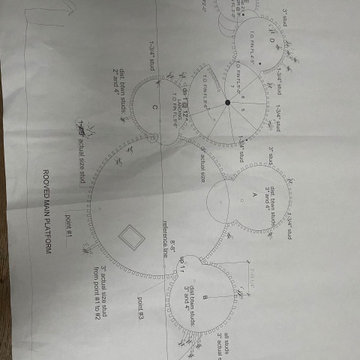
An environmental consultant had to assess a site and provide a plan to the client for retaining wall design meant to block the flood water from a nearby river from entering the site. Some old hand drawn sketches of a retaining wall structure and a PPT with landscaping plans, was all that was provided. Improvising the basic design and preparing a well rendered 3D model, to facilitate the consultant to give final presentation of the design to the client, was the task.
Challenges
1. Client expected a design improvement based on a landscape PPT & some handmade designs developed in 2008.
2. Files were without any exact dimensions or additional inputs from the client
3. No plans, elevations and CAD files were given to support the team for further design revisions and 3D modeling
4. Client’s verbal explanations were to be used as a base to analyze and understand the requirements.
5. Numerous brainstorming sessions, repeated iterations and approvals.
6. Client was accessible only through email and conference call
Engineering Solution
Retaining the wall to stop flood water from a nearby river entering the area filling it with debris
1. Hi-Tech team deftly handled the communication, approvals and design development process.
2. Built a retaining wall to extend the useful area towards the flood plain of the river.
3. Retaining wall was designed as a 3 stepped structure with property (7 – 8 homes and a swimming pool) at the top.
4. Terraces with trees and shrubs were included. This design feature made the entire wall look like a natural retaining boulder covered with greenery.
5. Narrow walkways and stairs that led to the terrace were incorporated in the design
6. Subterranean garage under the flat ground surface of the property was also included as a part of the design
Benefits
1. In a short span of one month, the team managed to develop a fully fledged design and plan for the retention wall.
2. Vacant space was effectively utilized; the stepped wall not only stooped the flood water from entering the client’s property, but also created space for 7-8 homes.
3. The designed structure looked very much a part of the natural terrain, and in fact added to the beauty of the surround
1